4. Using the TrackPoint
®
device.
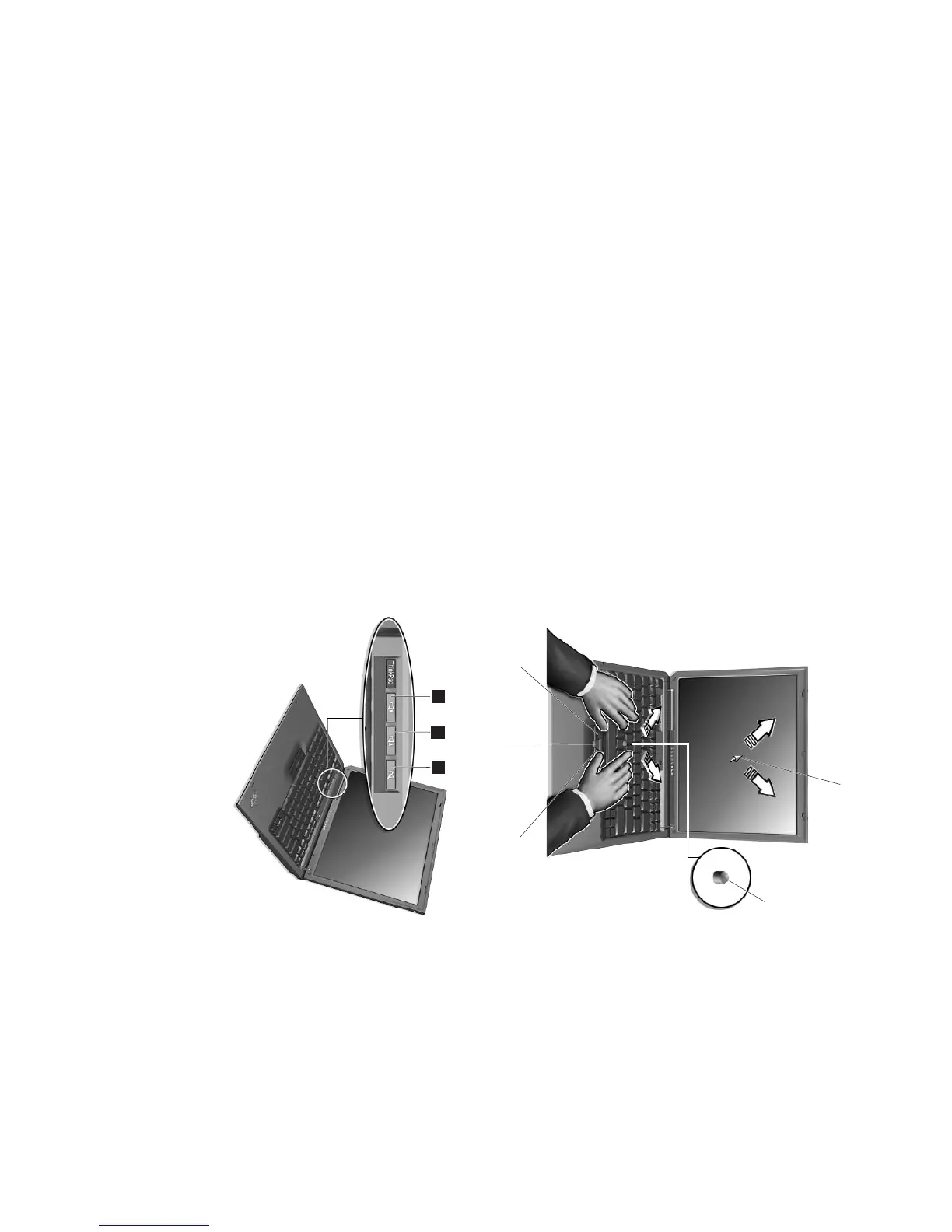
The TrackPoint is a unique device for moving the cursor on
the screen. You can perform all mouse operations using the
TrackPoint. The left and right click buttons function like
mouse buttons.
To move the cursor, use the red-topped stick at the center of
the keyboard. Press gently with your index finger in the
direction you want to move the cursor. To select and drag
an object, press and hold one of the buttons with either
thumb, as required by your software.
For more information about the TrackPoint, press the
ThinkPad button to open Access ThinkPad, your on-board
help system.
Cursor
Stick
Right click button
Center button
Left click button
5. Using the volume control.
You can adjust the sound level produced by the built-in
speakers by using the following three buttons:
1 Volume down
2 Volume up
3 Mute
If you mute the sound, and then turn off your
computer, the sound remains muted when you turn
your computer on again. To turn on the sound,
press Vo lume up or Volume down.
When you press one of these buttons, the volume indicator
appears on the screen for a few seconds. For more
information on volume control, see the on-board help
system, Access ThinkPad.
1
2
3
4


 To Next Page
 Loading...