EasyManua.ls Logo

IcOtec GC500 User Manual

IcOtec GC500
9 pages
To Next Page IconTo Next Page
Page #1 background imageLoading...
Page #1 background image
ÙÝëðð Ю±¹®¿³³¿¾´»
Û´»½¬®±²·½ Ù¿³» Ý¿´´
Ѱ»®¿¬·²¹ ײ-¬®«½¬·±²-
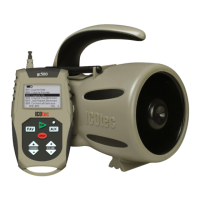
̸¿²µ §±« º±® °«®½¸¿-·²¹ ¬¸» ×ÝѬ»½ ÙÝëðð
Ю±¹®¿³³¿¾´» Û´»½¬®±²·½ Ù¿³» Ý¿´´ò
̸·- ³¿²«¿´ ©·´´ ©¿´µ §±« ¬¸®±«¹¸ -¬»° ¾§ -¬»° -»¬«° ¿²¼
±°»®¿¬·±² ±º ¬¸» «²·¬ ¿²¼ ¬¸» ®»³±¬»ò ͸±«´¼ §±« ¸¿ª» ¿²§
¯«»-¬·±²-ô °´»¿-» ½±²¬¿½¬ «- ¿¬ ·²º±à·½±¬»½ò½±³ò
Game Calls
UnRegistered
Question and Answer IconNeed help?

Do you have a question about the IcOtec GC500 and is the answer not in the manual?

IcOtec GC500 Specifications

General IconGeneral
BrandIcOtec
ModelGC500
CategoryVideo Gaming Accessories
LanguageEnglish

Summary

Setting Up Your New GC500

Battery Installation and Power Up

Step-by-step guide for installing batteries and powering on the GC500 unit and remote.

Remote Control Interface Navigation

How to select audio calls, adjust volume, and control the electronic decoy using the remote.

Programming New Sound Files

Favorites List Management

Instructions for adding and removing calls from the GC500's favorites list.

Custom Sound File Preparation and Transfer

Guide to organizing, renaming, and loading new sound files onto the GC500 via SD card or USB.

Synchronizing Your Remote

Remote and Unit Synchronization Process

Connecting the remote and unit with a synch cable to ensure proper communication and updating the call list.

Basic Coyote Call Set Strategy

1 Year Limited Warranty