3
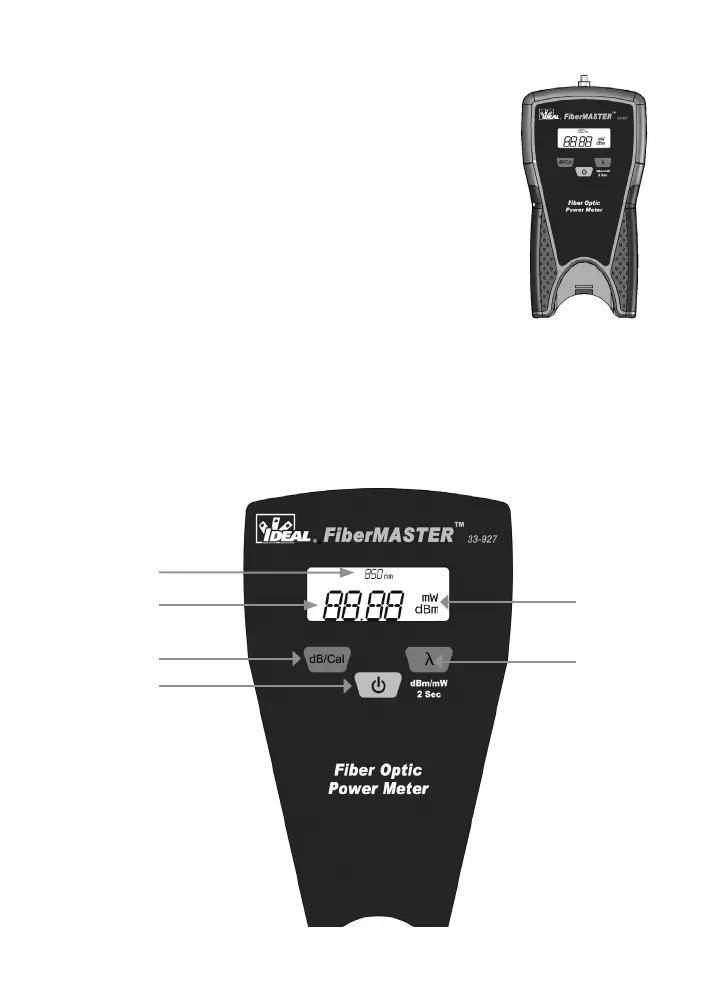
Power Meter Display and Functions
Wavelength measurement annunciator.1.
Numeric display for power and loss measurements. 2.
Also displays “null” when power is below detection
level.
Decibel toggle button. Press to change between power 3.
measurement mode (dBm) and loss calculation mode
(dB). Changing to dB mode automatically stores the cur-
rent input level as the reference for loss calculations.
Power button.4.
Unit of measure annunciator, displays either dBm, dB or 5.
mW.
Wavelength select and dB/mW toggle button. Press and release to change 6.
wavelength between 850/1310/1490/1550nm. Press and hold for 2 sec-
onds then release to toggle between dBm and mW modes.
1
2
3
4
5
6


 To Next Page