6
GETTING TO KNOW THE
i DEVICES
®
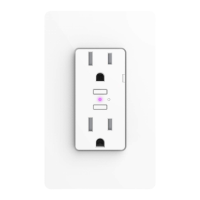
WALL OUTLET
Top Outlet ON/OFF. Pressing this button will turn the individual outlet
ON or OFF. DEVICE RESET: Press and hold for 10 seconds until LED
blinks red. PAIRING MODE: Press and hold for 3 seconds until LED is
solid blue.
Bottom Outlet ON/OFF. Pressing this button will turn the individual
outlet ON or OFF. DEVICE RESET: Press and hold for 10 seconds until
LED blinks red. PAIRING MODE: Press and hold for 3 seconds until LED
is solid blue.
Status LED/Night Light. Provides setup status and used as a night light
during operation. Refer to LED color codes on page 16.
1
2
3


 To Next Page