WWW.IFIHOMES.COM
Watch Features
The watch location is based on 3
different methods.
1. LBS: relatively accurate, as
this is the GSM master
used to find a position
2. GPS: Most accurate
outdoors, as GPS satellites
are well connected in
outdoors.
3. Wi-Fi: Relatively accurate
both indoors and
outdoors. Here the watch
uses the nearby wi-fi
networks to find position.
Read FAQ for complete details
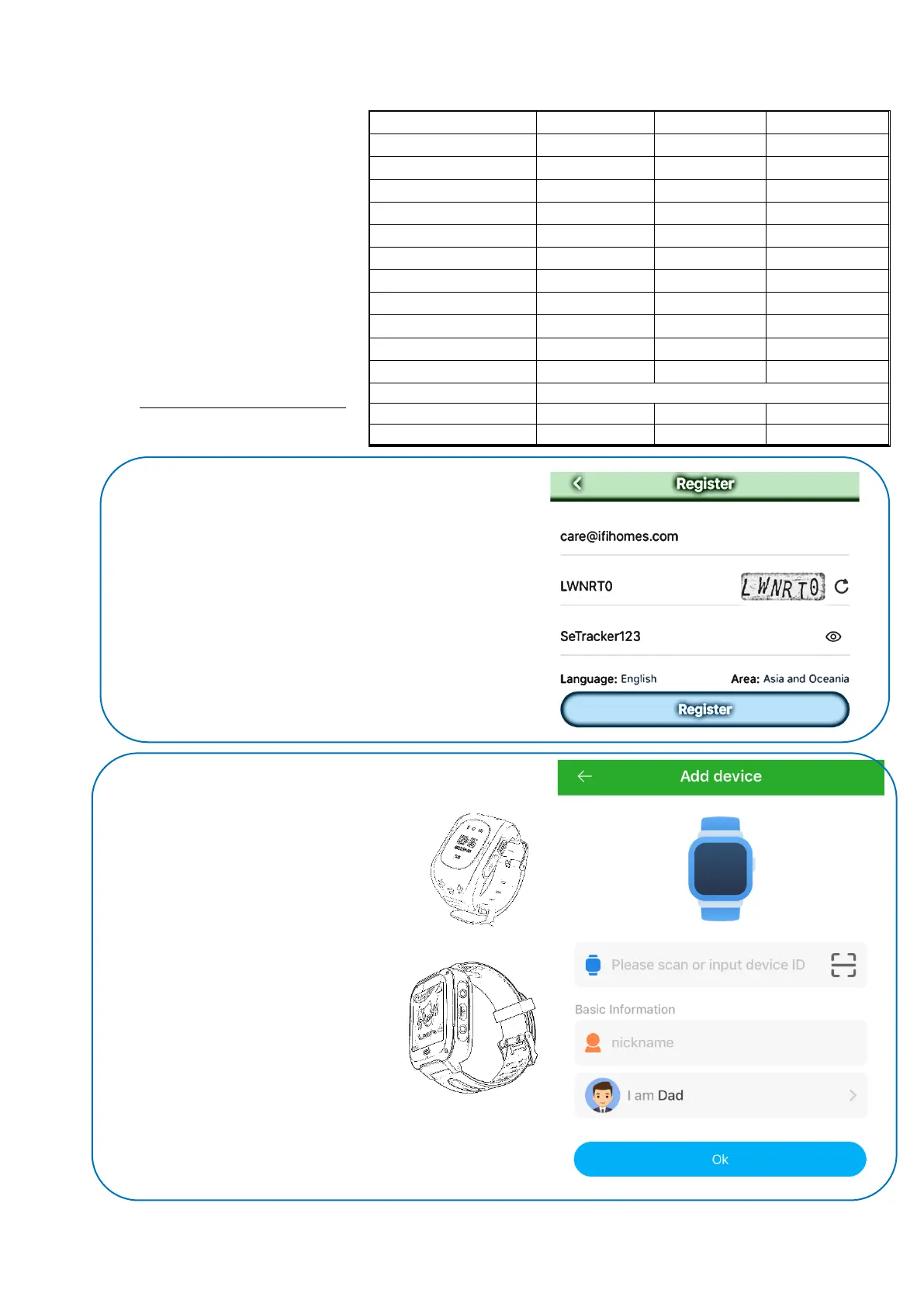
Download SeTracker2 application from app store
Open the app Allow access to microphone & other tools of the
phone, Choose ‘Register’ in the app
Choose Email id and fill rest of the details
Ensure that the Area is selected “Asia and Oceania”
Click ‘Register’
Note- Choosing wrong Area option can fail the watch
configuration in later stages
SeTracker App will open the window to bind the Watch
Scan the QR Code of the Watch
QR Code is on the back of the watch for
Small watches
Touch Screen watches have QR Code in
the Watch Menu ‘App’ option
Note – Unable scan the QR Code then
enter the number manually on the space
given
Choose a Nickname and Relationship
Option
Click ‘Ok’



 To Next Page
 Loading...