Need help?
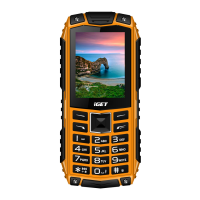
Do you have a question about the Iget GA30 and is the answer not in the manual?
Buyer's obligation to provide serial number for warranty and software update verification.
Detailed steps for inserting SIM cards and memory cards into the phone's slots.
Procedure for correctly inserting the battery into the phone.
Instructions on how to connect and charge the phone's battery to 100%.
Guide on turning the phone on, off, and switching to sleep mode.
Important warnings for safe phone usage, including driving, proximity, and environmental hazards.
Discontinue use if battery dimensions change until replaced with a new one.
Lists issues like moisture, mechanical damage, and overheating that require professional service.
Guidance on proper disposal of electrical and electronic products to protect the environment and health.
Procedures for warranty claims, contacting support, and warnings about device tampering and electric shock.
Official declaration of the product's compliance with EU directives.
List of countries where the device is approved for use.
Specific limitations and conditions for using WiFi functionality in Italy and Norway.
Information about the Restriction of Hazardous Substances (RoHS) compliance.
Authorizations for operating radio equipment in the Czech Republic and Slovakia.
Specifies the maximum Effective Isotropic Radiated Power (EIRP) levels for the device.
Lists the frequency ranges for GSM, WCDMA, and WiFi communication.
 General
| SIM | Dual SIM (Nano-SIM, dual stand-by) |
|---|---|
| Display Type | IPS LCD |
| Selfie Camera | 5 MP |
| Loudspeaker | Yes |
| 3.5mm jack | Yes |
| Display Size | 6.5 inches |
| Resolution | 720 x 1600 pixels |
| Main Camera | 13 MP |
| WLAN | Wi-Fi 802.11 b/g/n |
| GPS | Yes |
| Sensors | Accelerometer, proximity |
| Battery | Li-Po, non-removable |

 To Next Page