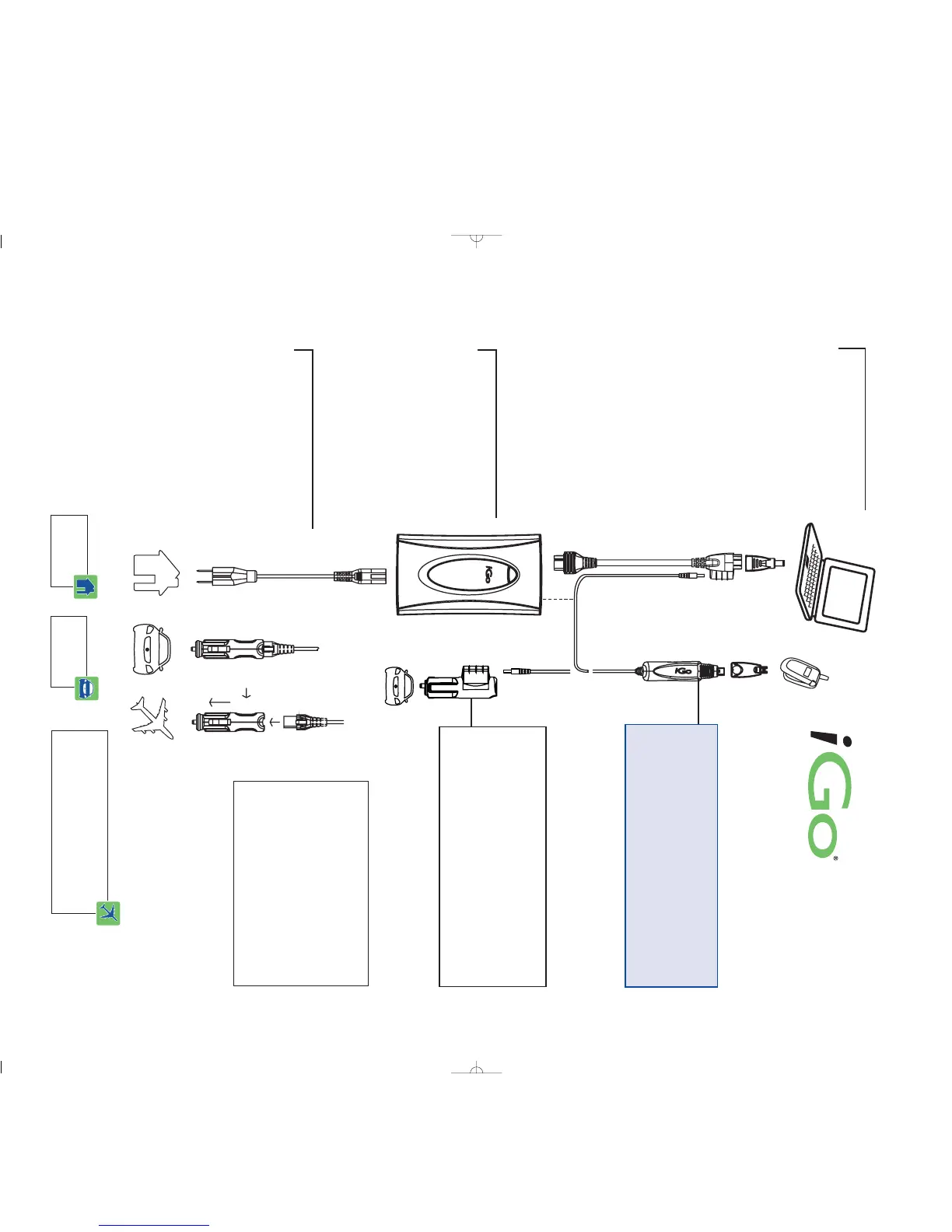
notebook input cord
connection port
Wall Cord
Wall outlet:
Use as shown.
Quick Connect Guide
Auto outlet:
Use as shown.
Auto Cord
1. Connect the correct notebook tip to
the iGo unit’s Notebook Input Cord.
Attention!
Unplug iGo everywhereMAX from the
power outlet each time you attach a new
“tip” to the cable.
Tip Selection:
Make sure you have selected the right tip
for the device you want to charge by
checking the compatibility hang tag.
Warning:
Choosing the wrong tip may damage your
device, causing it to malfunction.
2. Insert the Notebook Input Cord into the
iGo everywhereMAX body.
3. Select the appropriate power input
cord (wall or auto/air) and insert into
the iGo everywhereMAX body.
5. Plug into the notebook.
4. Plug into the appropriate socket. The
LED on the adapter will now illuminate,
indicating that power is available. If the
LED is not lit, be sure to check all
connections. Check
Troubleshooting
for additional information.
power tips
(sold separately)
notebook tip
iGo dualpower
accessory
Important Notice:
Always call your airline to confirm in-flight power
seat system availability and specifications for iGo
everywhereMAX compatibility.
Tech note:
When using iGo dualpower with this iGo adapter,
the maximum power output is shared between
both devices.
If a device attached to iGo dualpower is not
charging properly, it may need more charging power
than can be delivered at that particular time.
When this happens, the adapter will shut down
(LED will turn off), and we recommend charging
each device separately.
Simultaneously power/charge a notebook
computer and a gadget by using the included
iGo dualpower
®
accessory and tips (additional
iGo power tips sold separately).
When charging both your notebook and your gadget, plug
dualpower into the connection port on the Notebook Input Cord.
everywhereMAX
auto charging plug
Power a gadget from your car, RV or boat using
the included auto charging plug and iGo
dualpower accessory.
1. Simply press the button on the auto/air outlet cord connector
and take off the auto charging plug.
2. Connect the iGo dualpower accessory to the dualpower
port on the auto charging plug.



 To Previous Page