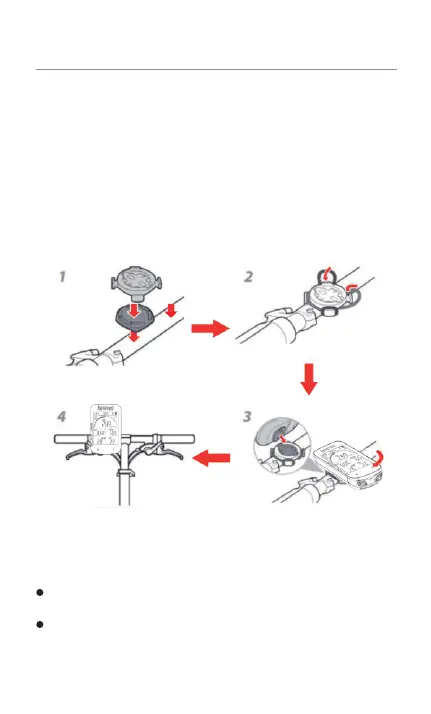
1)Installtherubberpadonthebackofthecomputerbase.
2)Chooseasuitablelocationonthehandlebartoplacetherubberpadsand
computerbase.
3)Chooseasuitablelocationonthehandlebartoplacetherubberpadsand
computerbase.
4)Alignthetabprotrusionsonthebackofthecomputerwiththeslotsonthebase
ofthecomputer.
5)Placethestopwatchonthestopwatchbaseandrotateit90degrees.
Securethecomputerbasetothehandlebarbyusingtheincludedrubberring.
7.INSTALLTHEBASEFORYOUBSC100S7.INSTALLTHEBASEFORYOUBSC100S7.INSTALLTHEBASEFORYOUBSC100S
Notes:
You can also use the iGPSPORT M80/S80 and the other model computer
extensionbracketstomountthecomputer.
It is recommended that you use the iGPSPORT official computer base or
extensionbrackettoavoiddamagingthecomputerbuckle.
7. INSTALL THE AASE FOR YOU BSCIOOS
computer baseto the handlebar by using rubber ring
I)lnstall the rubber pad on the back Ofthe computer base.
2)Chooseasuitablelocationon the handlebarto placetherÖer padsand
computer base.
3)Choose a suitable location on the handlebar to place the rubber pads and
computer base.
4)Align the tab protrusions on the back Ofthe with the slots on the base
of the computer.
5)plaæthe stopwatchon the stopwaE_hbaseand roüte it 90 degree
1
4
2
3
• You can also use the iGPSPORT M80/S80 and the other model computer
extension brackets to mount the omputer.
• It is recommendedthat you use the iGPSPORTofficial omputer base or
extensionbrackÄto avoiddamagingthe computerbuckle.


 To Next Page
 Loading...




