Settings revert to default Sound Profile #1 every time the
TRēO is turned on/off by opening and closing the battery
door.
Part No. 06-00121-001-C | Released Under DCO 0811
Easy Setup GUIDE
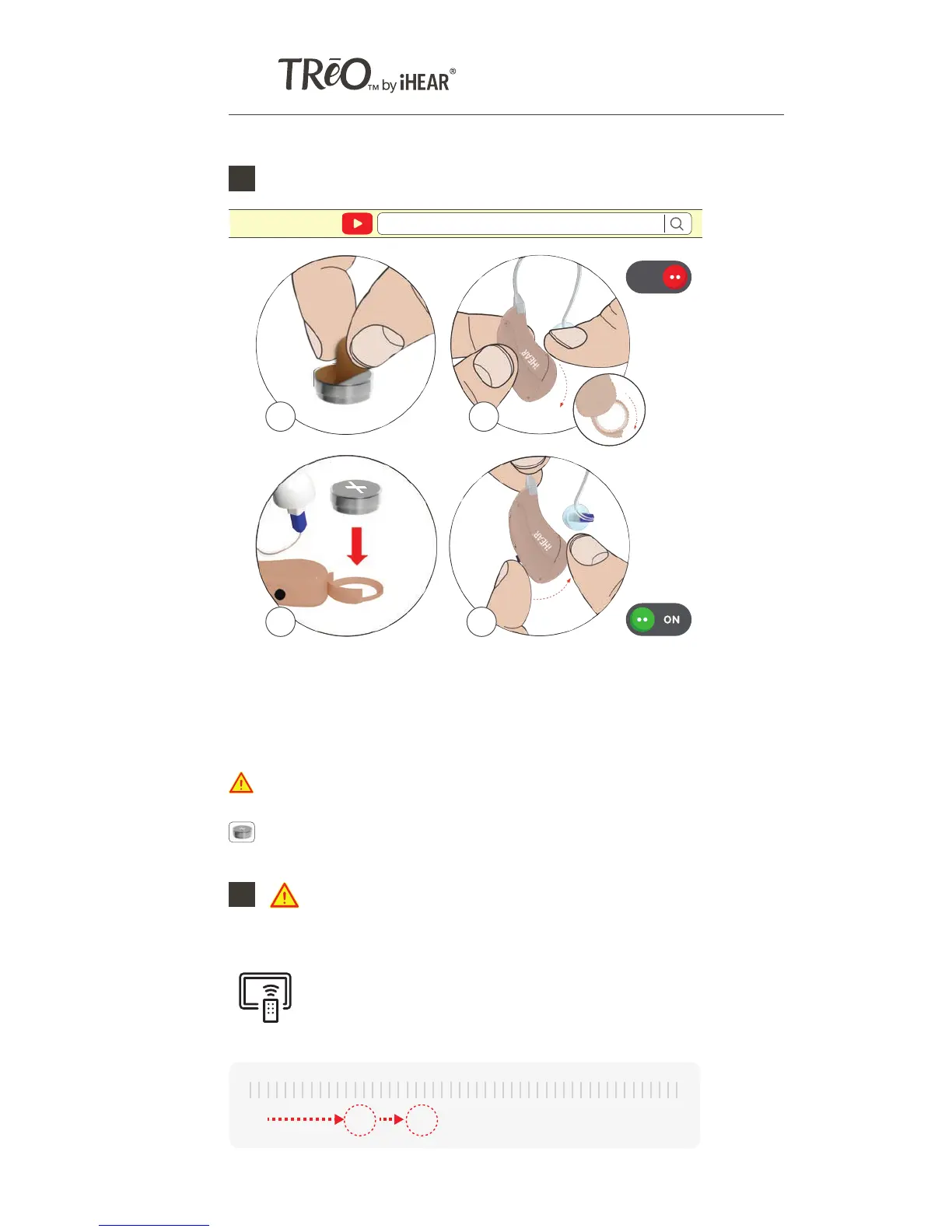
Inserting the battery and turning the TRēO On & Off2
a) PULL Off Battery Tab
b) SWING OPEN Battery Door - when open your TRēO is OFF
c) INSERT Battery with positive (+) side up
d) CLOSE the Battery Door - your TRēO is ON
a b
c d
https://www.ihearmedical.com/treo-video-3
Watch video
Selecting your Sound Profile
Sound Profile#1 is the default
4
https://www.ihearmedical.com/treo-video-4
Watch video
Keep batteries out of children's reach. Contact a medical
professional immediately if batteries are swallowed.
3
Remove the TRēO(s) from the ear(s) before
proceeding.
With the TRēO(s) out of your ear(s) TURN
ON the TV & ADJUST the volume until
speech is relatively loud.
Now PLACE the TRēO(s) on your ear and
gently INSERT Tip into ear canal.
Volume setting will vary depending on your TV.
If you experience feedback, use a larger and Closed Tip only.
PRESS (short press) the button and release to select your
Sound Profile. Each press cycles to the next profile, the
number of beeps indicate the Sound Profile setting you are in.
SELECT the Sound Profile with the best clarity, voice
intelligibility and overall sound quality. Record your favorite
profile number.
# SOUND PROFILE BEEPS
#1 MILD 1
#2 MODERATE 2
#3 HIGH PITCH 1 3
#4 HIGH PITCH 2 4
PROFILE
PRESS
Button
PRESS BUTTON TO SELECT SOUND PROFILE
RECORD YOUR SOUND PROFILE#
LEFT
EAR
RIGHT
EAR
OFF
Battery Door
0% 40% 75% 100%25%
TV VOLUME
iHEAR batteries are available through our on-line store at www.ihearmedical.com
or through customer support at 1 (844) IHEAR44 (1-844-443-2744).



 To Next Page
 Loading...