EasyManua.ls Logo

iHome HBN20 - User Manual

iHome HBN20
2 pages
Print Icon
To Next Page IconTo Next Page
Loading...
time set
time set
time set
time set
time zone
time zone
HBN20
Sta Quick Start Guide
Included
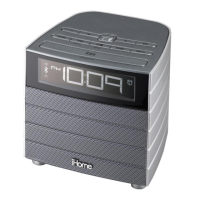
HBN20 system
Universal AC adaptor
Set Up
Connect the universal voltage AC adapter to the wall
outlet and the DC jack on the back panel of the radio
When Low Battery Icon appears on display,
replace backup battery with 1 fresh CR2450
battery. Keep unit connected to DC power when
replacing battery or you will lose settings.
Remove thumbscrew
and remove back cover
to access sta controls
Secure the attached Security Tether to
a wall or other permanent surface.
CAUTION: DO NOT attach to an AC
outlet or cause it to become entangled
with anything that can create a
hazardous situation.
The unit ships with the Daylight Saving Time (DST) switch in
Auto position, and will automatically adjust when the time
changes in March and November.
Daylight Saving Time
Press the time set button to conrm time
Press the - or + button to adjust time
Clock Setting
Press and hold the time set button
to enter clock setting mode
Maintenance
Once staff has completed setup, replace security cover on
back of unit and tighten thumbscrew.
HBN20 Quick Start Guide - Front
Size: 432 x 140 mm
Printing Color: Black
Mat’l: 100 gsm WF paper
Oct 2, 2013
HBN20 Quick Start Guide - Inside
Size: 432 x 140 mm
Printing Color: Black
Mat’l: 100 gsm WF paper
Oct 2, 2013
HBN20QSG-13102A © 2013 HTI Industries, LLC. All rights reserved Printed in China
Place the unit on a level surface away from sources of direct
sunlight or excessive heat.
Protect your furniture when placing your unit on a natural wood
and lacquered nish. A cloth or other protective material should
be placed between it and the furniture.
Clean your unit with a soft cloth moistened only with mild soap
and water. Stronger cleaning agents, such as thinner or similar
materials can damage the surface of the unit.
WARNING: Lithium batteries can explode or cause burns if
disassembled, shorted, recharged, exposed to water, re, or
high temperatures. Do not place loose batteries in a pocket,
purse, or other container containing metal objects, mix with
used or other battery types, or store with hazardous or
combustible materials. Store in cool, dry, ventilated area. Follow
applicable laws and regulations for transport and disposal.
Setting the Time
(Factory Preset Clock)
Including Year, Date, Month: This step would
only be required if the pre-set time is lost
Press the time set button to conrm year
Press the - or + button to set year
Press the - or + button to set date
Press the time set button to conrm Clock Setting
Time Zone Setting
Press and hold the time zone button.
The currently set time zone will ash.
Press the - or + button to adjust for your
time zone.
Press the time zone button to conrm
time set time zone
time set time zone
Zones are:
00 - ATLANTIC
01 - EASTERN
02 - CENTRAL
03 - MOUNTAIN
04 - PACIFIC
05 - ALASKA
06 - HAWAII
outlet
DC 9V 2A
AUX in cable
AUX in cable

Question and Answer IconNeed help?

Do you have a question about the iHome HBN20 and is the answer not in the manual?

Overview

This document describes the HBN20, a staff quick start guide for a device that appears to be a clock radio or similar electronic device.

Function Description

The HBN20 is a device designed to display time, allow for alarm settings, and potentially include radio functionality, given the mention of an "AC adapter to the wall outlet and the DC jack on the back panel of the radio." It features a digital display for time and settings, with buttons for various functions such as setting the time, alarms, and adjusting radio settings. The device also incorporates a battery backup system to maintain settings during power outages. A key feature is the "Daylight Saving Time" switch, allowing for easy adjustment for DST changes.

Important Technical Specifications

  • Power Source: The device operates via an AC adapter, connecting to a wall outlet.
  • Battery Backup: Utilizes a CR2032 button cell battery for backup, ensuring settings are retained during power interruptions. The manual specifies that the battery should be replaced every 2-3 years or when the low battery icon appears.
  • Display: Digital display for time and settings.
  • Dimensions (Manual): The legal sheet for the device is 108 x 140 mm.
  • Material (Manual): 100 gsm WF paper.
  • FCC Compliance: The device complies with Part 15 of the FCC Rules, indicating it meets standards for electromagnetic interference. It is also compliant with Industry Canada licence-exempt RSS standard(s) and RSS-102 RF exposure guidelines.

Usage Features

  • Setup:
    • Battery Installation: Requires removal of the battery compartment cover to insert a CR2032 button cell battery. This is crucial for maintaining settings during power outages.
    • Power Connection: Connect the universal AC adapter to the wall outlet and the DC jack on the back panel of the radio.
  • Time Setting (Factory Preset Clock):
    • Clock Setting Button: Press and hold the "Time Set" button to enter clock setting mode.
    • Hour Adjustment: Use the "+" or "-" buttons to adjust the hour.
    • Minute Adjustment: Use the "+" or "-" buttons to adjust the minute.
    • Time Zone Setting: Press the "Time Zone" button to select the desired time zone from a list (e.g., EASTERN, CENTRAL, MOUNTAIN, PACIFIC, ALASKA, HAWAII).
    • Confirmation: Press the "Time Set" button to confirm time and time zone settings.
  • Daylight Saving Time (DST) Switch: A dedicated switch allows for easy adjustment of the clock by one hour forward or backward, typically in March and November.
  • Alarm Setting: The manual indicates alarm setting functionality, though specific steps are not detailed in the provided excerpts. Buttons for "Alarm 1" and "Alarm 2" are visible on the device diagram.
  • Radio Functionality: The presence of an "AC adapter to the wall outlet and the DC jack on the back panel of the radio" implies radio capabilities, although specific radio usage instructions are not provided in these excerpts.
  • Low Battery Indicator: An icon on the display indicates when the CR2032 battery needs replacement.

Maintenance Features

  • Battery Replacement: The CR2032 button cell battery should be replaced every 2-3 years or when the low battery icon appears. This is a user-serviceable task involving removing a cover and inserting a new battery.
  • Cleaning: The manual specifies that the unit should be cleaned only as recommended. For the cabinet, a soft cloth moistened only with mild soap and water is suggested. Stronger cleaning agents or abrasive materials should be avoided as they can damage the surface. For the display, a soft, lint-free cloth is recommended.
  • General Care:
    • Avoid using near water.
    • Ensure proper ventilation; do not block ventilation openings.
    • Keep away from heat sources.
    • Protect power cables from being walked on or pinched.
    • Prevent objects and liquids from entering openings.
    • Unplug during lightning storms or extended periods of non-use.
    • Avoid overloading wall sockets.
    • Refer to qualified service personnel for damage requiring service (e.g., damaged power cable, liquid spills, drops).
  • Warranty: A limited 30-day warranty is provided by Hotel Technologies (valid in contiguous U.S.A. only). It covers defects in workmanship and materials under normal use. Service requires obtaining a Return Authorization Number after contacting Hotel Technologies and providing proof of purchase. The warranty does not cover damage from negligence, misuse, accidents, unauthorized modifications, cracked cabinets, excessive heat, or shipping costs.

iHome HBN20 Specifications

General IconGeneral
BrandiHome
ModelHBN20
CategoryBattery Charger
LanguageEnglish

Related product manuals