EasyManua.ls Logo

iHome iW3 - iHome iW3 Controls and Overview; Top, Bottom, Rear, and Front Panel Layouts; Status and Network LED Indicators

iHome iW3
23 pages
Print Icon
To Next Page IconTo Next Page
To Previous Page IconTo Previous Page
Loading...
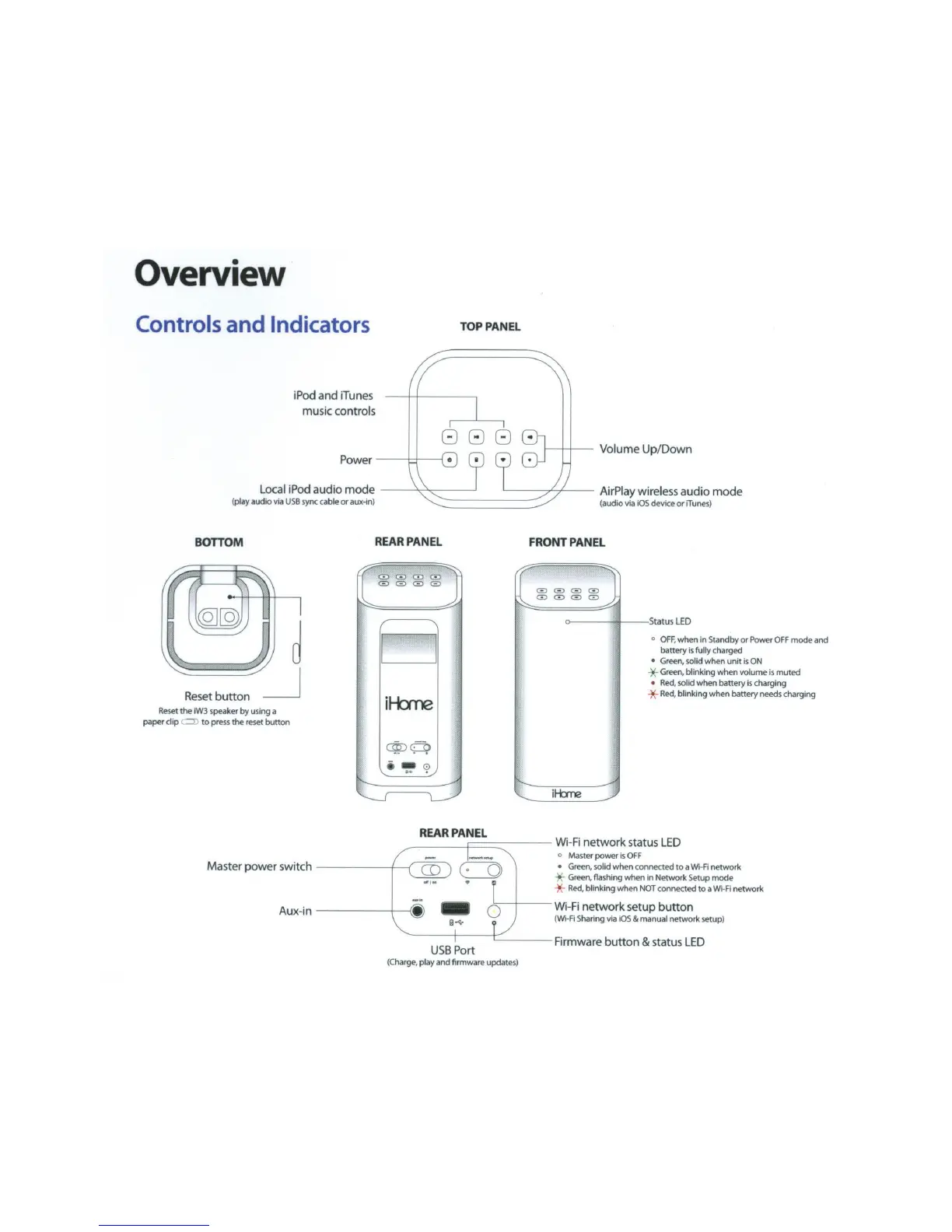
Overview
Controls and Indicators
TOP
PANEL
iPod and iT
un
es
music controls
808
Power
---+-+-----1
Volume Up/Down
Local
iPod audio
mode
'~
1
(play audio
via
USB
sy
nc cable or aux-in) "'-...:
---
--
---'""
AirPlay wireless audio
mode
(audio via
iOS
device
or
iTunes)
BOTTOM
Reset
button
Reset
the
iW3
speaker
by
using a
paper clip
~
to
press
the
reset
button
REAR
PANEL
~
--.;:;;
8 G 0
CD
CDCD
G G
~
~
I'
D
it-bne
I
~
~
ctiDO>
~
FRONT
PANEL
~
-~
G G G
CD
GJ0CD0
~ ~
>----
+
--
S
tatu
s
LED
0
I
I
r .,
~
o
OFF
, when in Standby or
Power
OFF
mode and
battery
Is
fully charged
Green
, solid when unit
is
ON
*
Green
, blinking when volume is muted
Red,
so
lid when battery
is
charging
-)(-
Red,
blinking when battery needs charging
REAR
PANEL
----
--
-t===
::::=----
Wi-
Fi
network status
LED
Master power
switch
~
o Master power Is
OFF
Green
, solid when connected
to
a
W!-Fi
network
-)(-
Green,
flashing when in Network Setup mode
-)(-
Red,
blinking when
NOT
connected
to
a Wi-
Fi
network
Aux-in 1
Wi
-
Fi
network setup
button
(
W1-Fi
Sharing
via
iOS
& manual network setup)
USB
Port Firmware
button
&
sta
tu
s L
ED
(
Charge
, play and firmware updates)

Related product manuals