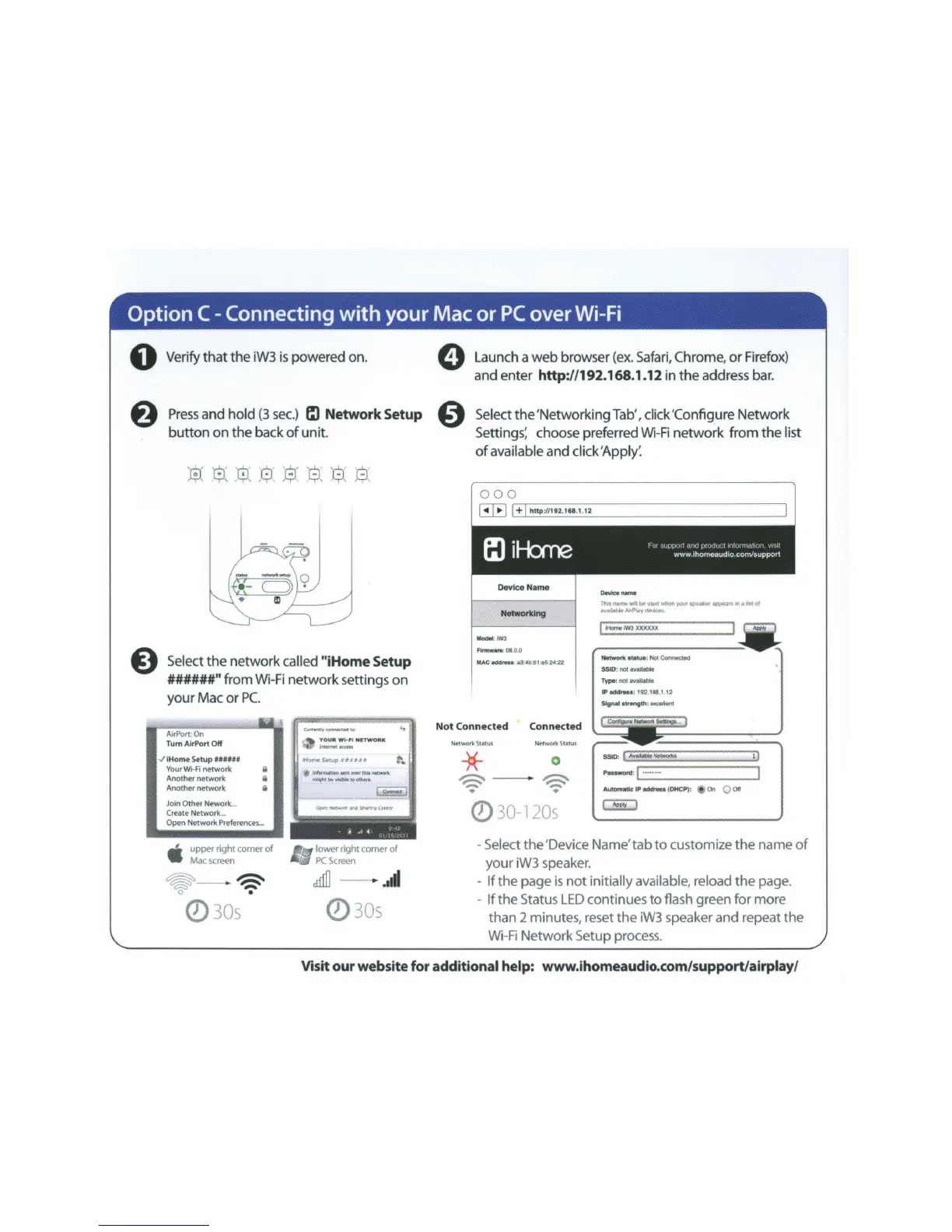
0 Verify
that
the
iW3
is
powered on.
8
8
Press
and
hold
(3
sec.)
t:l
Network
Setup
button
on
the
back
of
unit.
s
r.:-.·
~
8-
'6'
~
·
'0'
·o '
~~
~
t;J,
~'
, : '
J;-1
. .
J..TJ,
,
c;;,
h-J
,
Select
the
network
called
"iHome
Setup
######"from
Wi-
Fi
network
settings
on
your
Mac
or
PC.
Tum AirP
ort
Off
v'
iHome Setup
Ullllt
Your
Wl-FI
network 8
Another network 8
Another network 8
Join Other Nework
...
Create Network
...
Open Network Preferences
...
•
, upper nght comer
of
Mac
screen
~
~
~
-
•
Q)30s
"""--
..
·
~
YOUR
W
l-~
N!TW
O
RK
.
._
.1,..,.__
-
..
IHomcSeotup
,,.,
__
t-
..
l,.,..._t.oft..W.WW~.--tl
riOI'ItM..,..._•ottws
(-
c-
-l
OltM
~.,....
...,
V'Lar1f!9
,...,.,
-
-~-
..
~-------,
• .
,A
..
<'
I
lower right
co
rner
of
PC
Screen
crlifl
..
Ill
Q)30s
0
0
Launch a
web
browser (ex. Safari, Chrome,
or
Firefox)
and
enter
http:/1192.168.1.12
in
the
address bar.
Select
the
'Networking
Tab
',
click 'Configure
Network
Settings~
choose preferred Wi-Fi
network
from
the
list
of
available
and
click
'Appll
000
~
l'
+~l
h
_
H
_
p
-
~
-
19
-
2
.-1
&
-
l
-.
1
-.
1
-
2
------------------------------,,
Device
Name
Nelworkl1111
- ·
IW3
Flnnw.,.
01
0.0
MAC
eddr
...
a3
4b:$1
e52422
O..Otce
name
Tho&
,......
of'~~
used
when
';Oll'
IPNk"'
ri11QP03'
~
In
a
hi
of
• .,.
.,.
~y
(llftv,_
JIHorno
IW3
xxxxxx
I
Network
ttatua
: Not eorv..ct.ed
SSID:notiVIIiloble
Type
:notovolable
IP
odd,_o:
192 118
I
12
Slgnol~
:oxcellont
Not
Connected
Connected
NHWOrtc
Statui NMwof'ttStatlH
*
~
-
..
0
~
~
Pouword
: I
.........
I
Automollc
IP
odd,_a
(D
HC
P):
4il
On Q
011
Q)
30-120s
GEJ
- Select
the
'Device Name'
tab
to
customize
the
name
of
your
iW3 speaker.
-
If
the
page
is
not
initially available, reload
the
page.
-
If
the
Status
LED
continues
to
flash green
for
more
than
2 minutes, reset
the
iW3 speaker
and
repeat
the
Wi-
Fi
Network Setup process.
Visit
our
website
for
additional help: www.ihomeaudio.com/support/airplay/



 To Next Page