For Warranty Information and the most up-to-date version of this User’s Guide, go to www.iliveelectronics.com Customer Service: 1-888-999-4215
Copyright © 2012 Digital Products International (DPI, Inc.) All other trademarks appearing herein are the property of their respective owners. Specications are subject to change without notice.
1. Press the Power button
to turn the unit off.
2. Press and hold the M/Clk/Ala1/2
button until the display begins to
blink, then release the button.
3. Press the Tun+/-button to adjust the hour.
4. Press the M/Clk/Ala1/2button.
5. Press the Tun+/-button to
adjust the minute.
6. Press the M/Clk/Ala1/2button
to nish setting the time.
1. Press the Power button
to turn the unit off.
2. Press the M/Clk/Ala1/2button
to select Alarm 1 or Alarm 2.
3. To begin setting the selected alarm,
press and hold the M/Clk/Ala1/2
button until the display begins to
blink, then release the button.
4. Press the Tun+/-button to adjust the hour.
5. Press the M/Clk/Ala1/2button.
6. Press the Tun+/-button to
adjust the minute.
7. Press the M/Clk/Ala1/2 buttons to switch
between FM Radio, iPod, Buzzer, or Off.
The display will indicate the
following: IPod-iPod, bU-Buzzer,
rAd-FM Radio, oFF-Alarm Off
8. Once the set alarm time is reached,
the alarms will sound.
To set the other alarm, follow
the above steps and choose
the alarm not currently set.
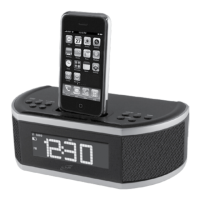
1. Connect the iPod or iPhone to
the connector inside the Dock
for iPod and iPhone.
2. When the dock is plugged in,
using AC power, the docked
iPod or iPhone will charge.
Clock and Sleep Timer
Alarm
iPod and iPhone
Setting the Clock
1. Press the Power button
to turn the unit on.
2. Press the Snooze/Sleep button
repeatedly to set the sleep timer
( 90, 80, 70, 60, 50, 40, 30,
20, 10, 5, 3 min or OFF ).
3. Once the set sleep time has expired
the unit will automatically power off.
Setting the Sleep Timer
Setting the Alarm
After the alarm sounds:
Press the Snooze/Sleep button to
delay the alarm for several minutes.
OR
Press the Power button to turn the alarm off
until the set alarm time is reached again.
Snooze and Alarm Reset
Docking an iPod or iPhone
1. Follow the instructions for
Docking an iPod or iPhone.
2. Press the Source/TimeSync
button to switch to iPod mode.
3. Press the Play/Pause button to begin
playing the docked iPod or iPhone.
Playing a Docked iPod or iPhone
1. Follow the instructions for
Docking an iPod or iPhone.
Note: Auto time sync will not work
with some older model iPods.
2. Upon initial use, the clock will
automatically sync to the time of
the docked iPod or iPhone.
3. After initial use, press and hold the
Source/TimeSync button to sync the
time from the connected iPod or iPhone.
Auto Time Sync
To download this User’s Guide in English,
Spanish, or French, or to get answers to
frequently asked questions, visit the support
section at: www.iliveelectronics.com
Para descargar este Manual del
Usuario en inglés, español y francés, o
para obtener respuestas a preguntas
frecuentes, visite la sección de apoyo
en www.iliveelectronics.com
Pour télécharger ce guide de l’utilisateur
en anglais, espagnol ou français, ou pour
obtenir des réponses à des questions
fréquemment posées, consultez la rubrique
d’assistance sur www.iliveelectronics.com
International Support
Requires a 3.5mm audio cable (not included)
1. Connect a 3.5mm audio cable to the
LineIn on the unit and an audio output
on an MP3 player or other audio source.
2. Press the Source/TimeSync
button to switch to Line In mode.
The display will show “AU”.
3. Use the native controls on the
connected MP3 player or other audio
source to play and control audio
played through the clock radio.
1. Press the Powerbutton
to turn the unit on.
2. Press the Source/TimeSyncbutton
to switch to FM Radio mode.
3. Press the Tun+andTun-buttons to
adjust the radio to the desired frequency.
4. Press and hold the Tun+and
Tun-buttons to search for the
next available frequency.
5. Press the Vol+/- buttons
to adjust the volume.
6. Press the Powerto turn the radio off.
Adjust the position of the FM wire
antenna to improve FM radio reception.
1. Follow the instructions for
Tuning the FM Radio.
2. Tune to the desired station.
3. Press the M/Clk/Ala1/2 button.
4. Press the Tun+/-buttonsto
choose the preset number.
5. Press the M/Clk/Ala1/2button
to save the station as a preset.
Up to 20 stations may be
saved as presets.
1. Follow the instructions for Tuning the
Radio and Saving a Station as a Preset.
2. Press the Play/Pausebutton to cycle
through preset radio stations.
1. Follow the instructions for
Tuning the Radio.
2. Press and hold the M/
Clk/Ala1/2button.
3. The unit will scan for an available station,
and save it as a preset. It will then scan
for the next available station, and set
that as the next preset, continuing until
up to 20 stations are saved as presets.
Line In
Using the Line In
Radio
Tuning the FM Radio
Saving a Station as a Preset
Autosaving Preset Radio Stations
Tuning Preset Radio Stations
To get information on which iPod, iPhone,
or iPad products are compatible with this
product, go to www.iliveelectronics.com.
For Warranty Information and the most
up-to-date version of this User’s Guide,
go to www.iliveelectronics.com.
Compatibility
Warranty



 To Previous Page
 Loading...