6
SPEAKER OUTPUT
AUX
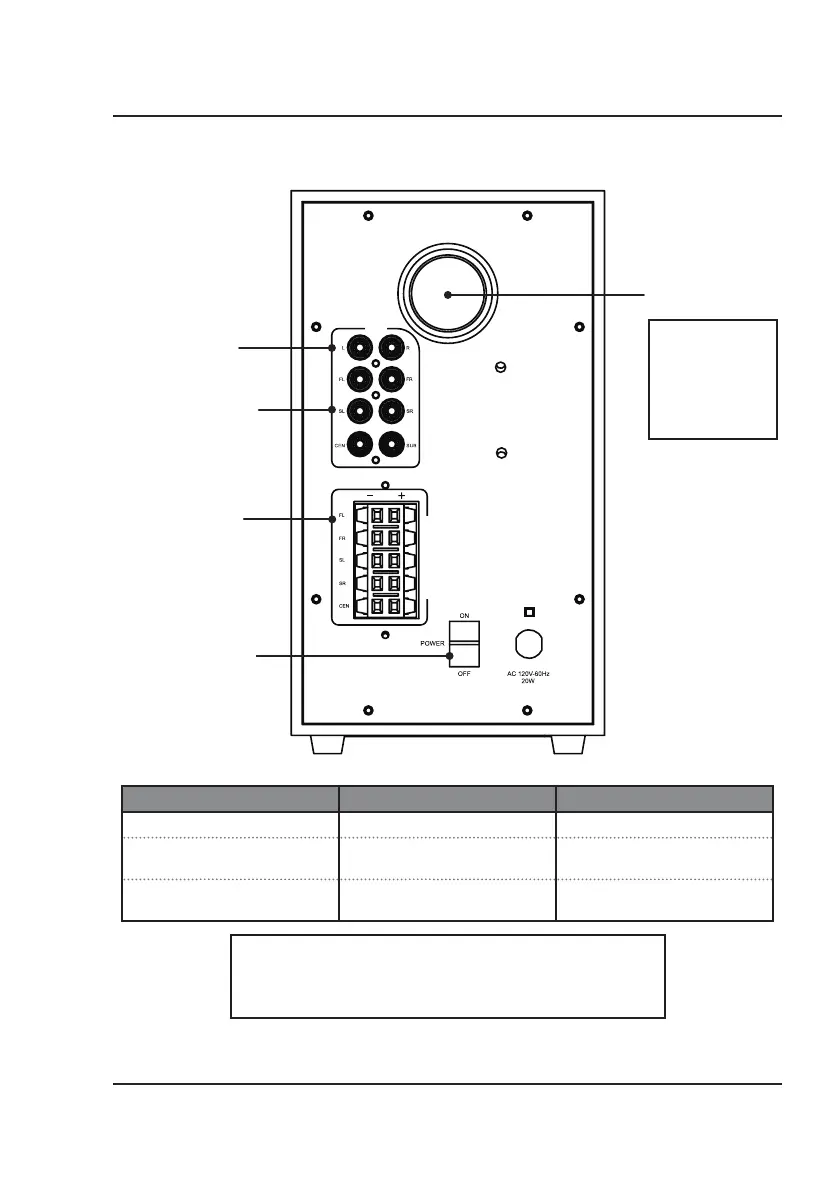
Subwoofer Rear View
Stereo Audio
Inputs (L, R)
5.1 Surround Sound
Audio Inputs
(FL, FR, SL, SR, CEN, SUB)
Subwoofer Bass Tube
Audio Outputs
(to speakers)
Main Power Switch
Power the system
ON or OFF.
See info below.
Orientation
Power Status Switch Position Indicator Light
Power OFF Switch OFF No Lights
Standby Mode Switch ON Power indicator ON,
all other indicators OFF
Power ON Switch ON + ON signal from remote Power Indicator OFF,
Volume / Source indicators ON
NOTE: To reduce
unwanted vibration,
try placing the
subwoofer on a
solid or padded
surface, such as the
floor or carpet.
For most instances, leave the switch in the ON position, the system will be
in Standby Mode. It is not necessary to use the Main Power Switch every time.
Use the remote to fully power ON and begin listening to audio.
Use the remote again to place the system back in Standby Mode.


 To Next Page