Customer Support: 1-888-999-4215
iLive | ITBSW285 v1070-01
Quickstart Guide
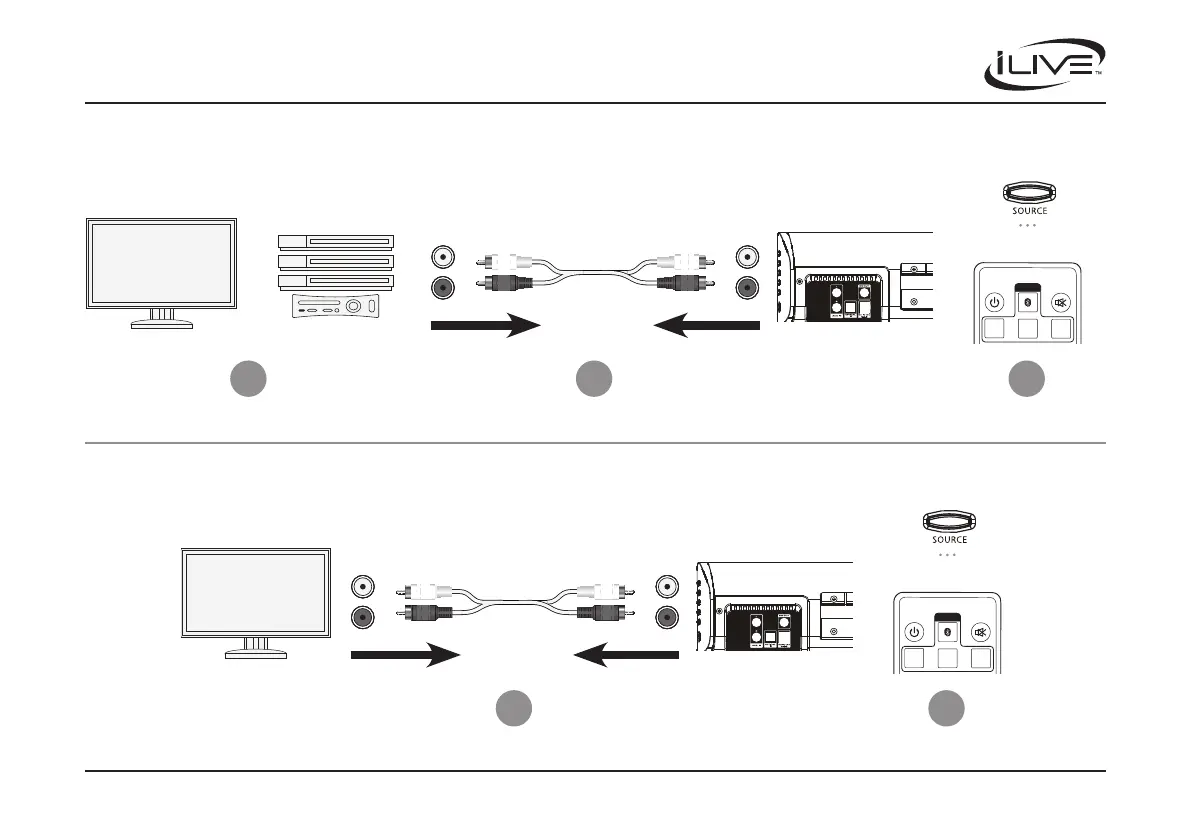
Television
Television
Soundbar
Soundbar
Soundbar Controls
Soundbar Controls
Remote Controls
Remote Controls
Set Source to Aux
Set Source to Aux
Cable, Satellite Box,
DVD Player,
or Gaming Console
Connect using
RCA Cable
Connect using
RCA Cable
Soundbar
Audio Inputs
Soundbar
Audio Inputs
Device Audio
Outputs
TV Audio
Outputs
The TV and Device should already be connected.
1
2
1
SOURCE
OPTICAL
LINE IN
POWER MUTE
AUX
SOURCE
OPTICAL
LINE IN
POWER MUTE
AUX
3
2
Connecting to a DVD player, Gaming Console, or other device
Connecting directly to the TV


 To Previous Page