Customer Support: 1-888-999-4215 7
CLOCK SYNC
TIME SET/MEM
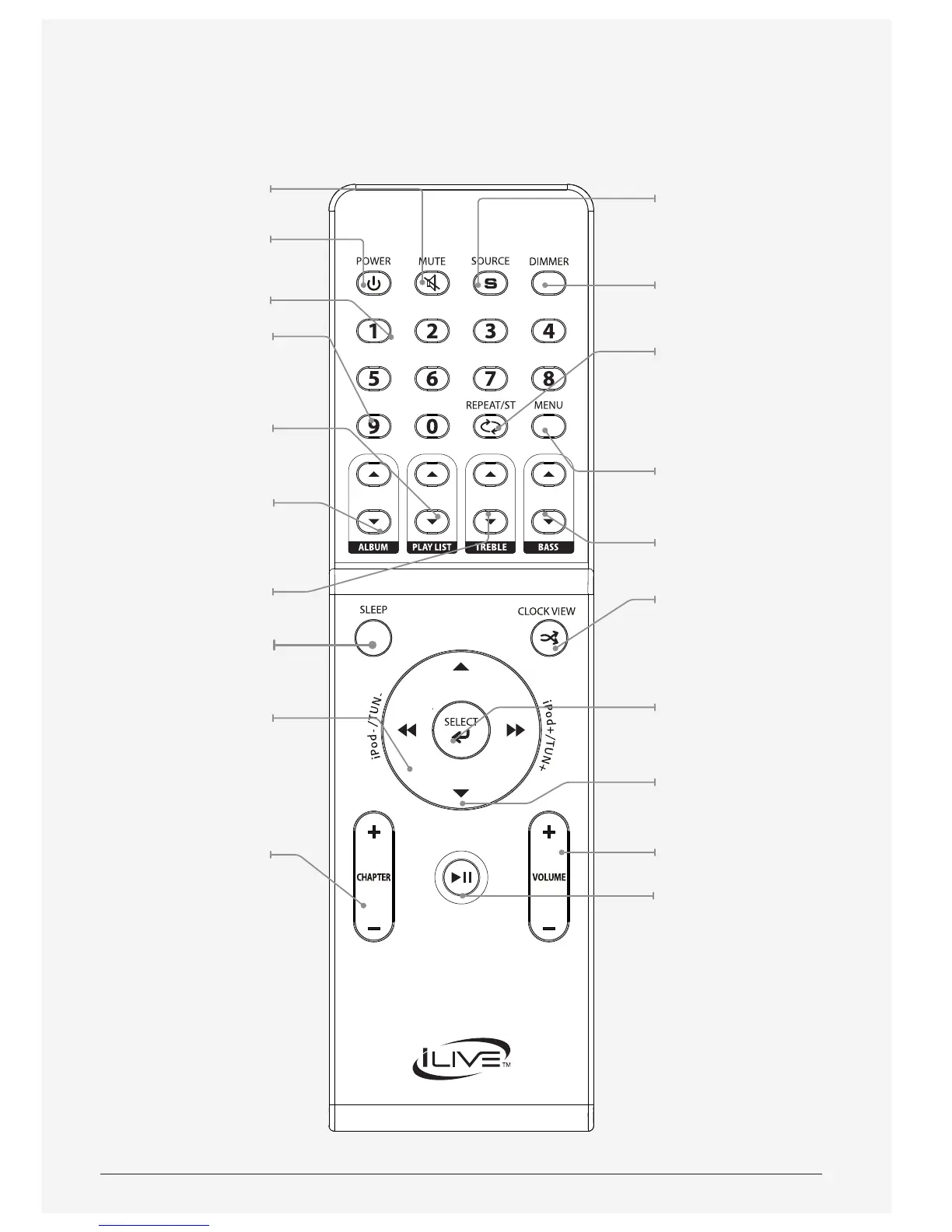
Mute
Press to mute the volume.
Power
Press to power the
unit o or on.
Number Keypad
Clock Sync
Press and hold to sync
the clock with the
docked iPod or iPhone.
Playlist
Press to cycle through
playlists on a docked
iPhone or iPod.
Album
Press to cycle through
albums on a docked
iPhone or iPod.
Treble
Press to adjust the treble.
Sleep
Press repeatedly to
set the sleep timer.
iPod (+/-) / Tun (+/-)
Press to tune the FM radio.
Press to skip between
tracks on a docked
iPhone or iPod.
Press and hold to search
the current track on a
docked iPhone or iPod.
Chapter
Press to cycle through
chapters on a docked
iPhone or iPod.
Source
Press to switch between
iPod/iPhone, Line, Tuner,
and AUX modes.
Dimmer
Presss to adjust the
brightness of the display.
Repeat/ST
Press to repeat the
current track, or album.
Press to switch between
FM Mono and FM ST.
when in Tuner mode.
Menu
Press to cycle through
the menus on a docked
iPhone or iPod.
Bass
Press to adjust the bass.
Clockview/Shue
Press & hold to play songs
from a docked iPhone or
iPod in a random order.
Press to view the time
in playback mode.
Select
Press to make selections on
a docked iPhone or iPod.
iPod Menu (pq)
Press to navigate up and
down the menus on a
docked iPhone or iPod.
Volume
Press to adjust the volume.
Time Set/Mem/
Play/Pause
Press to play or pause a
docked iPhone or iPod.
With the unit powered
o, press and hold
to set the time.
Press in Tuner mode to
save stations as presets.



 To Next Page