Customer Support: 1-888-999-4215 iLive 7
SOURCE
VIDEO
SLEEP
EQ
DISPLAY
VOLUME
MENU
MUTE
SHUFFLE
REPEAT
MO/ST
MEMORY
LIVE
CLOCK
TIMERMOVIE
USER TREBLE BASS
MUSIC
BBE
LEVEL
T
U
N
I
N
G
T
U
N
I
N
G
EQ
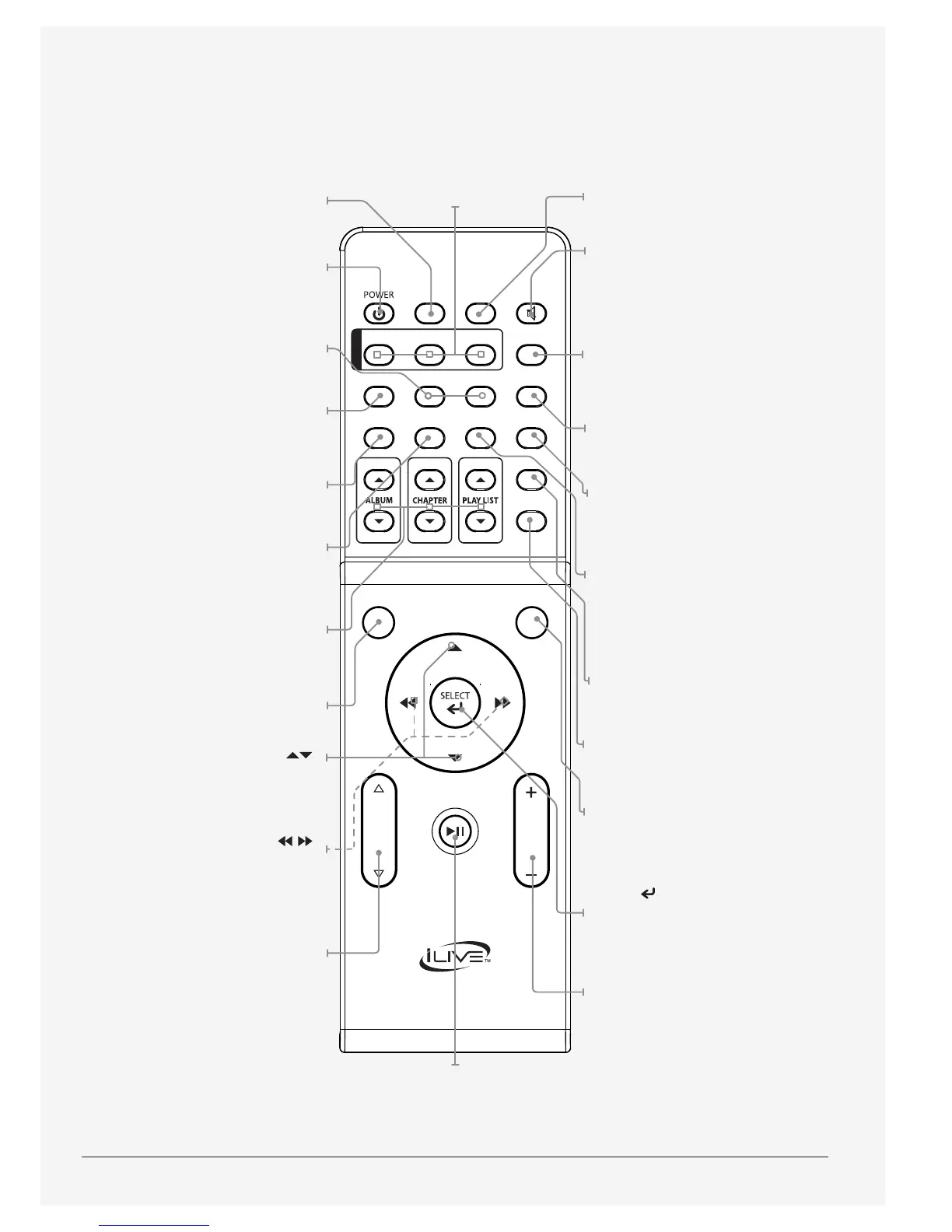
Press to switch between Rock,
Pop, Classic, Jazz, and Flat
preset equalizer modes.
Power
Press to power the sound
bar o and on.
Treble and Bass
Press and use the levels buttons
to adjust the treble or bass.
User
Press to set custom treble
and bass levels.
Memory
Press to save the current radio
station to a preset channel.
MO/ST
Press to switch between Mono
and Stereo FM radio modes.
Album, Chapter, and Playlist
Press to adjust the current
album, chapter, or playlist on
a docked iPod or iPhone.
Display
Press to view the time on the display.
Menu ( )
Press to move up and down
through menus on an iPod or
the iPod app on an iPhone.
Skip/Search ( )
Press to skip between tracks
or press and hold to search
through the current track on
a docked iPod or iPhone.
Level
In user mode, press to adjust
the treble and bass.
Source
Press to switch between FM,
iPod, Aux, AV, and Line modes.
Mute
Press to mute the volume.
Timer
With the power o, press to set a
timer to turn the sound bar on to
iPod or FM mode at a specied time.
With the power o, press and hold to
activate or deactivate the set timer.
Clock
With the power o, press
to set the clock.
Sleep
Press repeatedly to set a sleep timer
to turn the sound bar o after a
set amount of time has passed.
Video
In AV mode, press to switch
between Component Video Output
and Composite Video Output.
Repeat
Press to set the repeat options
on a docked iPod or iPhone.
Shue
Press to set the shue options
on a docked iPod or iPhone.
Menu
Press to switch between
menus on a docked iPod or
the iPod app on an iPhone.
Select ( )
Press to make selections on
a docked iPod or the iPod
app on a docked iPhone.
Volume
Press to adjust the volume.
BBE Live, Music, and Movie
Press to switch to the
BBE Live, Music, and
Movie audio modes.
Play/Pause
Press to play or pause a
docked iPod or iPhone.



 To Next Page