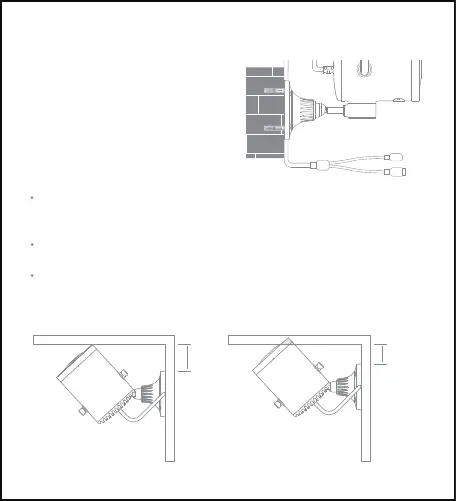
Note:
In order to prevent accidents and injuries, please secure the device firmly
onto the wall as illustrated. The wall on which the device is mounted must
have a loading capacity of at least 3 times the weight of the device.
Do not install the device near a heat source, such as an air-conditioner
compressor, air vent of a range hood or air vent of a gas water heater.
As the camera can be rotated horizontally, please pay attention to the safe
turning distance during installation. Do not install the device at a location
where its horizontal movement would be impeded.
4. Put the base plate on the wall.
Ensure that the 2-in-1 power and
LAN cable goes straight down.
Secure the base plate by inserting
the screws into the expansion nuts.
Top view
50mm
< 50mm



 To Next Page