─ 11 ─
Console Panel Functions
CONSOLE PANEL FUNCTIONS
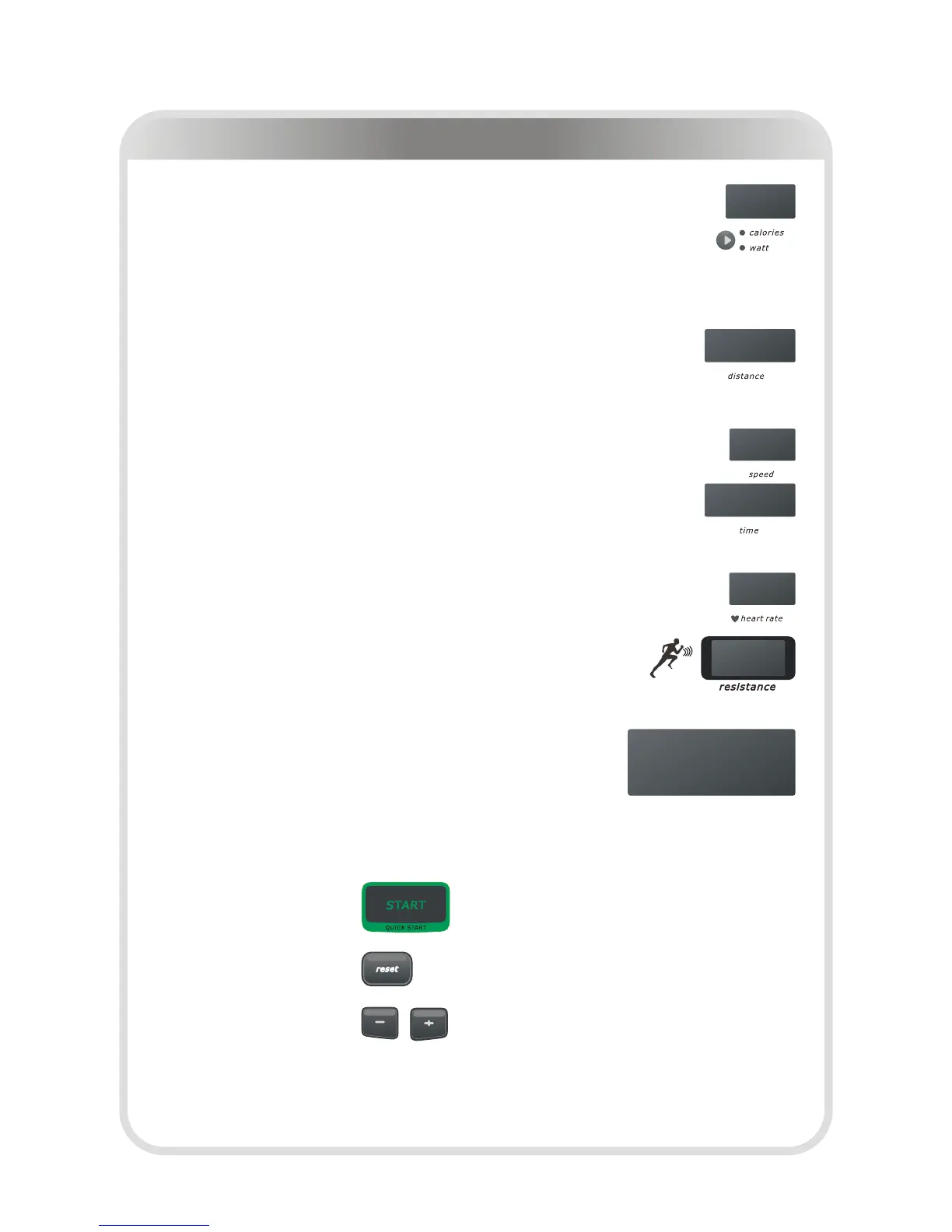
1. CALORIES WINDOW
Indicates estimated calories burned, based on user's weight, speed, resistance,
and time.
2. WATT WINDOW
Indicates user's current power ( Watt).
3. DISTANCE WINDOW
Indicates Kilometers or Miles traveled in 0.01 increments up to 9.99 and 0.1
increments starting at 10.0 (Range 0.01---999).
4. SPEED WINDOW
Indicates workout laps per minute on pedal.
5. TIME WINDOW
Indicates elapsed time after press Start in minutes and seconds (0-99minutes,
0-59seconds).
6. HEART RATE WINDOW
Indicates user's current heart rate (BPM).
7. RESISTANCE WINDOW
Indicates workout in degree of force L1—L20 in 1 increments.
8. DOT MATRIX
8.1 Indicates Welcome message when turn on power.
8.2 Indicates message when enter value.
8.3 Indicates workout curve in Program mode.
8.4 Indicates workout 400m track when manual.
CONSOLE BUTTONS
1. START
This button is used to start the current program.
2. RESET
This button is used to stop the current program.
3. + and -
These buttons are used to adjust the degree of Resistance of the machine during
workout.
These buttons are also used to adjust the values when entering up your workout.


 To Next Page
 Loading...