Need help?
Do you have a question about the in-lite CB-056/M and is the answer not in the manual?
Secure the transformer to a wall, panel, or post using supplied screws.
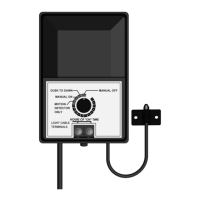
The light sensor can be positioned horizontally or vertically.
Strip wire ends, insert into terminal lugs, and fix firmly.
Place the cable under the underside screws and tighten firmly.
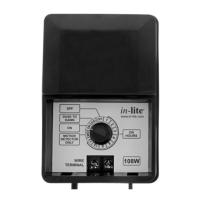
Set the dial for desired hours of 'ON' time (1-12 hours) for dusk activation.
Light sensor activates lighting at dusk and switches off at dawn.
Manually switch lights on or off by turning the dial to MANUAL ON/OFF.
Set to MANUAL OFF; lighting activates only with detected motion.
Check transformer connections, voltage, and low-tension cable wiring.
Ensure light sensor is away from artificial light and test its function.
Check fixture Easy-Lock contacts, bulb attachment, and bulb condition.
Relocate the transformer's light sensor away from artificial light sources.
Lay cable in a straight line to fixtures, noting max lengths for 14/2 and 10/2 cables.
Create branches using connectors for multiple fixtures, ensuring correct cable orientation.
Each cable connector has a maximum load of 50W; use multiple connectors for higher loads.
Use ample cable to prevent tension if the garden subsides slightly.
Insulate cable ends using caps to protect exposed wires.
Leave sufficient cable at fixtures; use extension cables (1m, 3m) for longer distances.
Clamp cable duct, place cable, tighten cap to push contacts through insulation.
Connect the main cable to the fixture using the mini-connector.
Verify Easy-Lock and mini-connector connections; check for bent contacts if lamps don't work.
 General
| Brand | in-lite |
|---|---|
| Model | CB-056/M |
| Category | Transformer |
| Language | English |

 To Next Page