12
(Depending on model)
USlNG THE GRILL
The grill is situated in the top of the oven compartment.
The grill pan should be located on the top oven shelf position.
Always grill with the door closed.
Warning:
Do not place fatty foods too close to the grill and never leave the
grill unattended. If fatty foods are grilled, or roasting has been
cooked in the oven at a high temperature the grill element may
smoke. This is not dangerous and the smoke is caused by the fat
burning off when the grill element is hot. Leave the grill element
on until the smoking has stopped t-hen use as normal. If a grease
fire should occur in a pan put out the flame by placing a lid on the
pan. Do not throw water on a grease fire.
Using the prograa mmer of cc ooking
Main functions (for some models)
1,Time function, keep the time in 24 hours.
2,Make an reservation for the oven work
time, and can set anytime in 24 hours.
3,Set the oven work time, the longest maybe 10 hours.
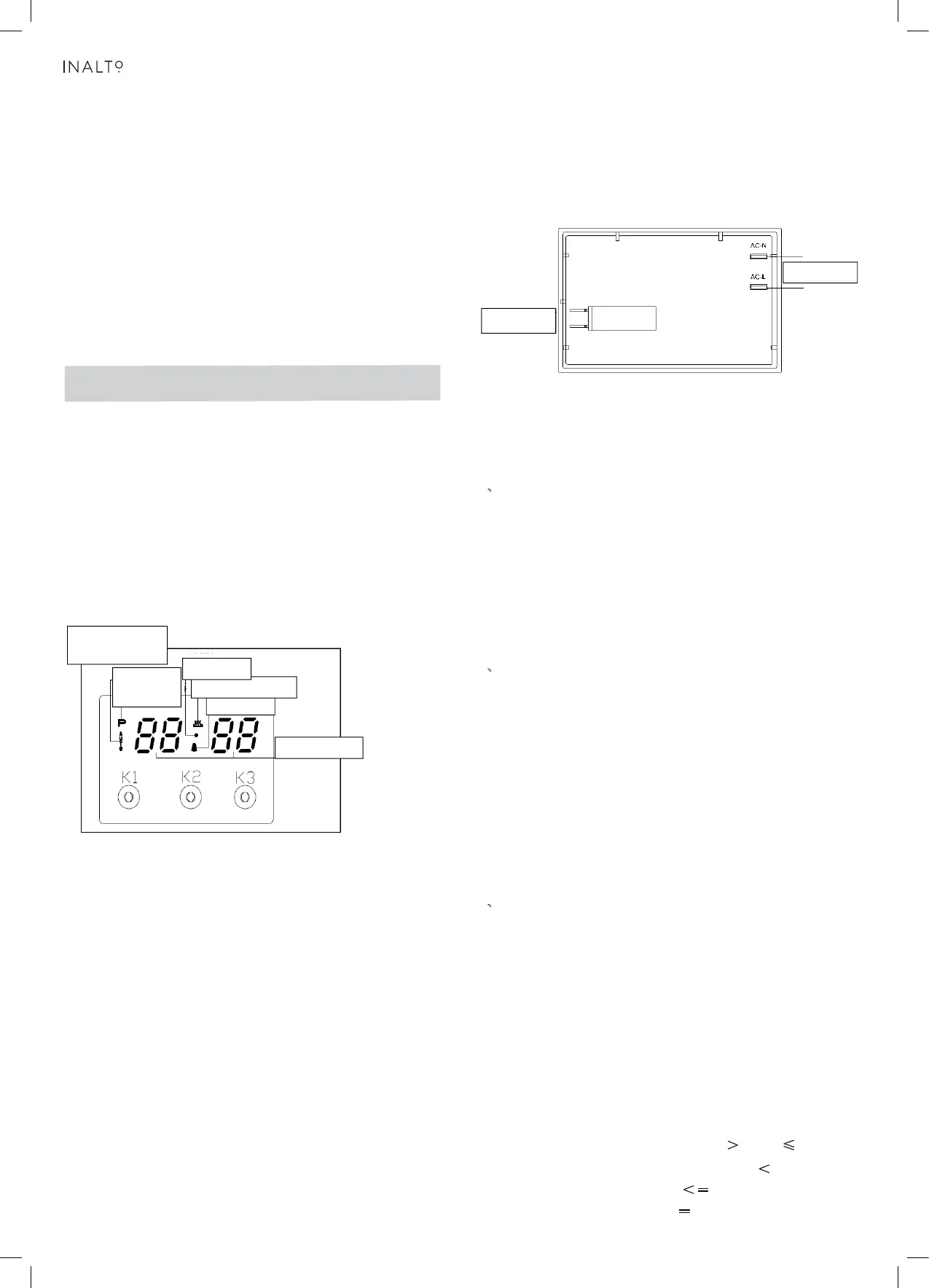
Operation Panel and Instructions (for some models)
1 List of functions
Instructions from left to right: Key1, Key2, Key3.
Key1 Decrease Key
Key2 Mode Key
Key3 Increase Key
Note: Press Key 1 and Key 3 under the setting mode, which
changes the time by one minute either up or down. If keep
pressing them, the number will be up or down quickly.
2 Icon Instructions
“ "Auto-programming icon" : it will flash when
setting automatic
program a nd th e e nd o f automatic program. If automatic program
has been set, after 5s, it will k eep lighting up. At the end of
automatic program, the flash will be off when resetting the clock
or it will keep lighting up when resetting automatic program after 5s.
“"Time-setting Icon" will flash when setting Beijing time.
“ "Sec Icon" and "Alarm Icon"” are flashing under the mode of time
setting and alarm setting, after 5s of setting, it will turn to lighting up.
Alarm Icon
Rela
O
eration Icon
Auto-programming
icon
Time-setting
Icon
Sec Icon
Number Display
“"Relay Operation Icon"”shows the working state
of relays. The
if contacts are disconnected. "Number Display"”is LED Nixie Tube.
As shown in the picture, on-off control is used to control heating
components of oven, the left is power source which can be
connected under the 220V.
1、
Time Adjustment after Starting up
When the power is on, it shows 12:00 and flashes. The relay
contact is disconnected, auto-programming icon keeps lighting
up, time setting icon flashes.
Press K1 or K3 to the time or press K2 to get into the present
working mode. The relay contact is connected.
Press K2 by 4 times to get into the present time-setting mode
under the common mode.
2、
Alarm and Buzz Function
Press K2 once under the common mode: "Alarm Icon" flashes.”
Press K1 or K3 to adjust the present alarm clock.
5s after adjusting to the time you need, "Alarm Icon" keeps
flashing, and will work after setting up. In this case, pressing
K1 can know the alarming time( it will show seconds at one
last minute).
When alarm counts down to zero, alarming program ends,
alarm icon flashes, and the buzzer os buzzing. Press any
key to stop the buzzing or it will turn off automatically after 2
minutes.
3、
Auto-programming Setting and Instructions
① Semiautomatic program mode
Use this setting for oven working time, automatic heating
switch-off at the end of setting time, buzzer will inform the user.
on-off control
Power source
icon will keep lighting up if contact are connected, and will be off
Control Function and Intructions
Press K2 twice or three times to get into the auto-programming
time setting, "Auto-programming Icon"” flashes. Press K1 and
K3 to aujust continuous time and end time.
5s after setting, it will work automatically, "Auto-programming
Icon" keeps lighting up. If continuous time is 0, turn off the
relay contact, and "Relay Operation Icon" is dark, "Auto-
programming Icon" flashes, the buzzer is buzzing.
This mode’s range of continuous time and end time:
Adjustment range for continuous time: >
0 but ≤ 10 hours
Adjustment range for end time: present time <
end time
=
present time + 10 hours
If meet this standard: end time = present time + continuous time
<
=
USE OF THE ELECTRIC GRILL
USlNG THE GRILL
Turn the oven knob to the right and place it on the grill position .
The grill pan should be located on the top oven shelf position.
Always preheat the grill on full for 3-5 minutes before inserting
the food.
The user can change the shelves, depending on his personal
whishes and on the different food.
To remove the shelves from the oven, pull them forward you,
tilt front end upward and pull them out.
To replace it in the opposite manner as before.
Install shelves by locating them in the horizontal guide rails on
the oven walls. The raised portion of the shelf is to be facing the
rear wall of the oven.
For example: the present time is 2: 00, then the max. end time
is adjusted to 12:00 (2: 00+10:00=12:00). When the end time
is adjusted to 12:00, then the continuous time is 10:00.
5s after adjusted, automatic program is working. After 10 hours,
if continuous time is counting down to 0, turn off the relay
contact, and "Rel ay Operation Icon" is dark, "Auto-programming
Icon"”flashes, the buzzer is buzzing.
Note:
1. only use this setting for either continuous time or end time.
For example: the present time is 2:00, and if let the oven
work for 3 hours, set the continuous time to 3:00, and the
end time will automatically change to 5:00 and vice versa.
2. If the continuous time is equal to 0 or the end time is equal to
the present time, it means that the automatic program is over.
3. When the automatic program is over, the continuous time
is 0 and the end time is equal to the present time.
② Automatic Mode
Use this mode for setting oven’s starting time and end time,
which means make an appointment to boot. When the time is
over, it will automatically turn off the heating and the buzzer is
buzzing to inform the user.
Press twice to get into the continuous time setting mode under
the common mode, press three times to get into the end time
When the continuous time setting is ok or the end time setting
is ok, then press K2 to get into the other kind of automatic
program time setting, "Auto-programming Icon" flashes, ”
press K1 and K3 to ad just continuous time and end time.
setting mode.
5s after automatic program setting, it will automatically work,
and "Auto-programming Icon" keeps lighting up. Turn off the
relay conntact, and the icon i s dark. When work until the
starting time, the relay contact is connected, the icon is light.
When the continuous time is counting down, if the continuous
time is 0,turn off the relay contact, "Relay Operation Icon" is dark,
"Auto-programming Icon" flashes, and the buzzer is buzzing.
The continuous time and the end time under this mode will be
set as follow:
Starting time = end time
- continuous
time
For example, the present time is 2:00, set the continuous time to
3:00, and the end time to 10:00, then the starting time is 7:00
(7:00=10:00-3:00). The relay contact is connected and its icon
is light. After working for continuous 3 hours, the continuous
time is 0, turn off the relay contact,
"Relay Operation Icon" is dark,
“ "Auto-programming Icon"” flashes, the buzzer is buzzing.
Note:
1 End time >present time+ continuous time,
but 23 hours and 59 minutes
For example: the present time is 2:
00
, continuous time is 0:01,
then the range for end time is 2:02 (2:02
2:00+1).
2 Continuous time ≥ 1 minute, continuous time and end time both
will be set.
3 If the continuous time is equal to 0 or the end time is equal to
the present time it meas the automatic program is over.
4 When the automatic program is over, the continuous time is 0,
and the end time is the same with the present time.
4、Cancel Function
When semiautomatic or automatic function is starting, press K1
and K3 at the same time which can cancel the automatic mode.
( to cancel continuous time and end time).
>
≤
≥
1
2
3
4
ily.
accessories
ialist retailer
meals.
Enamelled
For moist c
For roasts a
of poultry. U
combinatio
erneath the
rotary spit a
ip tray to
nd large piec
se only in
ily.
accessories
ialist retailer
.
Description
Baking and roasting shelf
For ovenwa
roasts, grilli
meals.
Enamelled
For moist c
collect fat.
Rotary spit
For roasts a
of poultry. U
combinatio
r-sales serv
re, cake tins,
erneath the
rotary spit a
ip tray to
nd large piec
se only in


 To Next Page
 Loading...