
 Need help?
Do you have a question about the INDY AUDIO LABS Acurus ACT 4 and is the answer not in the manual?
Crucial safety guidelines regarding electric shock, fire hazards, and proper usage.
Initial congratulations, instructions for retaining packaging, and registering the product.
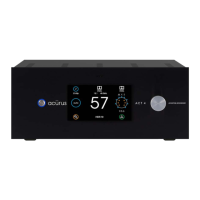
Details on the front panel's design, touch-sensitive LCD, volume knob, IR sensor, and power button.
Information on the side panels and their ventilation slots.
Details on HDMI, Optical, Coax, Phono, XLR, and RCA input/output connections.
Covers USB power, trigger I/O, RS-232, Ethernet, and USB programming ports.
Information on the main power switch, fuse drawer, and AC cord inlet.
Recommendations for optimal placement, airflow, and connections during installation.
Instructions for shelf mounting and equipment rack mounting the ACT 4.
Guidance on connecting HDMI, Coax, Optical, Phono, Stereo RCA, and Multichannel sources.
Details on Pre-amp Outputs, Trigger I/O, USB Power, Ethernet, RS-232, and AC power connections.
Instructions for AC power on, bootup process, standby mode, and powering on the unit.
How to select inputs and adjust volume using the front panel controls.
Explanation of main screen elements: indicators for resolution, signal format, volume, and input selection.
Details on output processing, loudspeaker format indicators, and the network/settings button.
Guide to selecting inputs via the touch screen interface.
How to access the ACT 4's IP address for network control.
Explanation of available sound modes: Auto, Direct, Stereo, Analog, Party, and Night.
Details on DTS, Dolby, Stereo, 2.1, 5.1, and 7.1 sound modes.
How to boost dialog clarity in DTS-exclusive content.
Adjusting overall bass and treble levels for listening preference.
Covers temperature, loudspeaker, sound mode, HDMI, Dolby, and DTS settings.
Details on level, trigger, screen, firmware, network, and reset settings.
Guide to setting speaker layout for audio bed, subwoofers, and overhead speakers.
Information on AUX output screen and the loudspeaker layout indicator.
Details on the Aux Output screen for managing four additional outputs.
Using signal generators and adjusting levels/polarity for aux outputs.
Tables detailing signal routing for 2.x.x and 3.x.x audio bed channel layouts.
Tables illustrating signal routing for 4.x.x audio bed channel layouts.
Tables detailing signal routing for 5.x.x audio bed channel layouts.
Tables illustrating signal routing for 6.x.x audio bed channel layouts.
Tables detailing signal routing for 7.x.x audio bed channel layouts.
Tables illustrating signal routing for 9.x.x audio bed channel layouts.
Details on RS-232 connection, pinout, serial format, and command examples.
Explains verbose response, command sequencing, and mute/update functionalities.
Using the built-in web server for direct control, status monitoring, and setup.
Details on UDP protocol, command structure, and IP address setup for Ethernet control.
Using UDP commands to directly set volume levels without restrictions.
Accessing real-time status feedback using XML files from the web server.
A table guiding users through common problems and their solutions.
Contact information and advice for persistent problems not covered in the troubleshooting table.
Technical specifications for Phono, XLR, RCA, Digital, HDMI, and Audio Decoding.
Details on calibration, post-processing, video, control, audio connections, and physical dimensions.
Diagrams showing the physical dimensions and layout of the ACT 4 unit.
Diagrams showing the physical dimensions and mounting details of the ARM-4 rack ear.
Information about Acurus and Indy Audio Labs' design and manufacturing principles.
Details on the manufacturer's warranty terms and conditions for the U.S. and Canada.
 General
| Frequency Response | 20Hz - 20kHz ±0.1dB |
|---|---|
| Input Impedance | 47kΩ |
| Dolby Atmos | Yes |
| DTS:X | Yes |
| Auro-3D | Yes |
| Dirac Live | Yes |
| Type | Preamplifier |
| Power Output | N/A (Preamplifier) |
| Total Harmonic Distortion (THD) | <0.005% |
| Damping Factor | N/A (Preamplifier) |
| HDMI Inputs | 7 |
| HDMI Outputs | 2 |
| Inputs | 7 HDMI, 2 Coaxial, 2 Optical, 1 USB |
| Outputs | 2 HDMI, 16 XLR |

 To Next Page
