QUICK REFERENCE FOR DAILY OPERATION:
After your initial set up (see instructions below), follow these easy steps for optimal
performance of your zooby® monitor:
In the car:
1. Always use the safety buckle straps of the plush camera and adjust to fit snugly on
any headrest posts the plush camera is mounted on. Note: If the arms are still loose
after adjusting straps on the posts, you can wrap the plush arms around the headrest
posts at least once on each side and then use the buckle to tighten up your fit.
2. Turn on the monitor by holding the power button for 3-5 seconds until the unit screen
illuminates.
3. You can toggle between the 3 screen modes by quickly pressing the power button
until you get the camera view (camera 1, camera 2, or split screen) that is paired to
your monitor. (Note: Additional camera sold separately for split screen mode.)
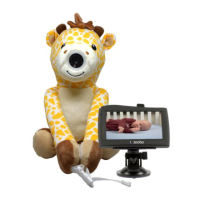
4. When you place your baby/toddler in the backseat, turn on the camera in the plush at
the bottom by opening the velcro enclosure and holding the power button until the
light turns green. Reattach the velcro.
5. The monitor will display the images from the camera. Adjust the camera in the plush
for the view you like by moving the bendi-neck inside the plush.
6. When exiting the vehicle, turn off the monitor by holding the power button for 3
seconds. When taking your baby out of the vehicle, turn off the camera in the plush.
This will ensure optimal battery life and performance.
7. Remember to charge monitor or camera as needed. If your vehicle is equipped with
cigarette lighter or power outlets, you can keep your monitor plugged in with the
included 2-port USB car adapter. The camera in the plush may be charged in the
vehicle when your child is not in the car. When your unit is fully charged, the "red"
charging light will turn off.
NOTE: Due to potential extreme heat in the car, we recommend that the zooby® and
monitor screnn be removed from direct heat to prevent permanent damage to the
camera or monitor screen.


 To Next Page
 Loading...