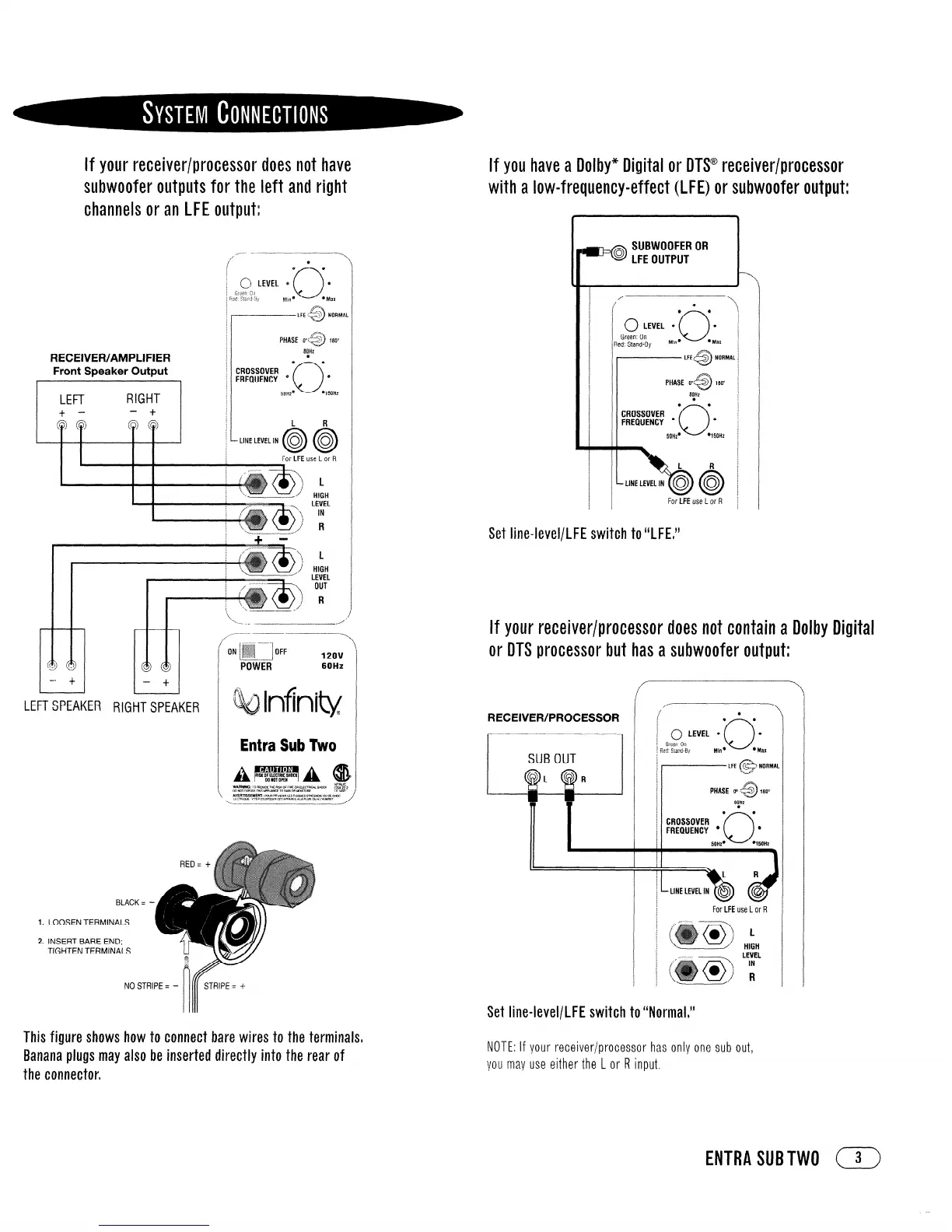
If your receiver/processor does not have
subwoofer outputs for the left and right
channels or an LFE output:
RECEIVER/AMPLIFIER
Front Speaker Output
LEFT
RIGHT
t -
-
t
LEFTSPEAKER RIGHTSPEAKER
For LFE use L or R
\
‘--. .- --_.-_______I
I’
/
-- ---. ______ -------,
\
*N p -...-----
/
..::::::v
y..::::::::::b
L..Ls
OFF
12ov
POWER
60Hz
BLACK = -
I. LOOSEN TERMINALS
2. INSERT BARE END;
TIGHTEN TERMINALS
NO STFWE = -
This figure shows how to connect bare wires to the terminalsi
Banana plugs may also be inserted directly into the rear of
the connector,
If you have a Dolby” Digital or DTS@ receiver/processor
with a low-frequency-effect (LFE) or subwoofer output:
SUBWOOFER OR
LFE OUTPUT
I
For LFE use L or R i
Set line-level/lFE switch to LLLFEI’J
If your receiver/processor does not contain a Dolby Digital
or DTS processor but has a subwoofer output:
RECEIVER/PROCESSOR
,I ((1
For LFE use L or R
I I
L
HIGH
LEVEL
IN
R
Set line-level/LFE switch to “Normal,”
NOTE: If your receiver/processor has only one sub out,
you may use either the 1 or R input,
ENTRA SUBTWO
( 3 )




 To Next Page