Black plate (10,1)
Model "INFINITI_NAVI" EDITED: 2006/ 3/ 20
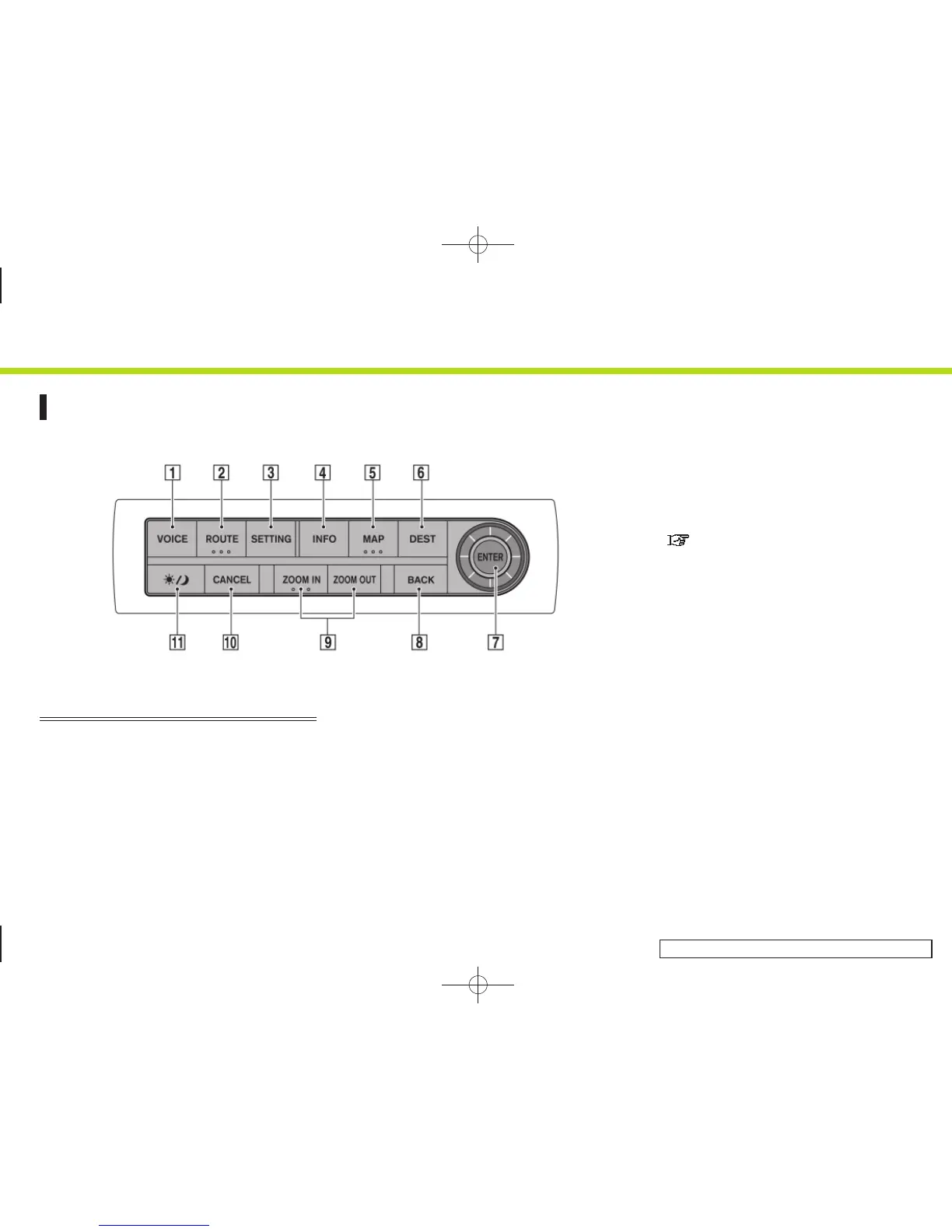
CONTROL BUTTONS AND FUNCTIONS
INI0202
G35 Coupe
&
1
<VOICE>:
Push to repeat voice guidance for a
guide point.
&
2
<ROUTE>:
Push to access guidance control func-
tions (guidance cancellation, route
priority, waypoint setting on the route,
etc.).
&
3
<SETTING>:
Push to access the system settings.
&
4
<INFO>:
Push to display the navigation informa-
tion, such as GPS and version informa-
tion, etc.
&
5
<MAP>:
Push to display the current location
map screen.
&
6
<DEST>:
Push to enter a destination. Various
methods for entering a destination are
available.
“4. Setting a destination”
&
7
JOYSTICK and <ENTER>:
Push to highlight an item on the
screen, select the highlighted item,
move on the map, etc.
&
8
<BACK>:
Push to return to the previous screen.
In a settings screen, this button can
also be used to apply the setting.
&
9
<ZOOM IN>/<ZOOM OUT>:
Push to switch to the zoom mode to
change the map scale.
&
10
<CANCEL>:
Push to return to the map screen while
making a setting on the menu screen or
cancel the route that has already been
set.
2. Getting started
2-2


 To Next Page
 Loading...