Black plate (13,1)
Model "INFINITI_NAVI" EDITED: 2006/ 3/ 20
INI0222
FX45/35
&
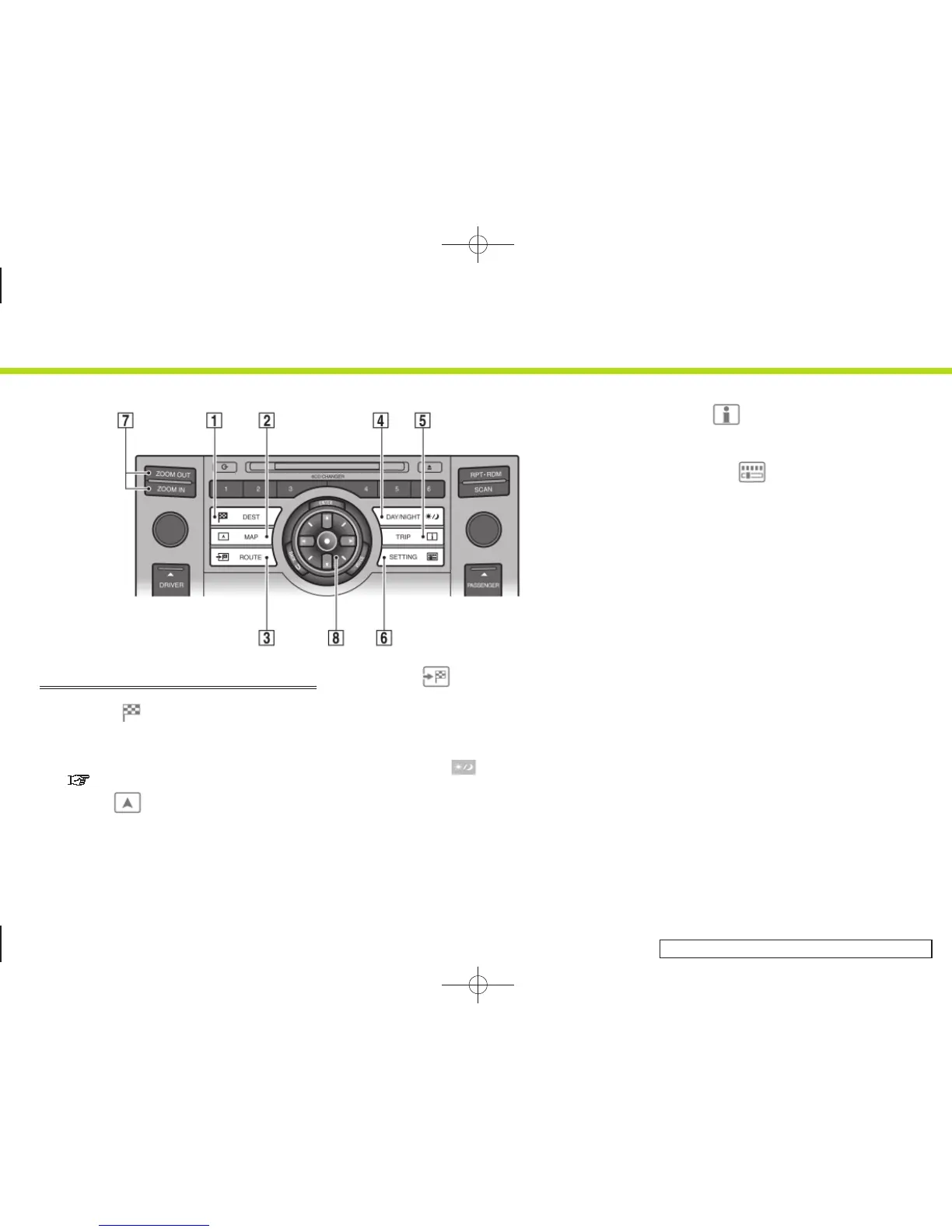
1
<DEST> :
Push to enter a destination. Various
methods for entering a destination are
available.
“4. Setting a destination”
&
2
<MAP> :
Push to display the current location
map screen.
&
3
<ROUTE> :
Push to access guidance control func-
tions (guidance cancellation, route
priority, waypoint setting on the route,
etc.).
&
4
<DAY/NIGHT> :
Push to switch between the day screen
and the night screen. Push and hold to
turn the display on and off.
&
5
<TRIP> :
Push to display the trip computer. Refer
to the Owner’s Manual of your vehicle.
&
6
<SETTING> :
Push to access the system settings.
&
7
<ZOOM IN>,<ZOOM OUT>:
Push to switch to the zoom mode to
change the map scale.
&
8
INFINITI Controller:
Push to highlight an item on the
screen, select the highlighted item,
move on the map, etc.
2. Getting started
2-5


 To Next Page
 Loading...