Black plate (32,1)
Model "INFINITI_NAVI" EDITED: 2006/ 3/ 20
OPERATING MAPS
INV2462
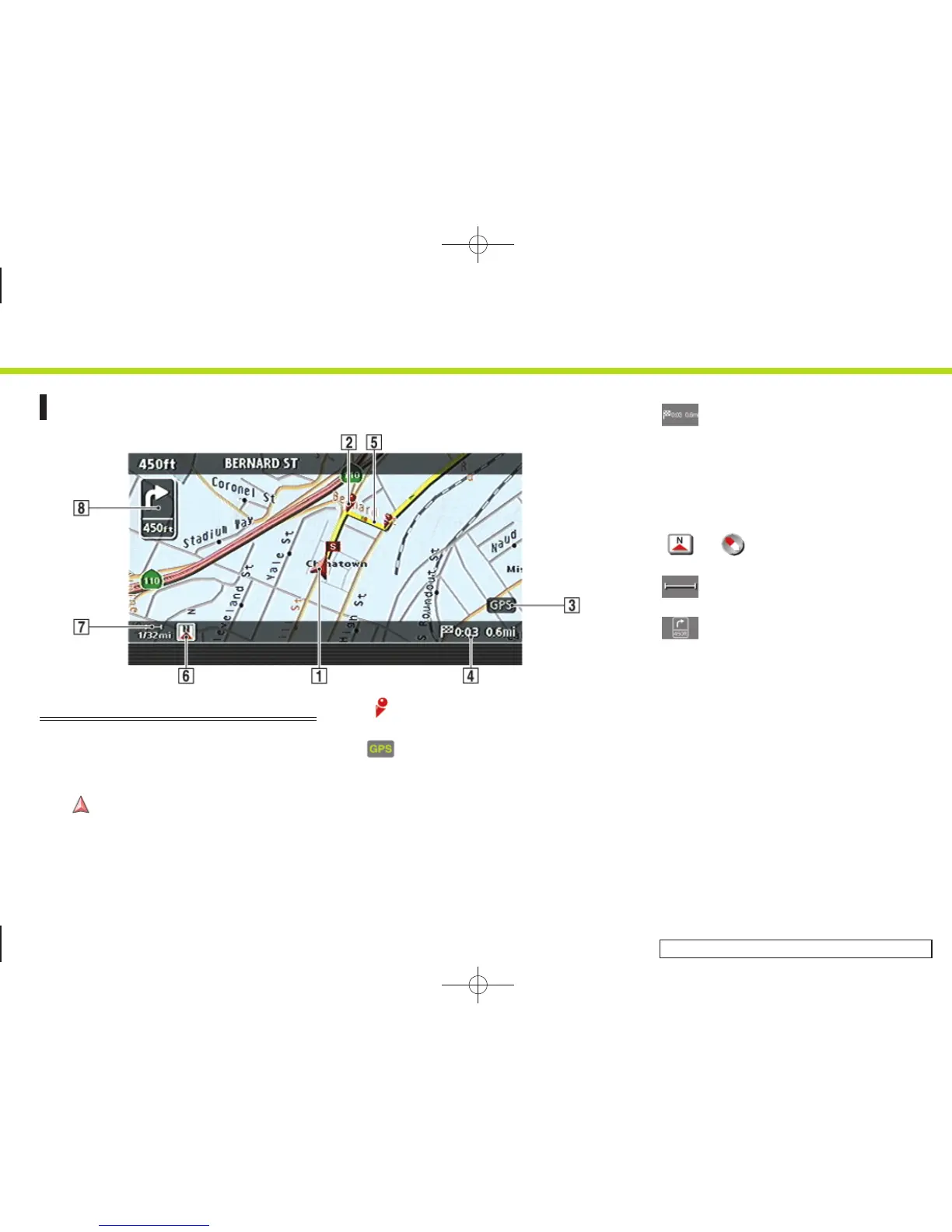
HOW TO VIEW MAP SCREEN
The navigation system displays various
information on the map screen.
Screen information
&
1
Vehicle icon:
Indicates the current vehicle location
and the direction that you are traveling.
&
2
Guide point:
Indicates a guide point on the route.
&
3
GPS indicator:
Indicates the GPS reception condition
of signals from the satellites.
*
Green: accurate positioning is possi-
ble
*
Gray: accurate positioning is not
possible
&
4
Remaining time and distance to
the destination:
Indicates the remaining time and dis-
tance to the destination.
&
5
Suggested route:
Appears in bold yellow during route
guidance.
&
6
/ Direction indicator:
Indicates the direction of the map.
&
7
Scale indicator:
Indicates the scale of the map.
&
8
Arrow and distance:
Appears on the upper left corner of the
screen when the suggested route is set.
Indicates the distance to the next guide
point and the turning direction at that
guide point. This function can be turned
on or off.
2. Getting started
2-24


 To Next Page
 Loading...