Black plate (46,1)
Model "INFINITI_NAVI" EDITED: 2006/ 3/ 20
INV2904
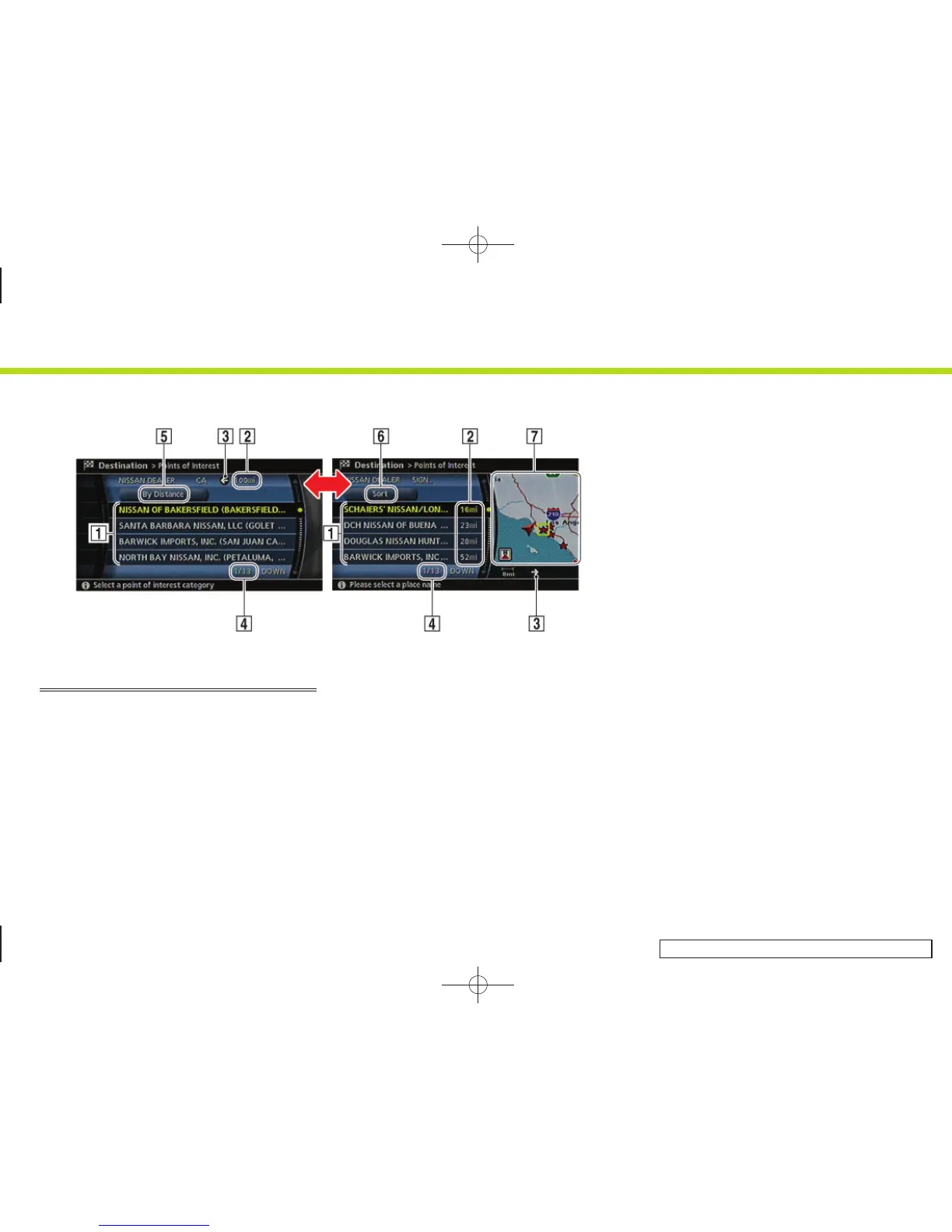
LIST SCREEN
After searching for a point of interest, a list
screen is displayed.
Depending on the list displayed, it can be
sorted.
Items displayed in a list
&
1
Highlight the preferred item from the
list and push <ENTER> to select it.
If a location or facility name is not
completely displayed (due to length),
highlight the item to show the hidden
part of the name.
&
2
Distance from the current location
&
3
Direction to the point of interest
&
4
If the entire list cannot be displayed on
the screen, the system displays the
total number of items in the list and the
entry number of the selected item. Tilt
the joystick upward or downward, turn
the center dial or push the up or down
buttons of the main directional buttons
to scroll the list.
&
5
Highlight and push <ENTER> to sort the
list by shortest distance.
&
6
Highlight and push <ENTER> to sort the
list in the original order.
&
7
When the list is sorted by the shortest
distance, you can confirm the selected
location in the preview on the right side
of the screen.
2. Getting started
2-38


 To Next Page
 Loading...