[ Edit: 2016/ 6/ 21 Model: 2017MY INFINITI Q50(V37) OM17E00V37U0 ]
5-14 Starting and driving
CAUTION
Do not leave the vehicle with the push-
button ignition switch in ACC or ON posi-
tions when the engine is not running for an
extended period. This can discharge the
battery.
EMERGENCY ENGINE SHUT OFF
V37-D-121025-B97EFA74-7631-43F4-BB12-722169CB72A8
To shut off the engine in an emergency
situation while driving, perform the follow-
ing procedure:
. Rapidly push the push-button ignition
switch 3 consecutive times in less than
1.5 seconds, or
. Push and hold the push-button ignition
switch for more than 2 seconds.
JVS0404X
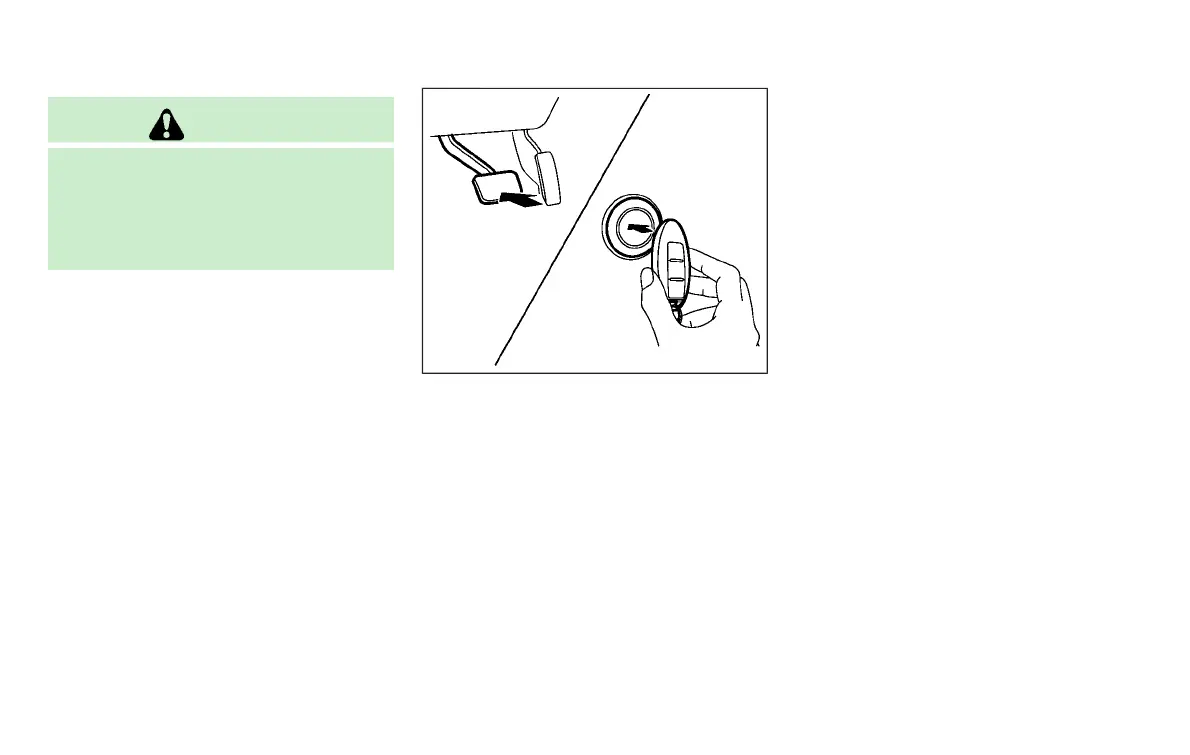
INTELLIGENT KEY BATTERY DIS-
CHARGE
V37-D-121025-881AEDE4-EC8A-459A-A547-0DBF545170CF
If the battery of the Intelligent Key is
discharged, or environmental conditions
interfere with the Intelligent Key operation,
start the engine according to the following
procedure:
1. Move the shift lever to the P (Park)
position.
2. Firmly apply the foot brake.
3. Touch the ignition switch with the
Intelligent Key as illustrated. (A chime
will sound.)
4. Push the ignition switch while depres-
sing the brake pedal within 10 seconds
after the chime sounds. The engine will
start.
After step 3 is performed, when the ignition
switch is pushed without depressing the
brake pedal, the ignition switch position
will change to ACC.
NOTE:
. When the ignition switch is pushed to
the ACC or ON position or the engine is
started by the above procedures, the
Intelligent Key battery discharge indi-
cator appears in the vehicle informa-
tion display even if the Intelligent Key
is inside the vehicle. This is not a
malfunction. To turn off the Intelligent
Key battery discharge indicator, touch
the ignition switch with the Intelligent
Key again.
. If the Intelligent Key battery discharge
indicator appears, replace the battery
as soon as possible. (See “Intelligent
Key battery replacement” (P.8-27).)
Condition:


 To Next Page
 Loading...