[ Edit: 2016/ 6/ 21 Model: 2017MY INFINITI Q50(V37) OM17E00V37U0 ]
JVS0748X
*
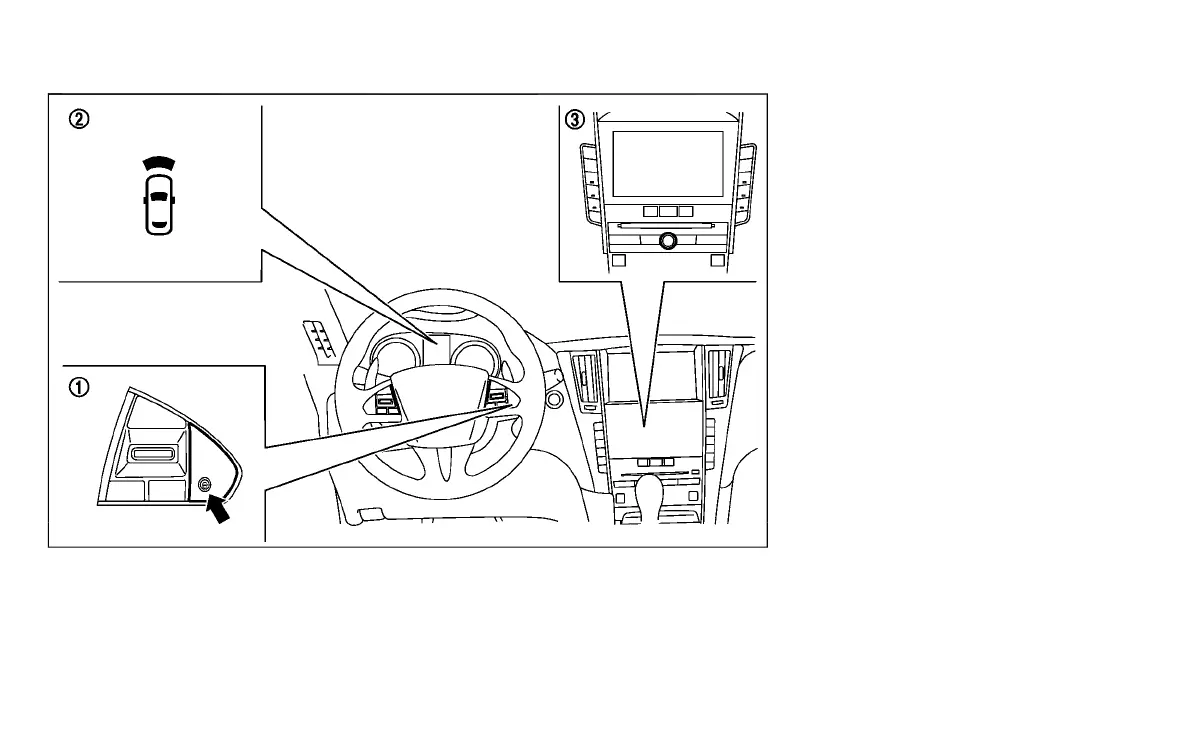
1
Dynamic driver assistance switch
*
2
Driver assist system forward indicator
(green) (on the vehicle information
display)
*
3
Lower display
TURNING THE DCA SYSTEM ON/OFF
GUID-8FA2126D-5265-4330-A914-E149EEE46A10
To turn on the DCA system, push the
dynamic driver assistance switch
*
1
on
the steering wheel after starting the
engine. The driver assistance switch in-
dicator
*
2
in the vehicle information dis-
play will appear. Push the dynamic driver
assistance switch
*
1
again to turn off the
DCA system. The driver assistance switch
indicator
*
2
will turn off.
The system will start to operate after the
vehicle speed is above approximately 3
MPH (5 km/h).
The dynamic driver assistance switch
*
1
is
used for the DCA, Active Lane Control (if so
equipped), LDP and BSI systems. When the
dynamic driver assistance switch
*
1
is
pushed, Active Lane Control, LDP and BSI
systems will also turn on or off simulta-
neously. The DCA system can be individu-
ally set to on or off on the lower display
*
3
.
If the system is set to off, the system will
not turn on even if the dynamic driver
assistance switch
*
1
is pushed to on. To
set the system to on or off on the display,
see “How to enable/disable the DCA
system” (P.5-102).
When the conventional (fixed speed) cruise
control mode is operating, the DCA system
Starting and driving 5-101
Condition:


 To Next Page
 Loading...