[ Edit: 2016/ 8/ 1 Model: 2017MY INFINITI Q70(Y51) OM17E00Y51U0 ]
4-94 Monitor, climate, audio, phone and voice recognition systems
Next/Previous Track and Fast For-
ward/Rewind:
Y51D-V-E01-578633FC-63C5-4CEE-B47A-97B9C75E57BA
When the or button is pushed for
more than 1.5 seconds while the iPod
®
is
playing, the iPod
®
will play while fast
forwarding or rewinding. When the button
is released, the iPod
®
will return to the
normal play speed.
When the
or button is pushed for
less than 1.5 seconds while the iPod
®
is
playing, the next track or the beginning of
the current track on the iPod
®
will be
played.
The INFINITI controller can also be used to
select tracks when the iPod
®
is playing.
REPEAT (RPT), RANDOM (RDM):
Y51D-V-E01-16CC6529-93F7-4B3C-BFC8-C36276E922CA
When the RPT button is pushed while a
track is being played, the play pattern can
be changed as follows:
NOS2652
SAA0451
CD/DVD/USB MEMORY CARE AND
CLEANING
Y51D-V-E01-AFD007B6-8590-41CB-8881-07A8EE97E653
CD/DVD
Y51D-V-E01-3FD7DD1C-B0E9-490C-BBDE-0979161CB528
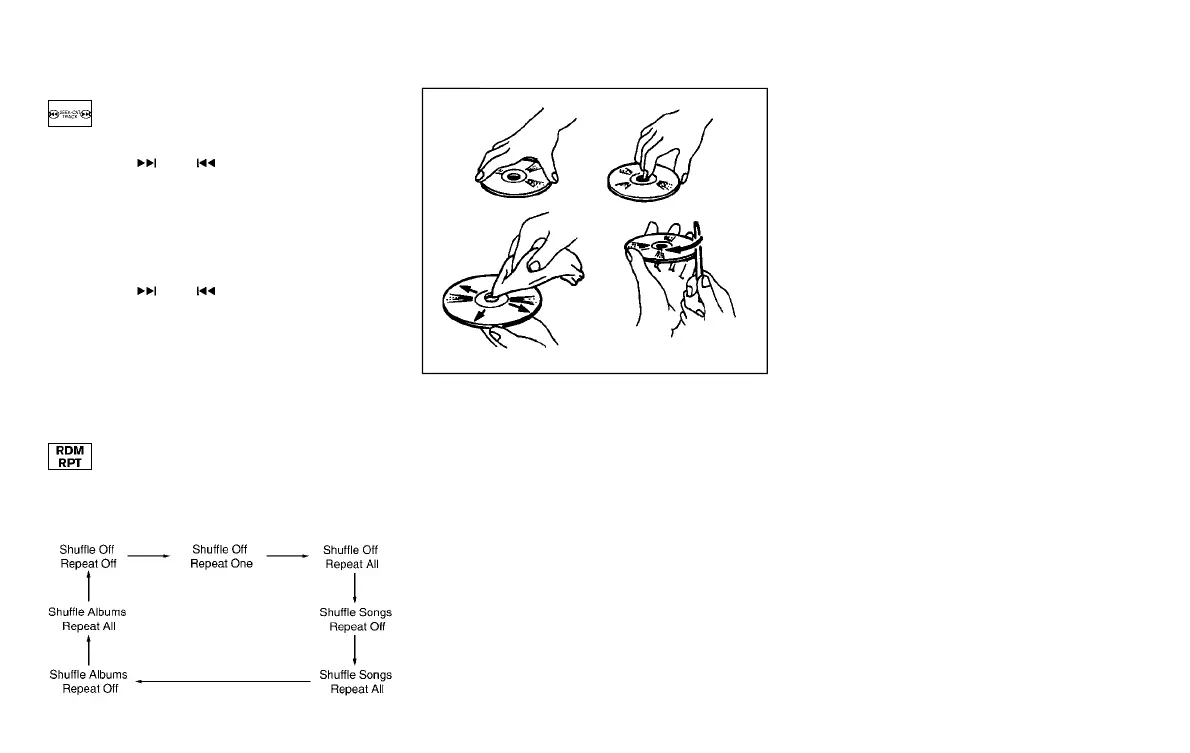
. Handle a CD/DVD by its edges. Never
touch the surface of the disc. Do not
bend the disc.
. Always place the discs in the storage
case when they are not being used.
. To clean a disc, wipe the surface from
the center to the outer edge using a
clean, soft cloth. Do not wipe the disc
using a circular motion.
Do not use a conventional record
cleaner or alcohol intended for indus-
trial use.
. A new disc may be rough on the inner
and outer edges. Remove the rough
edges by rubbing the inner and outer
edges with the side of a pen or pencil
as illustrated.
USB memory
Y51D-V-E01-9B32B5D4-C5E4-4661-8A26-E2F071574C66
. Never touch the terminal portion of the
USB memory.
. Do not place heavy objects on the USB
memory.
. Do not store the USB memory in highly
humid locations.
. Do not expose the USB memory to
direct sunlight.
. Do not spill any liquids on the USB
memory.
Refer to the USB memory Owner’s Manual
for the details.
Condition:


 To Next Page
 Loading...
