[ Edit: 2016/ 8/ 1 Model: 2017MY INFINITI Q70(Y51) OM17E00Y51U0 ]
4-134 Monitor, climate, audio, phone and voice recognition systems
INFINITI VOICE RECOGNITION AL-
TERNATE COMMAND MODE
Y51D-V-E01-252A70D3-AF37-41EF-98AB-08D7C8A24C16
The following section is applicable when
Alternate Command Mode is activated.
When Alternate Command Mode is acti-
vated, an expanded list of commands can
be used after pressing the TALK
switch.
In this mode, available commands are not
fully shown on the display or prompted.
Review the expanded command list when
this mode is active. See examples of
Alternate Command Mode screens.
Please note that in this mode the recogni-
tion success rate may be affected as the
number of available commands and ways
of speaking each command are increased.
To improve the recognition success rate,
try using the Speaker Adaptation Function
available in that mode. (See “Speaker
adaptation function (for Alternate Com-
mand Mode)” (P.4-143).) Otherwise it is
recommended that Alternate Command
Mode be turned OFF and Standard Mode
be used for the best recognition perfor-
mance.
SAA2529
Activating Alternate Command
Mode
Y51D-V-E01-EC14FB5E-BB69-40A6-BF45-74AD1DF521E6
When the Standard Mode is active, perform
the following steps to switch to the
Alternate Command Mode.
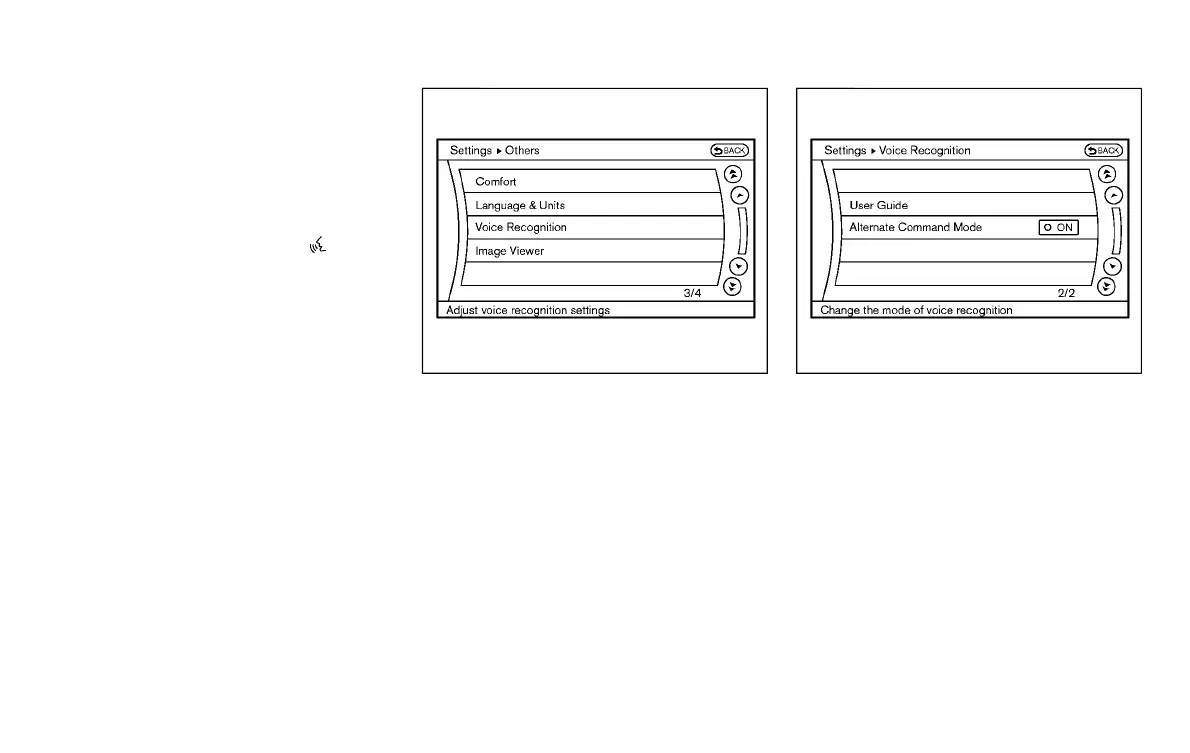
1. Push the SETTING button on the instru-
ment panel.
2. Highlight the “Others” key.
3. Highlight the “Voice Recognition” key.
SAA2543
4. Highlight the “Alternate Command
Mode” key.
5. The confirmation message is displayed
on the screen. Push the “OK” key to
activate the Alternate Command Mode.
Displaying command list
Y51D-V-E01-B3E48388-0DA0-48CD-9415-FF7102D7A250
If you are controlling the system by voice
commands for the first time or do not know
the appropriate voice command, perform
the following procedure for displaying the
voice command list (available only in
Alternate Command Mode).
Condition:


 To Next Page
 Loading...
