

EasyManua.ls Logo

Init NT-Retro-C - User Manual

Init NT-Retro-C
2 pages
Print Icon
To Next Page IconTo Next Page
Loading...
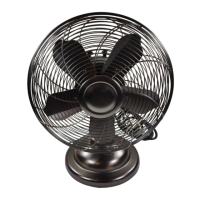
Adjustment
knob
Grill ring
Grill
Base
Fan blade
Oscillation
knob
Power switch/
speed selection
Quick Setup Guide
12" Table Fan
NT-Retro-C/NT-Retro-S
Features
Servicing instructions
To replace the fuse
1 Unplug the fan.
2 Slide open the fuse access cover
on top of the AC power plug.
3 Remove the fuse.
4 Replace the fuse only with a 5A, 125 Volt fuse. Do not force the fuse
in place.
5 Slide the fuse access cover on top of the AC power plug closed.
Caution: Do not replace the AC power plug. Discard the product if the
plug is damaged.
Cleaning your fan
Be sure to unplug your fan before cleaning.
Plastic parts should be cleaned with mild soap and a damp cloth or
sponge. Thoroughly remove soap lm with clear water.
Be sure not to splash water or other liquid into the motor.
Package contents
12" table fan
Quick Setup Guide
Using your fan
O/speed selection
The power switch is incorporated in the speed control switch on
the top of the fan.
0 - The fan is switched o.
1 - The fan operates at a low speed.
2 - The fan operates at a medium speed.
3 - The fan operates at a high speed.
Oscillation
To allow the fan to oscillate, push down the knob beside the fan
speed control. Pull up on the knob if you don’t want it to oscillate.
Adjustment
To adjust the angle at which the fan is blowing
1 Loosen the adjustment knob under the fan motor.
2 Adjust the fan to the angle you want, then retighten the knob to
secure the fan at that angle.
Question and Answer IconNeed help?

Do you have a question about the Init NT-Retro-C and is the answer not in the manual?

Overview

This document describes the Init 12" Table Fan (models NT-Retro-C/NT-Retro-S), a portable electric fan designed for personal cooling.

Function Description

The Init 12" Table Fan provides adjustable airflow for personal comfort. It features a multi-speed motor, an oscillation function for wider air distribution, and an adjustable tilt head to direct airflow. The fan is designed for indoor use and operates via a standard AC power plug.

Important Technical Specifications

  • Model: NT-Retro-C/NT-Retro-S
  • Size: 12" Table Fan
  • Power: Uses a 5A, 125 Volt fuse for overload protection.
  • Plug Type: Grounded three-prong plug. An adapter may be used for two-slot receptacles, provided it is properly grounded.
  • Speed Control: Integrated power switch and speed selection with four settings: 0 (Off), 1 (Low speed), 2 (Medium speed), and 3 (High speed).
  • Oscillation: Push-down knob to engage oscillation, pull-up knob to disengage.
  • Tilt Adjustment: Secured by an adjustment knob located under the fan motor.

Usage Features

Off/Speed Selection: The fan's power switch is integrated into the speed control switch located on the top of the fan.

  • 0: Switches the fan off.
  • 1: Operates the fan at a low speed.
  • 2: Operates the fan at a medium speed.
  • 3: Operates the fan at a high speed.

Oscillation: To activate the oscillation feature, push down the knob positioned next to the fan speed control. This allows the fan head to sweep from side to side, distributing air over a wider area. To stop oscillation and fix the fan in one direction, pull up on the knob.

Angle Adjustment: To change the angle at which the fan blows:

  1. Locate the adjustment knob situated under the fan motor and loosen it.
  2. Manually adjust the fan head to the desired angle.
  3. Retighten the adjustment knob to secure the fan in its new position.

Maintenance Features

Replacing the Fuse: The fan is equipped with an overload protection fuse located within the AC power plug. To replace a blown fuse:

  1. Unplug the fan from the power outlet.
  2. Locate the fuse access cover on top of the AC power plug and slide it open.
  3. Carefully remove the old fuse.
  4. Replace the fuse only with a 5A, 125 Volt fuse. Do not force the new fuse into place.
  5. Slide the fuse access cover on top of the AC power plug closed. Caution: Do not attempt to replace the AC power plug itself. If the plug is damaged, the product should be discarded.

Cleaning Your Fan: Regular cleaning helps maintain the fan's performance and appearance.
  • Always unplug your fan from the power outlet before cleaning to prevent electric shock.
  • For cleaning plastic parts, use a mild soap solution and a damp cloth or sponge.
  • Thoroughly wipe away any soap film with clear water to prevent residue buildup.
  • Crucially, do not splash water or any other liquid into the motor to avoid damage and electrical hazards.

Important Safety Instructions

  • Read and save all instructions before use.
  • Do not use this fan with any solid-state speed control device.
  • If the power cord is damaged, it should be repaired by a qualified person.
  • This appliance has a grounded three-prong plug. If using an adapter for two-slot receptacles, ensure it is properly grounded. Do not defeat this safety feature.
  • Do not leave the fan running unattended.
  • Never insert fingers, pencils, or other objects through the fan housing while it is running. Unplug the fan when moving it.
  • Disconnect the fan before cleaning.
  • Place the fan on a stable surface to prevent overturning.
  • Do not use the fan by a window to reduce the risk of electric shock.
  • Cord and Plug Rules:
    • The product uses an overload protection fuse. If the fuse blows, unplug the product, replace the fuse according to instructions (5A, 125V), and check the product. If the replacement fuse blows again, a short circuit may be present, and the product should be discarded or returned for service.
    • Do not operate any fan with a damaged cord or plug. Discard or return it for service.
    • Do not run the cord under carpeting, throw rugs, runners, or similar coverings. Do not route the cord under furniture or appliances. Arrange the cord away from traffic areas to prevent tripping hazards.

Warranty and Support

  • One-year limited warranty: Details available at www.initproducts.com.
  • Customer Service: Call 800-573-2860 or visit www.initproducts.com.
  • INIT is a registered trademark of BBY Solutions, Inc. Distributed by Best Buy Purchasing, LLC.
  • ©2012 BBY Solutions, Inc. All Rights Reserved.

Init NT-Retro-C Specifications

General IconGeneral
BrandInit
ModelNT-Retro-C
CategoryFan
LanguageEnglish