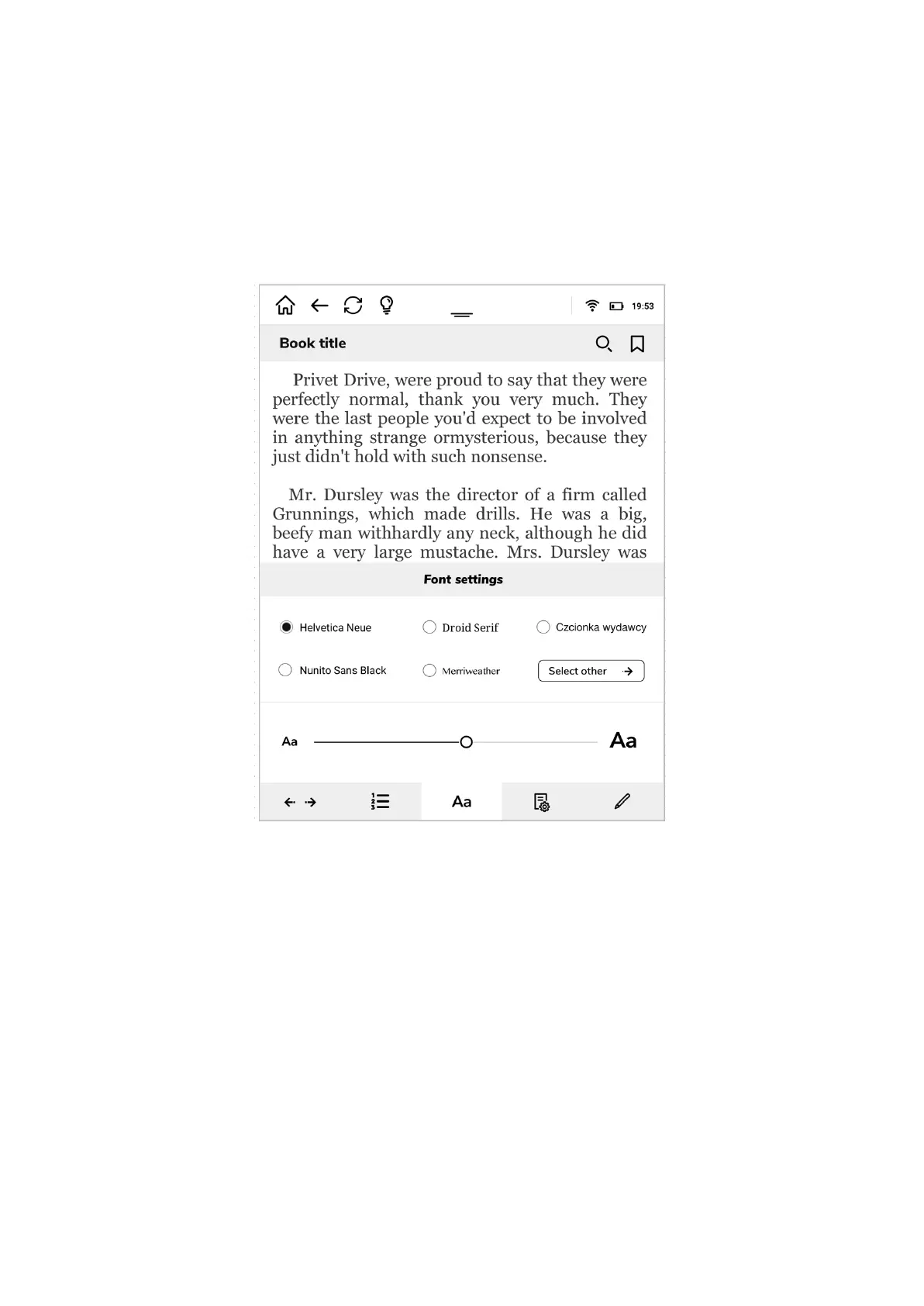
Third fold allows you to play with fonts and set you your preferred one. The settings you do
here are for all EPUB or MOBI documents that you will open.
You can set up your preferred font from the list (the list can be enlarged when you click
“Select other”).
Please note that “Publisher’s font” is a font and it’s size that your e-book publisher chosen
for his book. It is not always the most agreable one. If you choose “Publisher’s font” option
the font shape and size for all e-books will differ.
In the lower part of the font settings you will find a slide which you can drag to increase or
decrease the font size.
Next fold is your tool to set the preferred page structure.
In the upper left corner of page settings you have a possibility to choose the preferred
background and font color. You can choose as in printed book - black letters on white pages
or a negative view - white letters on black background.
The upper right corner may be used to change the screen view, from vertical to horizontal.
Under you will find two sliders.
The upper one increases or decreases margin sizes.
The lower one increases or decreases the text leading.


 To Next Page
 Loading...