EasyManua.ls Logo

innex C570 - Remote Control Features; LED Indicator Status

Default Icon
4 pages
Print Icon
To Next Page IconTo Next Page
To Previous Page IconTo Previous Page
Loading...
Event Camera response LED Status
1
Plug-in power /
Red light & orange
light ashing
2
Camera is in use / Green light
3
Camera is not
in use
/ Red light
4
Single press the
switch button
Switch to 1x→2x→3x
→4x→5x→auto framing
by each press
Red light blink
5
Long press (>2 sec)
the function button
Enter / Exit
auto framing mode
Red light blink
6
Long press (>5 sec)
the function button
Reboot the C570 Red light blink
7
Use remote and
turn o󰀨 mic
Mic is mute, mute icon
pop up
Orange light blink
8
Use remote and
turn o󰀨 camera
Camera is o󰀨, pop up a
black image with camera
o󰀨 icon
Red light blink
9
Use remote and
turn o󰀨 both mic
and camera
Mic is mute and camera
is o󰀨, pop up a black
image with mic o󰀨 icon
and camera o󰀨 icon
Red light & orange
light blink alternately
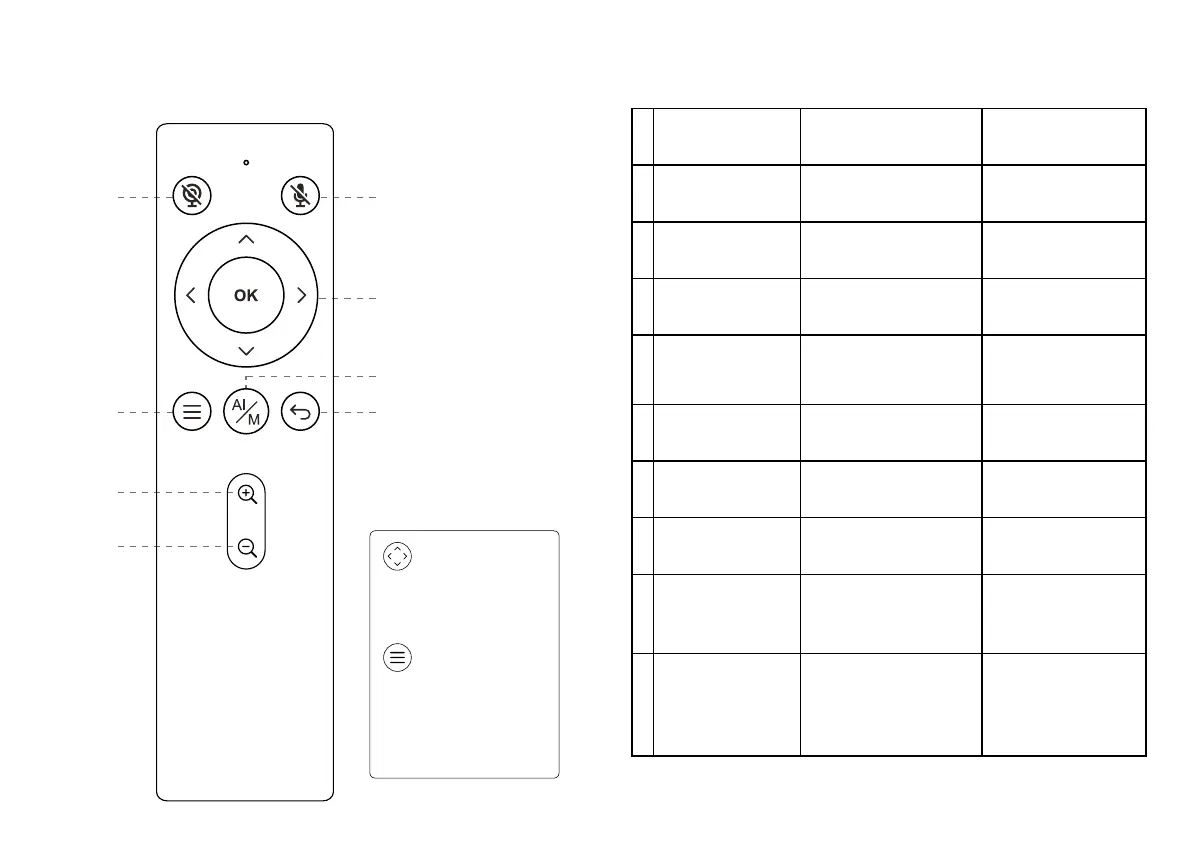
Remote Control
Camera o󰀨
Menu
Zoom in
Zoom out
Auto framing /
Manual
Mic o󰀨
Return
Arrow keys & OK
Arrow keys
Adjust the position of eld
of view
Menu
Open OSD settings to
customize image settings
including contrast,
saturation, brightness, etc.
LED Indicator Status
ZOOM