The InnoTorc EMAX series is a range of battery-powered torque wrenches designed for tightening and loosening screw connections. These tools are accompanied by the TorcDoc Android app, which facilitates parameter import, data synchronization, and protocol management.
Function Description
The EMAX torque wrench operates in two primary modes: "Start Torque" (torque mode) and "Start Torque+Angle" (torque and angle mode). In torque mode, users can set a specific switch-off torque. The tool will then apply torque until this preset value is reached, at which point it automatically stops. For loosening bolts, a power reserve of approximately 25% is recommended. In torque and angle mode, users can specify both a pre-torque and a desired rotation angle. The tool will first apply the pre-torque and then rotate the screw by the specified angle. The TorcDoc app allows for the creation and import of projects with multiple users, objects, and parameter sets, enabling structured and documented tightening processes. The tool also features a "Testmode" for checking screw connections, where it displays the retightening angle for loose connections until the required torque is reached.
The tool's operation is straightforward:
- Switch On: Press the main button to turn on the tool and access the main menu.
- Menu Navigation: Use the up and down arrow buttons to select menu items.
- Selection Confirmation: Press the enter button (hook icon) to confirm a selection.
- Gear Selection: A rotary switch on the side of the tool allows selection between Gear 1 (full torque range) and Gear 2 (reduced torque range). For torque + angle mode, only Gear 1 is recommended.
- Torque/Angle Setting: Use the minus and plus buttons to adjust the desired torque or angle in fixed steps.
- Start Operation: Once "Ready" is displayed, the tool can be started using the rocker button in the handle. Pressing the lower half initiates clockwise rotation, while the upper half initiates counter-clockwise rotation. The tool stops when the set torque/angle is reached or the rocker is released.
- Switch Off: A long press on the main button turns off the tool.
- Release Angle: The automatic release angle can be configured in the "Options" menu, with a recommendation of no more than 20 degrees.
The TorcDoc app enhances the tool's functionality by allowing:
- Parameter Import: Users can create CSV files with project parameters (users, projects, objects, parameter sets) on a PC/laptop and import them into the app, which then transfers them to the torque tool.
- Data Synchronization: When connected to the torque tool, the app automatically synchronizes data and displays logs.
- Protocol Management: Users can view, export (as PDF or CSV via email or cloud), and delete individual or all logs from the app and the tool.
Important Technical Specifications
The EMAX series offers a range of models with varying torque capacities and square drive shaft sizes:
| Model |
Square drive shaft DIN 3121 |
Min. torque (Nm) |
Max. torque (Nm) |
Length A, without drive shaft (mm) |
Overall height B, incl. gear holding ring and battery (mm) |
Diameter of gear holding ring C (mm) |
Gear diameter D (mm) |
Weight without support arm (kg) |
Idling speed for Gear 1 (rpm) |
Idling speed for Gear 2 (rpm) |
| EMAX 40 |
3/4" |
20 |
450 |
300 |
270 |
78.0 |
77.0 |
4.9 |
18.0 |
54.0 |
| EMAX 80 |
3/4" |
50 |
800 |
300 |
270 |
78.0 |
77.0 |
5.2 |
9.0 |
27.0 |
| EMAX 150 |
3/4" (1") |
100 |
1500 |
345 |
270 |
78.0 |
77.0 |
6.1 |
5.0 |
15.0 |
| EMAX 300 |
1" |
200 |
3000 |
345 |
270 |
78.0 |
77.0 |
6.2 |
2.5 |
7.5 |
| EMAX 450 |
1½" (1") |
300 |
4500 |
405 |
270 |
78.0 |
90.0 |
8.9 |
1.5 |
4.5 |
| EMAX 600 |
1½" |
400 |
6000 |
420 |
270 |
78.0 |
102.0 |
11.0 |
1.0 |
3.0 |
Charger and batteries are supplied as per instructions from the company Fein.
Usage Features
- User-Friendly Interface: The tool features a clear display and intuitive button controls for menu navigation and parameter setting.
- Two Operating Modes: "Start Torque" for precise torque application and "Start Torque+Angle" for applications requiring both torque and angular rotation.
- Gear Selection: Two gear stages (power and fast) offer flexibility for different tightening requirements.
- Safety Precautions: Emphasizes the importance of wearing ear protection (noise level may exceed 85 dB(A)), observing local safety regulations (footwear, helmets, gloves), and avoiding use in hazardous environments or damp conditions. Proper assembly of the socket and support arm is crucial.
- Support Arm Guidance: Detailed instructions on how to correctly position the support arm to ensure stability and prevent injuries. The support arm must rest securely on an adjacent bolt or fixed point at the same height as the bolt, and on its vertical side surfaces.
- Rocker Button Control: The rocker button in the handle allows for both clockwise and counter-clockwise rotation, stopping automatically when the set torque/angle is reached or when released.
- Project Management with TorcDoc App:
- Project Creation and Import: Facilitates the creation of complex tightening projects with multiple parameters and their import into the tool.
- Data Logging: Automatically records tightening data for each screw connection, including torque achieved and "ok" or "nok" status.
- Protocol Export: Enables easy export of detailed tightening protocols for documentation and quality control.
- Remote Control (Implicit): While not explicitly stated as remote control, the app's ability to import parameters and synchronize data suggests a level of remote management for the tool's operation.
Maintenance Features
- No User-Serviceable Components: The device contains no components to be serviced or repaired by the end customer.
- Error Code Display: In case of malfunction, the display shows an "E" followed by a two-digit error number, which should be noted and reported to InnoTorc GmbH or a sales partner. Users are advised not to attempt repairs themselves.
- Service Due Notification: After 10,000 screwdriving operations, a "Service is due" message appears on the display, indicating the need for maintenance.
- Recommended Service Interval: InnoTorc recommends a service and torque calibration every 12 months or after a maximum of 1,000 operating hours.
- Return for Service: For maintenance, the device should be sent in its original packaging to the manufacturer or the respective sales partner.
- Protocol Deletion: The TorcDoc app allows for the deletion of individual logs from the app and all logs from the torque wrench via the "Settings" menu.

 Need help?
 General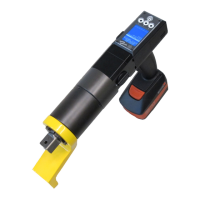

 To Next Page