38
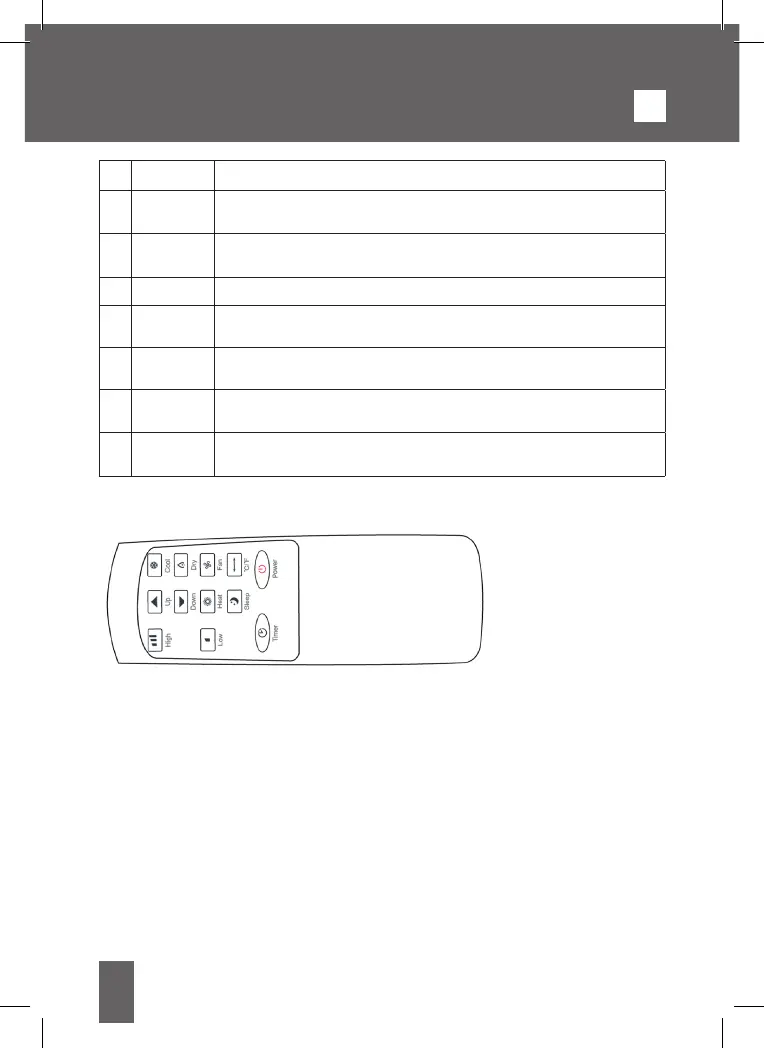
1 POWER Push to turn the conditioner on or off.
2 MODE
selector
Push to change the functioning mode among cooling, heating,
dehumidification and ventilation.
3 TIMER It sets the Timer function, to decide after how many minutes the
condition turns on or off.
4 UP To raise the temperature (16°C~32°C) or set the timer.
5
DOWN
To reduce the temperature (16°C~32°C) or set the timer.
6 SPEED Push to change the fan speed is working between HIGH and LOW.
7 Speed fan
light
It shows which fan speed is working between HIGH and LOW.
8 Mode
light
It shows which mode is working among COOL (Cooling), DRY
(Dehumidifcation), FAN (Ventilation) and Heat (Heating)
4.2 REMOTE CONTROL
HOW TO REPLACE BATTERIES
Remove the battery compartment from the bottom of the remote control by sliding the
compartment out. Remove the old batteries and insert the new batteries paying attention
to the polarity. Once inserted, place the battery compartment inside the remote control
and dispose of the exhausted batteries in the appropriate containers or separate collection
centers.
Batteries required: 2xAAA non included.
5. SETTINGS
5.1 SWITCHING ON AND OFF
- Press POWER to turn on the device.
- The air conditioner turns on in FAN mode by default.
- Press the MODE button to select the desired operation mode.
- Press POWER again to turn off the air conditioner.
GB


 To Next Page