INNOVV™
https://www.innovv.com
mProduct Over View I
INNOWCS
WiFi
Full
HD Remote
Lens
Motorcycle Camera System
Installation Guide
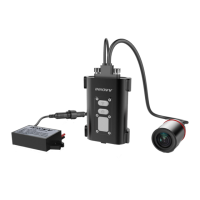
l.DVR
2.Lens
3.Lens Cable
4.Power Cable
S.Lens
Plug
6.Thumb Screw
7.Power Cable Connector
8.12V
to
SV
DC
Converter
9.DVR
Holder
. 10.External
Mic
1l.internal
Mic Hole
12.Mini
USB
Port
13.
Reset
Hole
14.
SD
card Slot
lSI
Installation Reference I
[I
Camera Bracket Installation
Ii]
Camera and
DVR
Connection
(l12V
DC
Converter Connection I
-,.
~v
[V
~
r "-T
!
,.,.
1:1
Installation Instructions I
Input Wires Connection:
Red
Wire: + (Positive Battery Terminal), Black Wire: - (Negative
Battery Terminal)
Yellow Wire:
To
12V Switched Power Source,
that
is
to
trigger
power supply
from
power source
to
camera system when
ignition
is
on.
OUTPUT:
DC
SV
2A
(Max).
There
is
10 second delay
for
ignition power on
or
power off.
• Locate a position
that
will allow the best view.
• Ensure the
mount
is
secure and will not interfere
with
the
operation
of
the motorcycle. Consider the range
of
motion on the
front
forks
of
a motorcycle.
• The camera may
be
mounted in several positions using the provided mounting accessories. Ensure you do not unscrew camera
case
or
it
may cause damage
to
lens inside.
• Route the camera cable in a safe manor back
to
the
DVR
location. Ensure the cables are
not
subjected
to
a pinch point
or
in
an
area
that
will expose
it
to
high temperature from the engine, and keep cable away
from all
of
the
other
cables (particularly head light,
taillight
cables)
to
avoid
EMI
(Electro-Magnetic Interference).
• The
CS
is
designed
to
start/stop recording when the ignition
is
turned on/off.
• The yellow wire from the supplied
DC
12V
to
SV
converter
is
to
connect the switched power source which
has
power only when the main ignition switch
is
on.
Red
wire
is
to
connect the reliable and stable 12V
power source, like the positive terminal
of
battery. Black wire
is
to
ground connection.
• Please keep a distance between
DVR
and Converter.
• The
CS
can
be
powered up by
SV
2.1A using a
USB
cable(Not included)
to
the
USB
port.
• The
CS
has
an
internal Mic
to
record audio.
An
external microphone (not included)
can
also
be
connected
to
the camera
to
record communications, etc.
n
Like
us
on
facebook!
www.facebook.com/lnnovv


 To Next Page