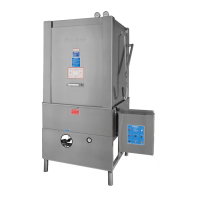
Thank you for purchasing a quality Insinger product.
In the space provided below please record the model,
serial number and start-up date of this unit:
Model:__________________________________
Serial Number:___________________________
Start-Up Date:____________________________
When referring to this equipment please have this
information available.
Each piece of equipment at Insinger is carefully tested
before shipment for proper operation. If the need
for service should arise please contact your local
Authorized Insinger Service Company.
To nd your local authorized Service Company please
visit our web site, www.insingermachine.com or call
Insinger at 800-344-4802.
For proper activation of the Insinger Limited Warranty,
a SureFire
TM
Start-up should be completed on your
machine. Refer to the Introduction section in this
manual for an explanation of Insinger’s SureFire
TM
Start-up and Check-out Program.
Please read the Insinger Limited Warranty and all
installation and operation instructions carefully before
attempting to install or operate your new Insinger
product.
To register your machine for warranty, or for answers to
question concerning installation, operation, or service
contact our Technical Service Department.
TECHNICAL SERVICE CONTACTS
Toll-Free 800-344-4802
Fax 215-624-6966
e-mail service@insingermachine.com
Web site www.insingermachine.com
CA-3 & DA-3 Technical Manual 2018 www.insingermachine.com 800-344-4802
TABLE OF CONTENTS
Part 1
Technical Information
• Specication Sheets
• Introduction
• Denitions
• Safety Summary
• Warranty
1-6
Part 2
Installation Instructions
• General Installation Instructions
• Installation Drawings
7-10
Part 3
Operation Instructions
11
Part 4
Cleaning Instructions
• Daily Cleaning Instructions
• Weekly Cleaning Instructions
Part 5
Maintenance and Repair Procedures
• Maintenance Requirements
• Maintenance Procedures
• Troubleshooting
Part 6
Replacement Parts & Assemblies
• Assembly Drawings with Parts Lists
12
13-20
21-45
Part 7
Electrical Schematics and Parts
• Electrical Schematics
• Control Panel Layouts
46-49
®


 To Next Page
 Loading...