*OUFM%FTLUPQ#PBSET%)7BOE%8/
2VJDL3FGFSFODF
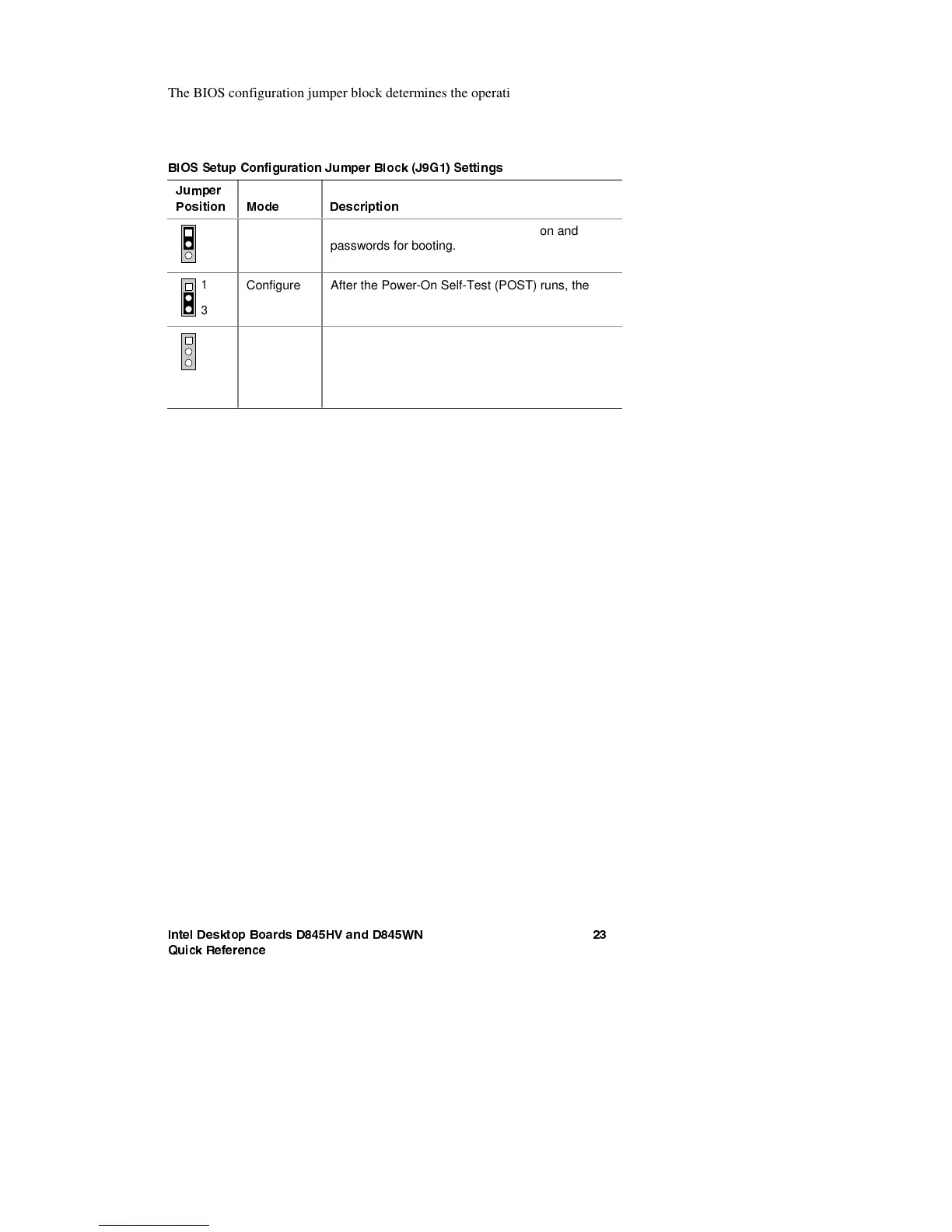
The BIOS configuration jumper block determines the operating mode of the
BIOS Setup Program and enables BIOS recovery in the event of a failed
BIOS update. The following table describes the jumper block settings for the
BIOS Setup configuration jumper.
#*044FUVQ$POGJHVSBUJPO+VNQFS#MPDL+(4FUUJOHT
+VNQFS
1PTJUJPO
.PEF
%FTDSJQUJPO
3
1
Normal
(default)
The BIOS uses the current configuration and
passwords for booting.
3
1
Configure After the Power-On Self-Test (POST) runs, the
BIOS displays the Maintenance Menu. Use this
menu to clear passwords.
3
1
Recovery The BIOS recovers data from a recovery diskette
in the event of a failed BIOS update. To update or
recover the BIOS, see the instructions in the Intel
Desktop Boards D845HV and D45WN Product
Guide on the Intel Express Installer CD-ROM.
For a complete list of BIOS Setup settings, see:
x The Intel Dekstop Boards D845HV and D845WN Product Guide on the
Intel Express Installer CD-ROM
x The Intel World Wide Web Site at
http://support.intel.com/support/motherboards/desktop/





 To Next Page