Item No. 8105086 – 12/2013 Page 3 of 3
2. Averaging several QuickSIN lists (only lists 1-12 at the same intensity level) will improve the reliability of
the results. This will be particularly useful for comparing two conditions i.e. Aided vs. Unaided or before and
after hearing aid adjustments have been made.
We do not recommend you save the QuickSIN results in the Callisto AC440 as this will save as a blank
audiogram in your Noah system. The results should be used to report in the client’s notes i.e. client has
a 12.5 dB SNR Loss at 70dB HL in the right ear. If you would like to save the results in your Noah
session please ensure the clients Audiogram is inputted in the ‘tone audiometry’ screen.
Additional QuickSIN features
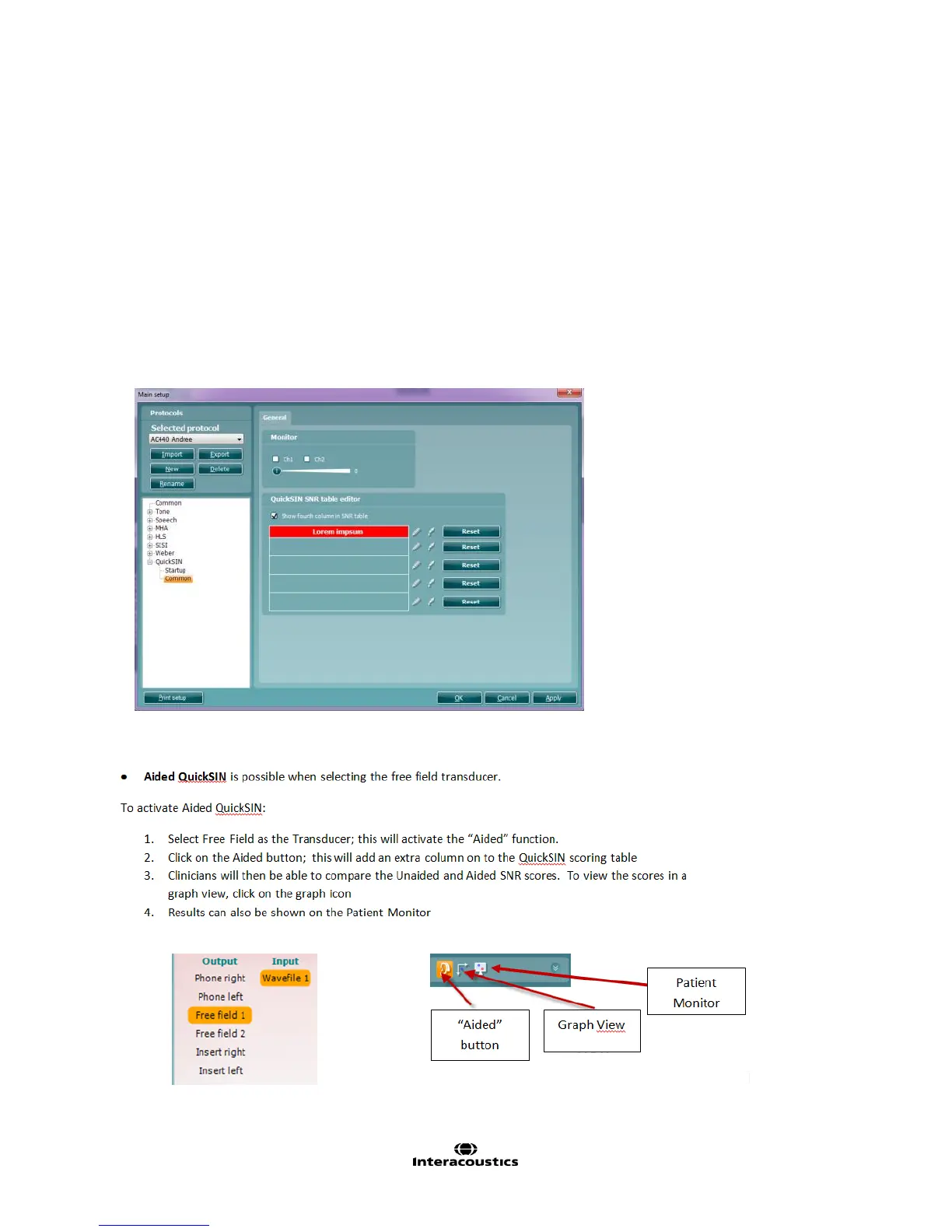
Adding a fourth column to the SNR loss definitions table:
1. Go to: Menu → Setup → AC440 → Main Setup → QuickSIN → Common
2. and insert a checkmark in the “show fourth column” box
3. Click on the pencil icon to enter text in the text box
4. Click on the dropper icon to add colour to the text box



 To Next Page