Item No. 8105088 – 12/2013 Page 2 of 7
Verification using Insertion Gain (REM Adult UK)
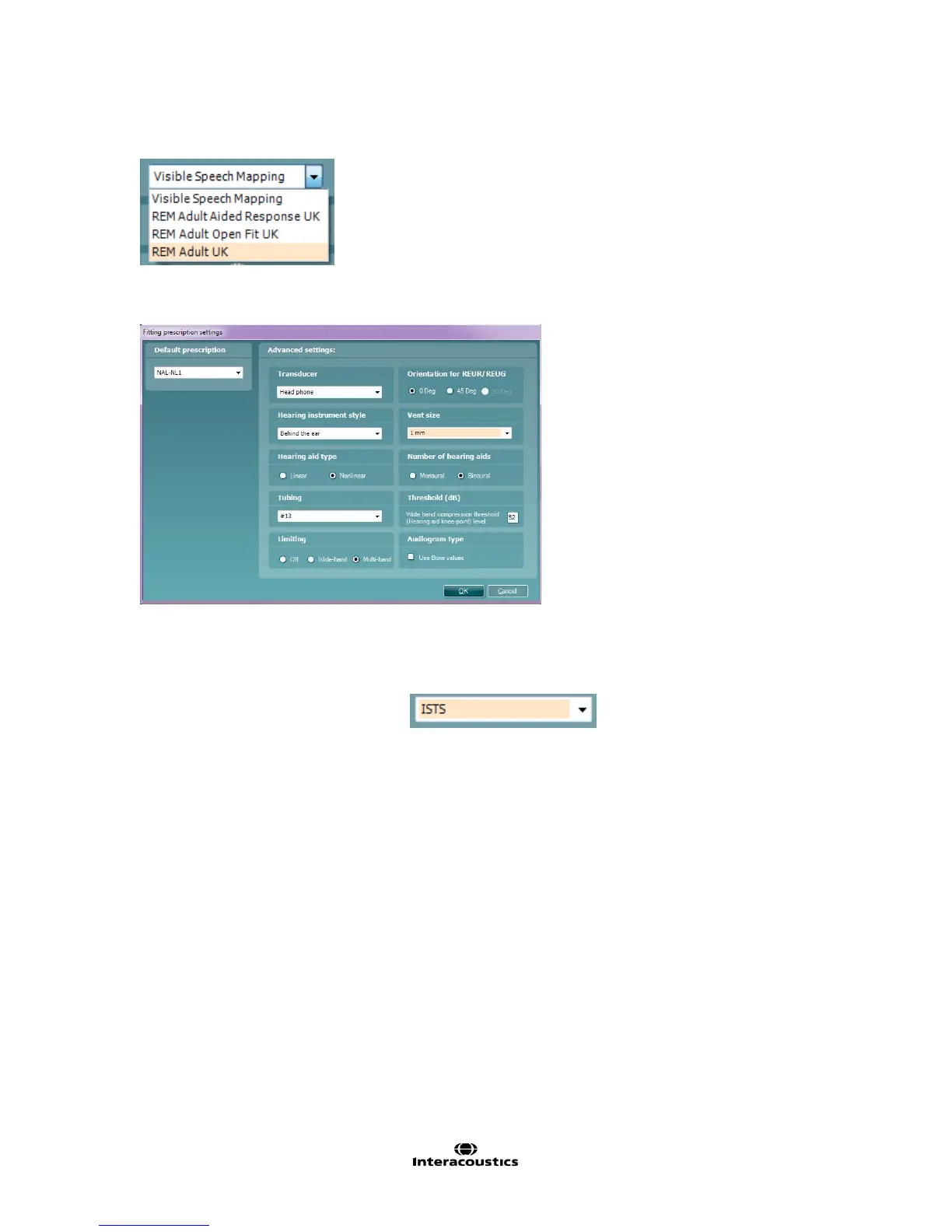
1. Choose the REM Adult UK protocol, this is correctly configured according to the BSA Guidelines.
2. Choose the appropriate options with in the Fitting Prescription Settings window, which will appear
automatically when a REM protocol is chosen:
It is here that you will configure your prescription settings to acknowledge aspects of the patients amplification
setup, i.e. venting, mono/binaural, compression method, whether you wish to base your target on their Bone
values for mixed and conductive losses. etc.
3. Select the desired verification signal.
It is advised that a calibrated signal such as ISTS is applied. This ensures that the Long Term
Average Speech Spectrum (LTASS) level is maintained and is known to provide consistent
stimulation intensity throughout the duration of the measurement.
4. Insert the probe tube in the patient’s ear without the hearing aid, you should aim to have this at a
length of 27mm from the patients tragus, this ensures that the tube is close to the ear drum.
5. Click on REUR, and click on START to measure the Real-Ear Unaided Response
(NOTE: The REUR is a required measurement as it is used for the calculation of the REIG, it enables
consideration for the patients’ natural ear canal resonance).
Effective placement of the Probe Tube is achieved when the response is between 0dB and -5dB
at 6kHz. Reposition the tube and re-perform the measure if you cannot achieve this, it will lead to
improved measures.



 To Next Page