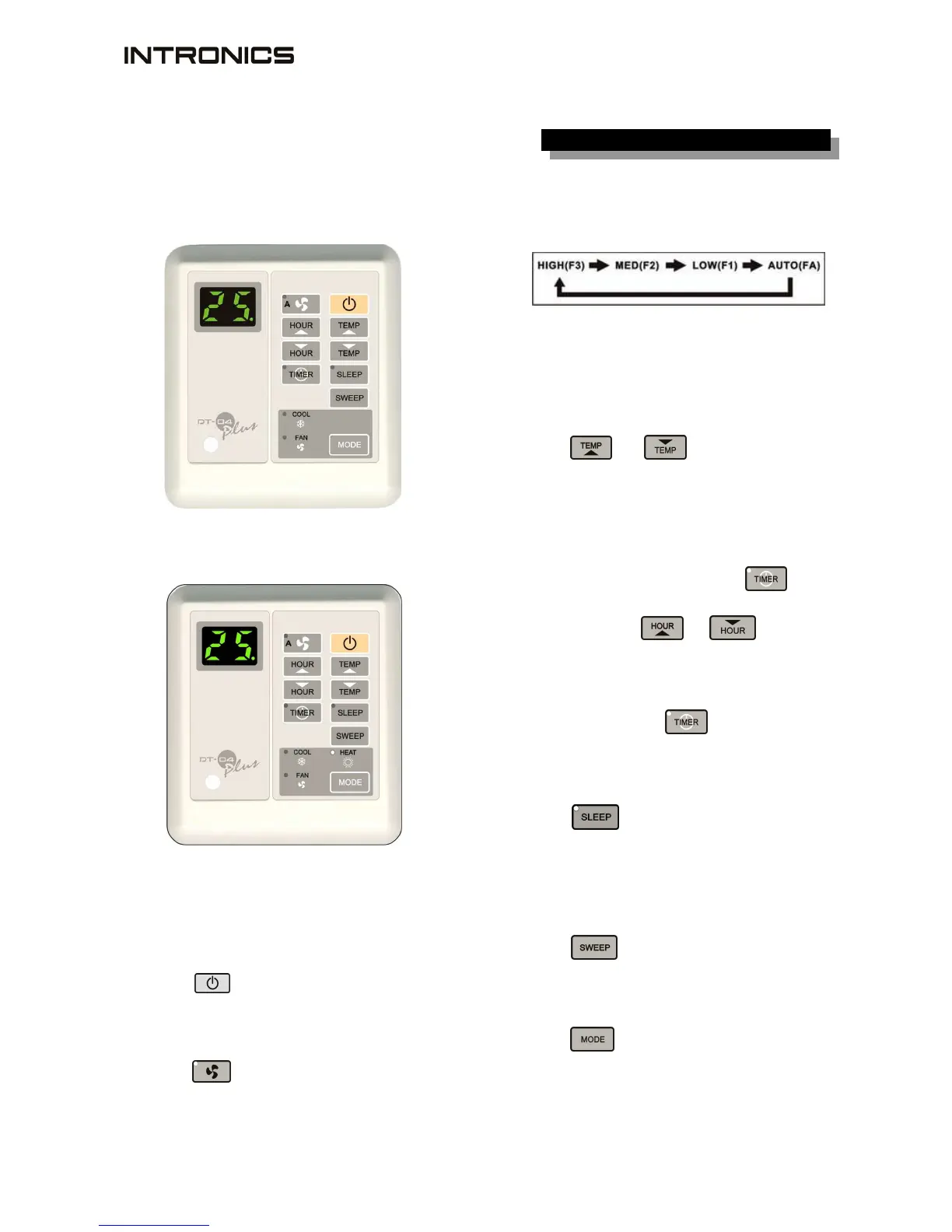
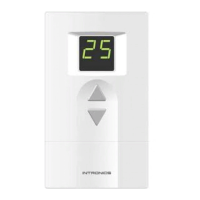
Display unit
-2-
cool only version
cool + heat version
1. Power
Press
button to turn on/off the air
conditioner.
2. Fan
Press
button to select the fan speed
(high, medium, low) or put it in
AUTO
fan
mode.
In
AUTO
fan mode, the fan speed will change
automatically according to the difference
between the room & setting temperatures.
3. Temperature setting
Press
or
button
to set the
temperature.
4. Timer on/off
To set the air conditioner on/off in advance up
to 15 hours.
To turn on in advance, press
button
while the air conditioner is off, LED will
be lit. Press
or
button for
hour setting.
To turn off in advance, follow the above
instruction while the air conditioner is on.
To cancel, press
button
once again,
LED will be off.
5. Sleep
Press button to activate the Sleep
function which will raise up/reduce the setting
temperature 1°C after 1 hour for Cool/Heat
mode respectively.
6. Sweep (optional)
Press
button
to turn on/off the sweep
motor.
7. Mode
Press
button
to select
Cool / Fan mode for cool only version.
Cool / Fan / Heat mode for cool + heat
version.


 To Next Page