
 Need help?
Do you have a question about the INVISIBLE FENCE LP4100 and is the answer not in the manual?
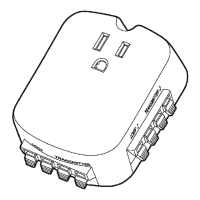
Explains how the surge protector safeguards the pet containment system from power surges and spikes.
General advice on planning installation in dry areas and compatibility with specific Invisible Fence systems.
Use grounded outlets within 5 feet of the transmitter; avoid GFCIs to prevent accidental tripping.
Disconnect power before installation/removal; handle cover screws carefully to avoid hazards.
Use the outlet's center screw to secure the unit; this is for mechanical attachment only.
Strip boundary wire ends and insert into the "Loop" connectors on the surge protector.
Measure, cut, and strip transmitter wires, twisting them together for signal integrity.
Insert transmitter wires into the "Transmitter" connectors on the surge protector and then to the fence transmitter.
Plug in the transmitter power adapter and check system settings like boundary width and continuity.
Remove old grounding wires and LP3000 devices; follow steps 2-6 for new installation.
Remove old grounding wires and LP-cards; insert jumper-cards and follow steps 2-6.
 General
| Brand | INVISIBLE FENCE |
|---|---|
| Model | LP4100 |
| Category | Surge Protector |
| Language | English |

 To Next Page