User Manual˙English
Notices and Warranty
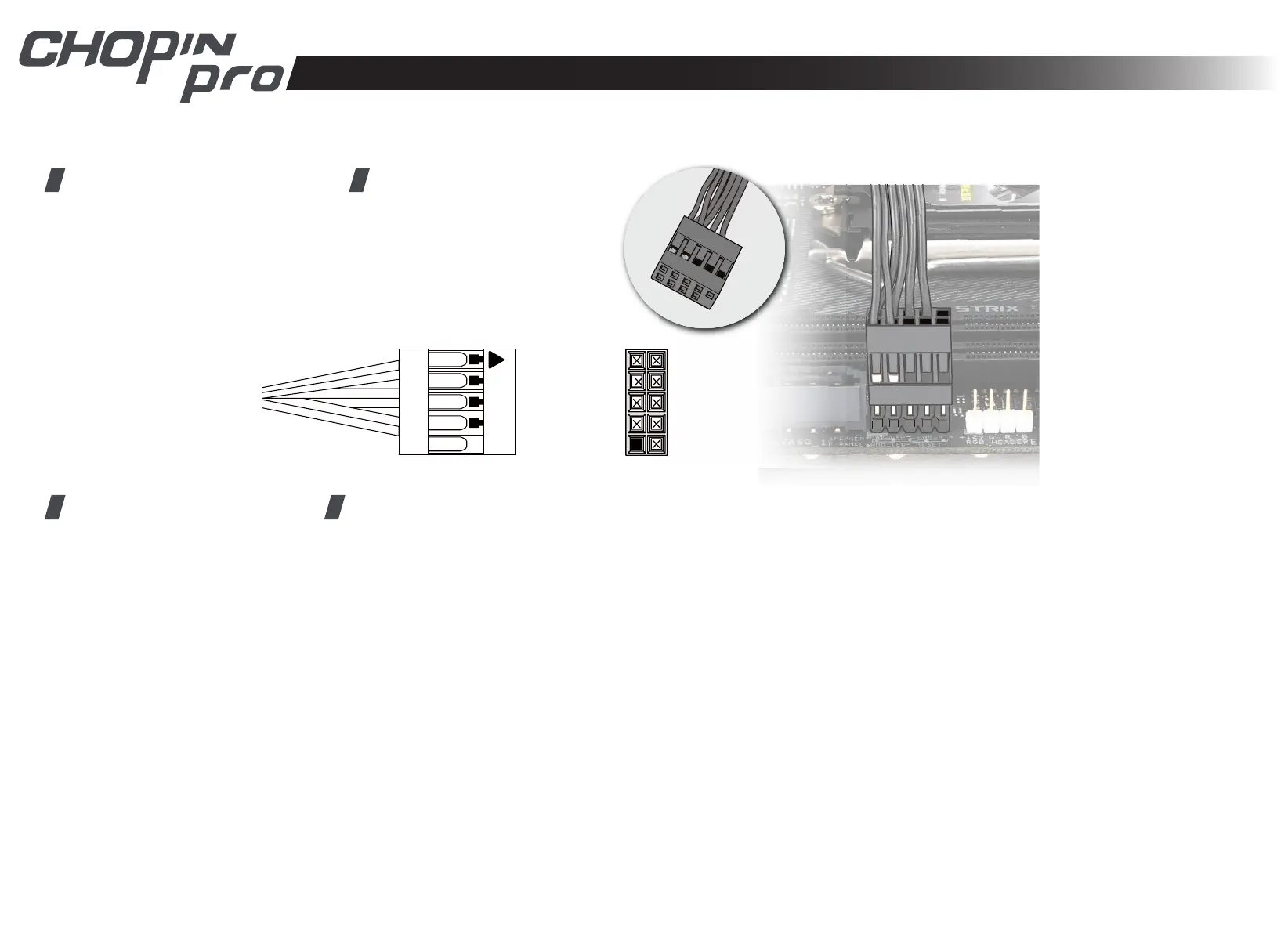
Switch/LED Connector
2 Black(HDD LED +)
4 Black(HDD LED -)
6 NC
8 NC
10 NC
Black(P LED +) 1
Black(P LED -) 3
Black(P SW +) 5
Black(P SW -) 7
Key 9
■ Notices
1. Please follow the user manual for installation.
2. When installing the computer components, please use the antistatic precautions to prevent ESD (electrostatic discharge) damage.
This can cause injury to the installer and/or damage to the machine. Incorrect installation may burn motherboard and other system
components.
3. To avoid any damages, please do not use this product for any other purpose than its intended use.
4. Any modications may damage the product.
5. Please remove all internal devices before shipping or moving. (Including power supply, hard drive, CD-ROM, motherboard and CPU, etc)
■ Warranty
*For more detailed warranty information, please visit the In Win retail website at www.in-win.com.
*The actual product is subject to change without prior notice. In Win Development Inc. reserves the right to make nal modications.


 To Next Page