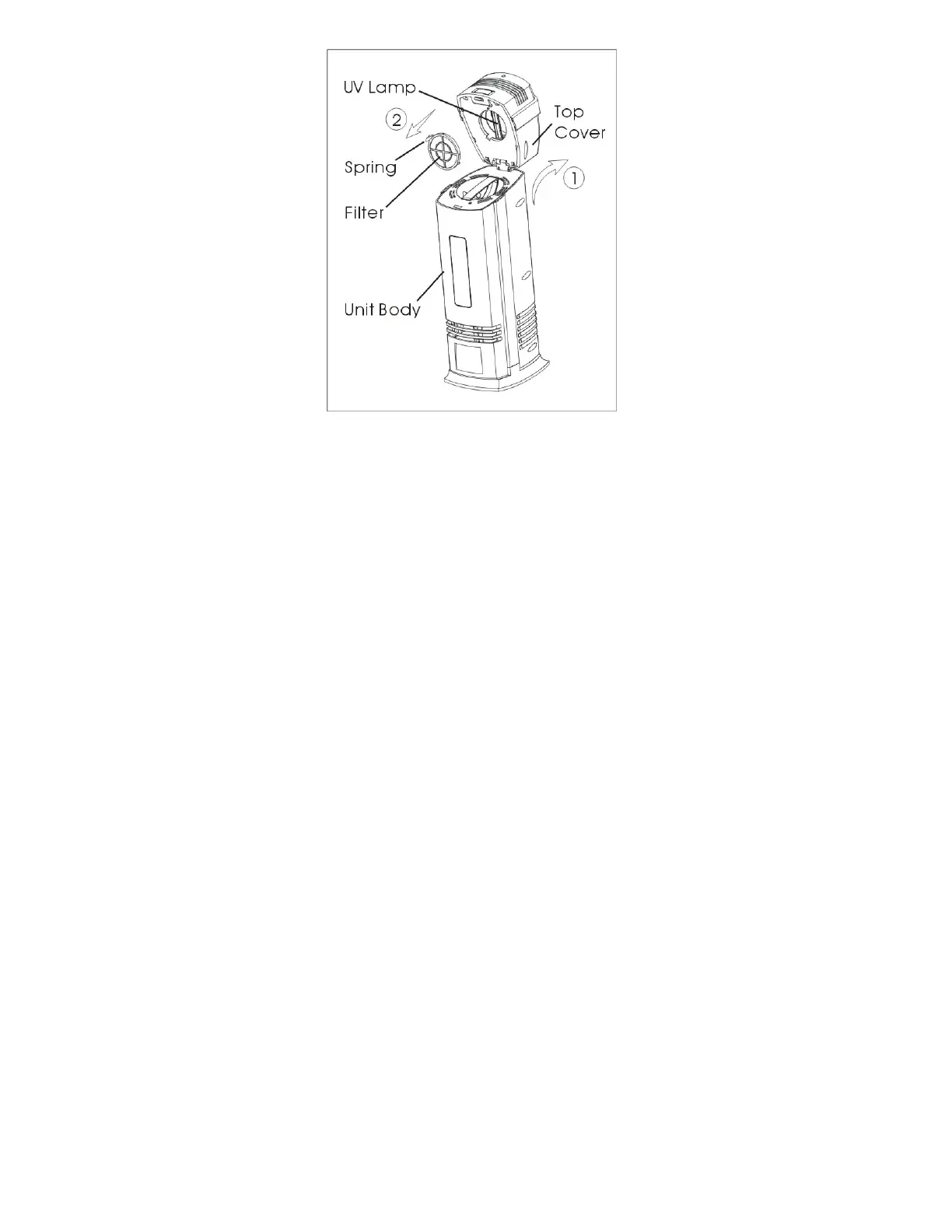
Figure 5
REMOVING/CLEANING/INSTALLING THE CARBON FILTER (See
Figure 5)
● To remove the filter:
1. Unplug the unit;
2. Press the release button and flip the top cover backward; (See Figure 5
and follow arrow ①)
3. Take out the filter from top cover by pressing and gripping the spring on
the filter cover. (See Figure 5 and follow arrow ②)
● To clean the filter:
1. Clean the filter with the vacuum brush attachment of your vacuum
cleaner. This will remove lint and dirt from the filter;
2. Although, the carbon filter is not critical for purification, we recommend
replacing this filter with a new one every 6-12 months of use.
● To install the filter:
1. Ensure the unit is unplugged;
2. Install the filter into the top cover by gripping and pressing the spring on
the filter cover;



 To Next Page