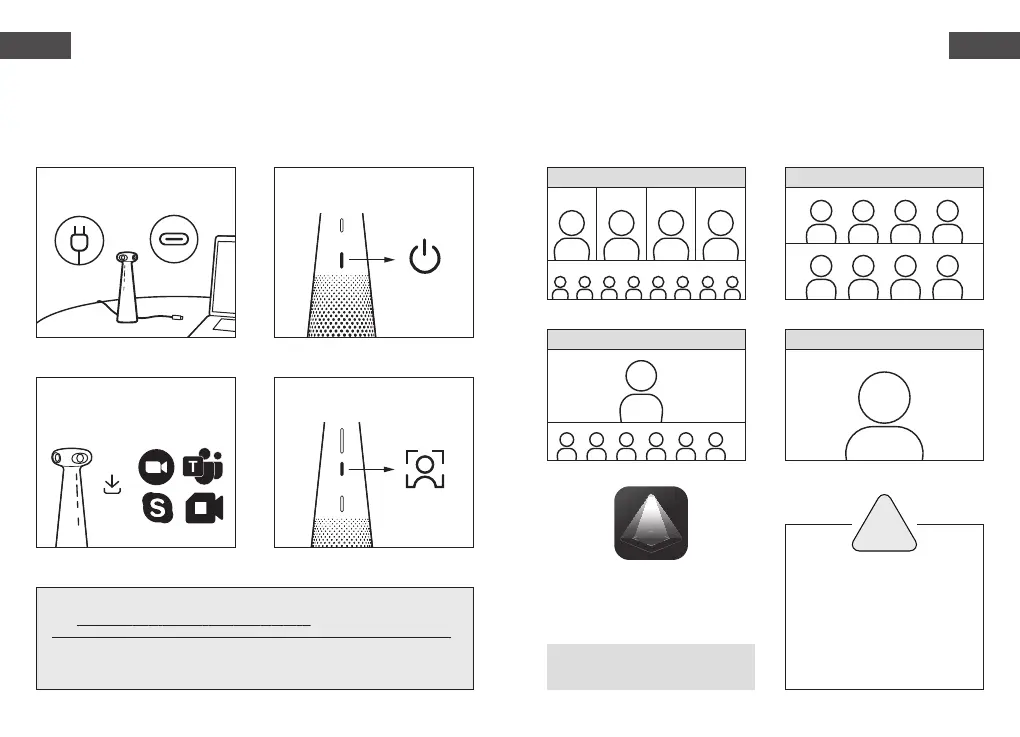
2. Hold the power button for 1 sec to
turn on the device.
3. Select IPEVO TOTEM 360 as the
camera, microphone, and speaker
in a conferencing app.
4. Choose the video mode that
matches your scenario.
Presentation ModeHybrid Learning Mode
Conferencing Mode
Surround Mode
1. Plug in the power adapter and
connect to PC via USB-C.
* All trademarks, logos, and brands are the property of their respective owners
and are used for identification purposes only.
For full user manual, FAQ & tech support,
visit
www.ipevo.com/products/totem-360/support
Caution
!
Do not use/store the product
in the following places:
・ Near heat sources
・ Locations with high humidity
・ Sandy or dusty places
Software Download
Works best with:
i5 2.5Ghz CPU (Windows) or
i5 CPU / Apple M1 (Mac)
IPEVO EyeStage™
Enhance your video conferencing with AI.
www.ipevo.com/eyestage
Hybrid conferencing with
IPEVO TOTEM 360
360° IMMERSIVE CONFERENCE
CAMERA + SPEAKERPHONE
English
English
1 2



 To Next Page