The MR40 is a wireless router designed for various connectivity needs, offering a blend of wired and wireless interfaces, along with robust management and maintenance capabilities. It is equipped with four embedded Ethernet ports, supporting both 2.4GHz and 5.8GHz Wi-Fi interfaces, making it versatile for different network environments.
Function Description:
The primary function of the MR40 is to act as a central hub for network connectivity, providing internet access via LTE/5G and distributing it through Wi-Fi and Ethernet. It supports multiple SIM cards, allowing for flexible mobile broadband deployment. The device is designed to be user-friendly, with a web-based interface for configuration and monitoring. It enables users to manage Wi-Fi settings, monitor network status, and perform system updates. The router's ability to automatically assign an available SIM card and quickly achieve a "READY" status simplifies the setup process for mobile broadband connections.
Important Technical Specifications:
- Wireless Interfaces: 2.4GHz and 5.8GHz Wi-Fi.
- Ethernet Ports: 4 embedded Ethernet ports.
- Antennas:
- 2 Wi-Fi antennas (marked 2.4/5.8).
- 4 LTE/5G antennas.
- Default Wi-Fi SSIDs: MR40_XXXXX (for 2.4GHz) and MR40_5ghz_XXXXX (for 5.8GHz), where XXXXX are the last 5 digits of the device's serial number.
- Default Wi-Fi Password: 12345678.
- Default Router IP Address: 192.168.1.1.
- Default Login Credentials: Username:
root, Password: admin (found on the back of the router).
- LED Indicators: The device features six LEDs: PWR (Power), SYS (System), 2.4G (2.4GHz Wi-Fi), 5.8G (5.8GHz Wi-Fi), 4G/5G (Mobile Network), and USB (USB activity).
- PWR: Off when powered off, On when powered on.
- SYS: Off when the system is running normally, Blinking during operation system processes (starting up, update).
- 2.4G/5.8G: Off when Wi-Fi is off, On when Wi-Fi is on, Blinking when Wi-Fi has data traffic.
- 4G/5G: Indicates modem registration to the network.
- USB: Indicates data traffic over USB.
- Operating System: Powered by LuCI openwrt-19.07 branch.
Usage Features:
- First Login and Password Change: Users can access the router's web interface via LAN or Wi-Fi. Upon first login with default credentials, the system prompts for a password change, which is strongly recommended for security. The password can be changed through the "System > Administration > Router Password" section.
- Wi-Fi Configuration:
- SSID Change: The Wi-Fi SSID (network name) can be customized through the "Network > Wireless" section. Users can select a wireless connection, click "EDIT," change the SSID in "General Setup," and then save and apply the changes.
- Password Change: Similar to SSID, the Wi-Fi password can be changed in the "Network > Wireless" section by selecting a connection, clicking "EDIT," and modifying the password in "General Setup."
- Router Status Monitoring: The "Modem > Network Status" tab provides crucial information about the router's operational status, including:
- General Information: Version, Data Consumption, and Bootstrap status.
- Modem/SIM Information: Modem Status (e.g., "Ready"), Signal Level, Operator, and Technology (e.g., "4G"). This feature is particularly useful for confirming mobile network connectivity and signal strength. The modem automatically assigns an available SIM card, and its status changes to "READY" once connected.
- LED Lights Signification: The LED indicators provide quick visual feedback on the router's status, including power, system activity, Wi-Fi status (2.4G and 5.8G), mobile network registration, and USB data traffic. This helps users quickly diagnose connectivity issues or confirm normal operation.
Maintenance Features:
- Router Update: The MR40 supports firmware updates through its web interface. Users can navigate to "System > Backup/Flash Firmware," click "FLASH IMAGE," and then use the "Browse" button to select the update file. After uploading, checking the "KEEP SETTINGS AND RETAIN THE CURRENT CONFIGURATION" box is an option before clicking "CONTINUE." The update process typically takes around 3 minutes.
- LED Configuration: The behavior of the LED indicators can be customized through the "System > LED Configuration" menu, allowing users to tailor the visual feedback to their preferences or specific monitoring needs.
The MR40 is designed for ease of use and reliable performance, making it suitable for various applications requiring robust wireless and wired connectivity with mobile broadband capabilities.

 Need help?
 General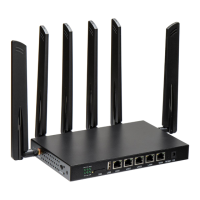

 To Next Page