C M Y CM MY CY CMY K
To Dock
A2
10
B
ass Vol
Pow
er
120V/60HZ
100Watts
Left
Right
AC power cord
Rear panel
4
Place the enclosed AAA batteries into the remote control battery compartment. Follow the battery
indicators ( + / - ) to make sure they are in correctly.
Before your speaker will function, the main power switch on the back of the subwoofer has to be turned
on. After this switch is turned on the system can be turned on and off with the remote control. NOTE: If
the speaker will not be in use for long periods of time it is recommended to turn off the main power switch
in the back.
Using The System
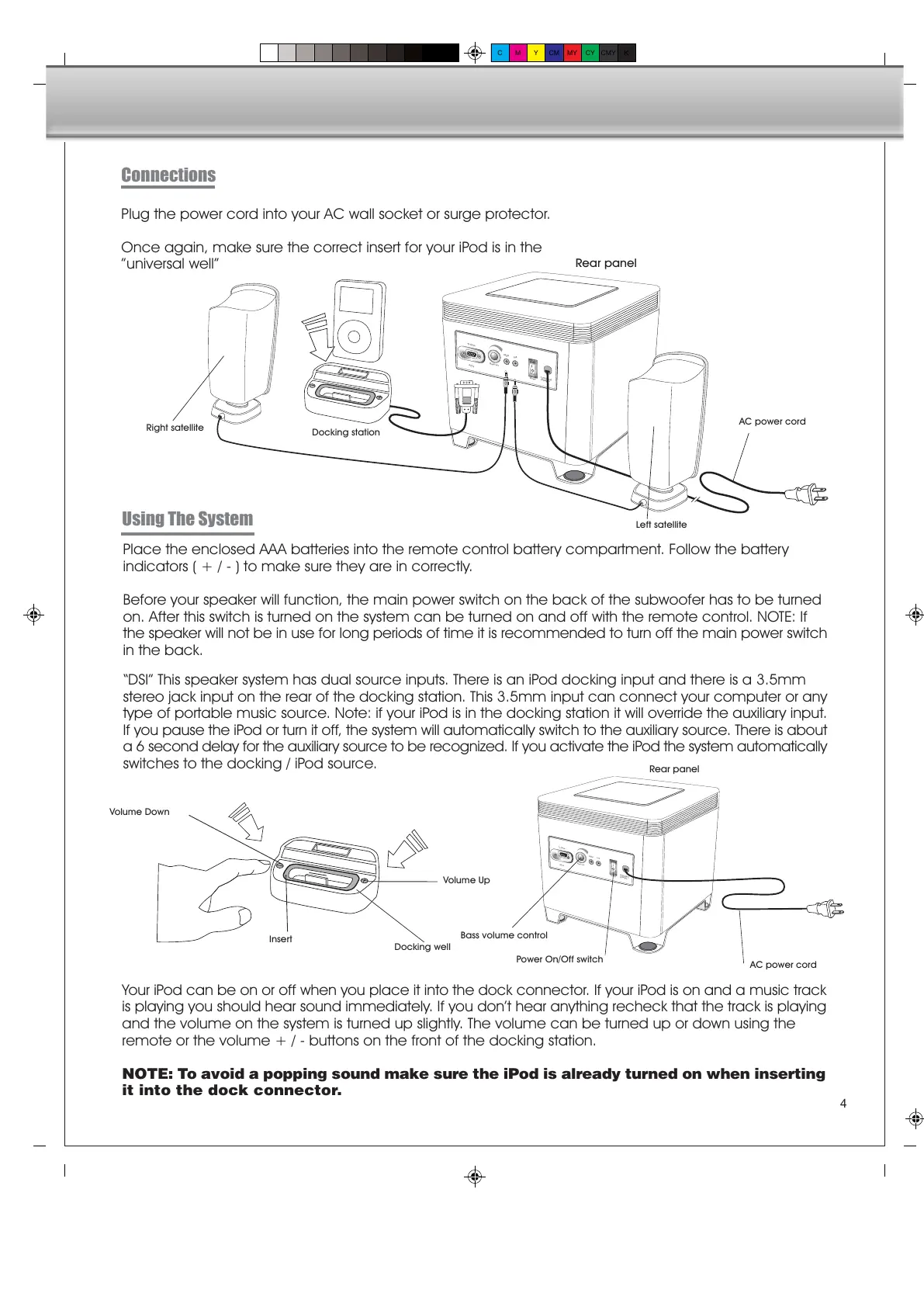
Plug the power cord into your AC wall socket or surge protector.
Once again, make sure the correct insert for your iPod is in the
universal well
Connections
Your iPod can be on or off when you place it into the dock connector. If your iPod is on and a music track
is playing you should hear sound immediately. If you dont hear anything recheck that the track is playing
and the volume on the system is turned up slightly. The volume can be turned up or down using the
remote or the volume + / - buttons on the front of the docking station.
NOTE: To avoid a popping sound make sure the iPod is already turned on when inserting
it into the dock connector.
To Dock
A210
Bass Vol
P
ower
120V/60HZ
100Watts
Left
Right
AC power cord
Rear panel
Insert
Volume Down
Volume Up
Docking well
DSI This speaker system has dual source inputs. There is an iPod docking input and there is a 3.5mm
stereo jack input on the rear of the docking station. This 3.5mm input can connect your computer or any
type of portable music source. Note: if your iPod is in the docking station it will override the auxiliary input.
If you pause the iPod or turn it off, the system will automatically switch to the auxiliary source. There is about
a 6 second delay for the auxiliary source to be recognized. If you activate the iPod the system automatically
switches to the docking / iPod source.
Power On/Off switch
Left satellite
Right satellite
Docking station
Bass volume control


 To Next Page
 Loading...