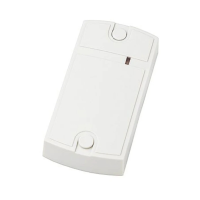
The CP-Z 2MF is an embedded ACS RFID Mifare reader operating at 13.56 MHz. This device is designed to read serial numbers from Mifare (ISO 14443-A) compliant tokens, such as cards and key fobs. It also possesses the capability to read and write protected memory sectors of Mifare 1K, 4K, and UltraLight compliant tokens.
Function Description
The CP-Z 2MF reader supports two primary operational modes: ACS RFID Reader and Computer Reader.
ACS RFID Reader Mode:
In this mode, the reader connects to Access Control System (ACS) controllers using iButton (Dallas Touch Memory), Wiegand-26, and Wiegand-34 protocols.
- Mode 1: The reader transmits the Unique Identifier (UID), or serial number, of all tokens it encounters.
- Mode 2: The reader transmits the UID only for tokens whose specific sector has been authorized (gained access).
- Mode 3: The reader transmits a code from a protected memory sector of Mifare tokens.
Modes 2 and 3 require setup using the free "M3NConf.zip" software, available from http://www.ironlogic.me.
Computer Reader Mode:
In this mode, the reader connects to and is controlled by a PC via an RS-485 interface (requiring a converter).
- Mode 4: The reader reads and writes protected memory sectors of Mifare tokens. To operate in Mode 4, software libraries SDK Z-2 USB MF are necessary, also available from http://www.ironlogic.me.
Configuration for Modes 2, 3, and operation in Mode 4 necessitate a Z-397 converter, which can be found at http://www.ironlogic.me. The reader connects via a point-to-point RS-485 interface, not a network connection.
Important Technical Specifications
- Working Frequency: 13.56 MHz
- Tokens Standard: Mifare (1K, 4K, UltraLight)
- Max. Reading Distance: 3 cm
- Ability to Write into Token Memory: Present
- Output Protocols: iButton (Dallas Touch Memory), Wiegand-26, Wiegand-34, RS-485 (Emulation)
- Max. Reader to Controller Line Distance:
- via iButton protocol: 15 m
- via Wiegand-26/-34 protocols: 100 m
- via RS-485 protocol: 100 m
- Indication: Visual
- External Indication Control: Present
- Power Supply Voltage: 12 V DC
- Standby Operating Current: 40 mA max.
- Casing Material: ABS Plastic with coating
- Dimensions: 25x22 mm
- Weight: 80 g max.
- Recommended Air Temperature: -30°C to 40°C
- Humidity: ≤80% at 25°C
Usage Features
Mounting and Connection:
The reader should be mounted on a flat surface that allows easy access with proximity tokens, at an ambient air temperature of 5°C or above.
To mount the CP-Z 2MF RFID Surface reader:
- Mark and drill a 20 mm hole.
- Insert the reader into the hole and secure it from the rear with a mounting ring nut.
- Connect wires according to the provided diagrams (Figures 2 and 3). When power is correctly connected, the red LED will illuminate.
- For optimal performance over specified line distances to the controller, a UTP CAT5e cable is recommended.
- Insulate all wire junctions.
Reader Operation:
Upon readiness, the red LED will be lit, indicating proper power. When a Mifare token enters the reader's working zone, its UID is read. For Modes 2 and 3, authorization and reading of additional codes from the token memory are also performed. A successful read operation is indicated by the LED briefly turning dark.
Data transmission occurs as follows:
- In Modes 1 and 2: the acquired UID is transmitted.
- In Mode 3: the acquired protected memory sector is transmitted.
Data is sent to the controller via iButton (Dallas Touch Memory), Wiegand-26, or Wiegand-34 protocol, as configured. Configuration is done using the free M3NConf.zip software. The reader supports both internal and external indication control.
Internal Indication Control:
- The red LED is always on when no token is present in the reader's working zone.
- When a token enters the working zone, the red LED turns off.
- While the token remains in the working zone, the red LED stays off.
- For Modes 2 and 3, when an uninitialized token is approached, the red LED momentarily turns off and then returns to an on state.
- While an uninitialized token stays in the working zone, the red LED stays on.
External Indication Control:
- This is managed by a controller via the external control terminal RED or RS-485 commands.
- It activates when an external control signal from the controller is detected.
- Note: For Modes 2 and 3, when reading an uninitialized token, the red LED momentarily turns off and then back on.
Maintenance Features
Operational Conditions:
The device is designed to operate within recommended air temperatures of -30°C to 40°C and humidity levels of ≤80% at 25°C. Deviations from these conditions may affect device specifications. The controller should be operated in the absence of precipitation, direct sunlight, sand, dust, and water condensation.
Limited Warranty:
The device comes with a limited warranty of 24 months from the date of sale. The warranty becomes void under the following conditions:
- Failure to follow this Manual.
- Physical damage to the device.
- Visible traces of exposure to moisture and aggressive chemicals.
- Visible traces of tampering with device circuits by unauthorized parties.
Under an active warranty, the manufacturer will repair or replace any broken parts free of charge if the fault is due to a manufacturing defect.
Disposal:
The crossed-through waste bin symbol indicates that the product and its accessories should not be disposed of with normal household waste. Instead, they must be taken to a separate collection point for recycling electrical and electronic equipment. Proper recycling helps reduce raw material consumption and protects the environment.

 Need help?
 General

 To Next Page